TryHackMe — Friday Overtime

It’s Friday afternoon and a finance company has just dropped a bag of malware on your desk. That’s the setup. I’m playing a CTI analyst at PandaProbe Intelligence, and SwiftSpend Finance has sent in a set of suspicious DLLs they pulled off their network. The job is to take those samples, hash them, find out what malware family they belong to, and pivot through public threat intelligence until I can name the campaign and pull out the indicators.
This is a challenge room with no hand-holding tasks. It’s the kind of thing I like, because it’s mostly the loop I’d actually run: hash a file, look it up, read the report it points to, pivot on what the report gives you. It was also a good chance to put my own tool vex to work for the lookup step.
| Field | Details |
|---|---|
| Platform | TryHackMe |
| Room/Machine | Friday Overtime |
| Difficulty | Medium |
| Tags | cti, threat-intelligence, mgbot, evasive-panda, virustotal, mitre-attack, cyberchef |
Theory
Pivoting in threat intelligence
The whole room is one technique: pivoting. You start with one indicator (a file), turn it into a stronger indicator (a hash), and use that to reach a public analysis. The analysis names a malware family and a campaign, and that report hands you more indicators (URLs, IP addresses, related samples) that you can pivot on again. Each hop adds context. By the end you’ve gone from “here’s a DLL” to “here’s the APT group, their C2 server, and a related Android sample.”
Hashes as IOCs
A file hash (MD5, SHA1, SHA256) is a fingerprint. Two copies of the same file produce the same hash, so a hash is the cleanest way to ask “has anyone seen this exact file before?” I ran sha1sum locally and took the result to VirusTotal and to vex. The hash is the pivot that turns a local file into a globally searchable indicator.
MgBot and Evasive Panda
I didn’t know either name going in. MgBot is a modular malware framework: a loader plus separate DLL modules, each doing one job (audio capture, clipboard theft, credential stealing, and so on). It’s used by Evasive Panda (also tracked as BRONZE HIGHLAND / Daggerfly), a China-aligned APT group. The room leans on an ESET report about an Evasive Panda campaign that delivered MgBot through hijacked updates for popular Chinese software. Finding that report was the key that unlocked most of the later answers.
Defanging
Defanging makes a malicious URL or IP safe to share by breaking it so it can’t be clicked or auto-linked: http:// becomes hxxp[://] and dots become [.]. Two of the room’s answers had to be submitted in defanged form, which I did with CyberChef’s Defang URL and Defang IP Addresses operations.
Walkthrough
Who sent the samples
The investigation starts inside PandaProbe’s DocIntel platform, where the submission shows up as a document titled “Urgent: Malicious Malware Artefacts Detected.” It’s an email from Oliver Bennett of SwiftSpend Finance’s Cybersecurity Division, reporting malware found during a security sweep on Friday, December 8, 2023.
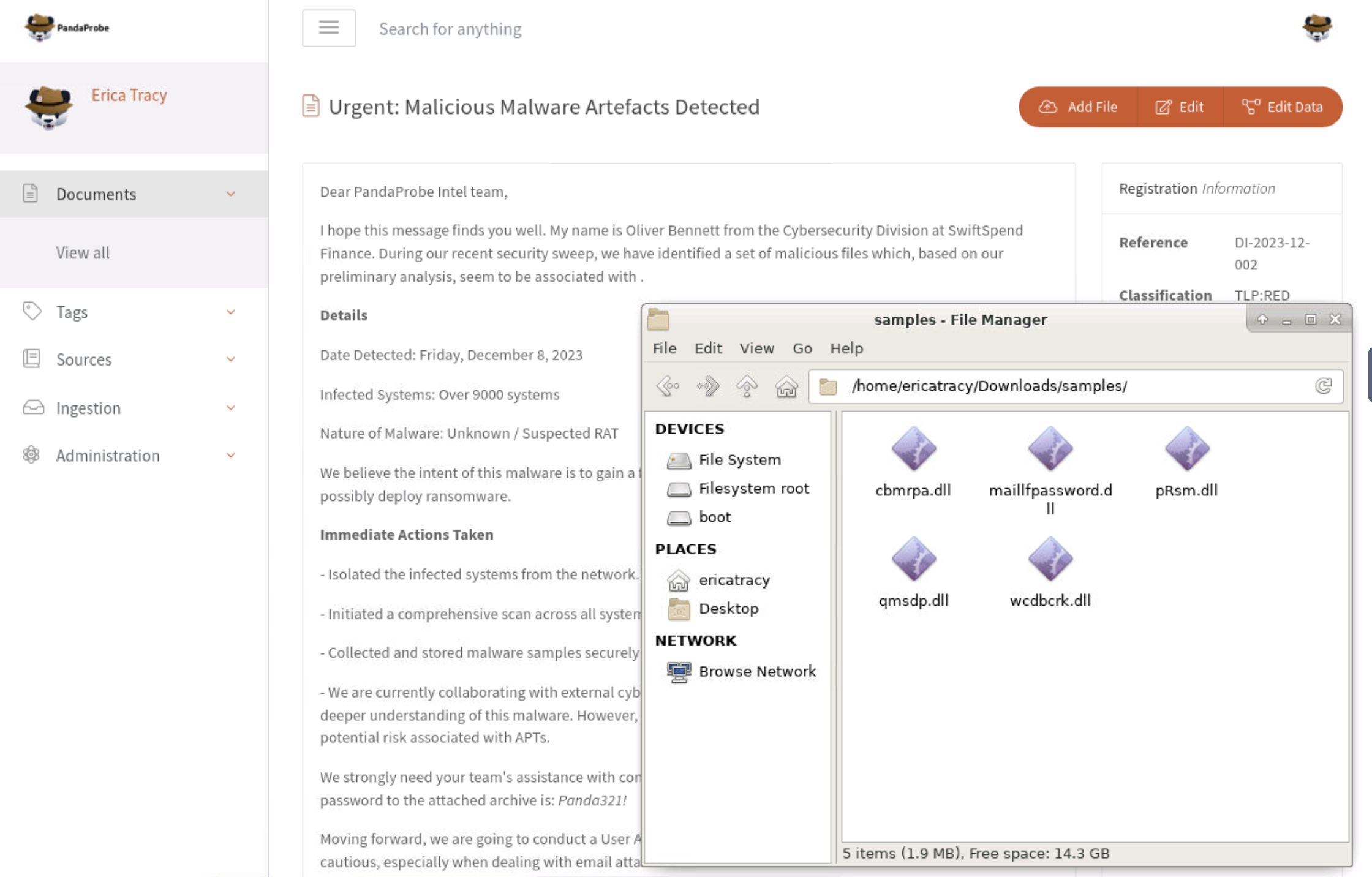
The email carries an attached archive, and the password for it is written in the email body ([redacted]). Extracting it gives five DLLs: cbmrpa.dll, maillfpassword.dll, pRsm.dll, qmsdp.dll and wcdbcrk.dll. The file names alone are suggestive (one literally contains “password”), but names are easy to fake, so the real work starts with hashing.
Hashing pRsm.dll
The room asks specifically about pRsm.dll, so I ran sha1sum on it in the terminal:
1
sha1sum samples/pRsm.dll

That gives the SHA1 9d1ecbbe8637fed0d89fca1af35ea821277ad2e8. This hash is the anchor for everything that follows.
Identifying the framework with vex
Instead of pasting the hash into VirusTotal by hand first, I ran it through vex, my own IOC triage tool, which queries VirusTotal and prints a condensed verdict:
1
vex triage 9d1ecbbe8637fed0d89fca1af35ea821277ad2e8 -q
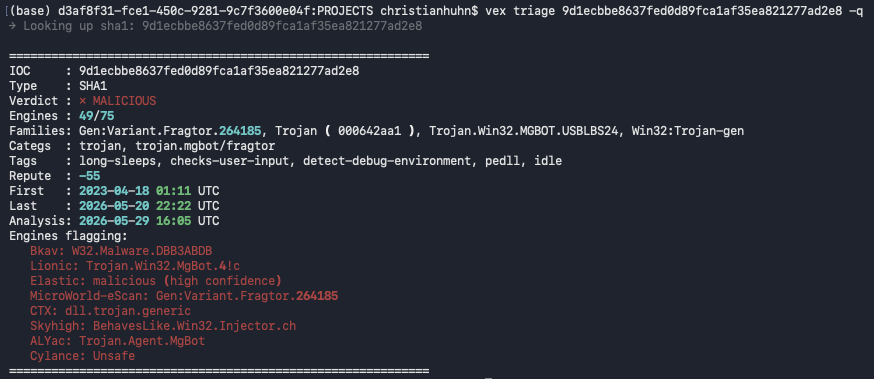
The verdict came back MALICIOUS (49/75 engines), and the family field made the answer obvious: several engines tagged it Trojan.Win32.MGBOT... and trojan.mgbot. So the malware framework is MgBot. The behaviour tags were a nice bonus, long-sleeps, checks-user-input and detect-debug-environment all point at sandbox evasion. Having the family surface in one command was much faster than reading down a VirusTotal engine list, and it’s exactly the step vex exists for.
The MITRE technique, and a wrong turn
The next question wanted the MITRE ATT&CK technique that pRsm.dll implements. My first instinct was to read it straight off VirusTotal’s behaviour tab, which listed T1056 (Input Capture). I submitted T1056, and it came back wrong. That’s what sent me back to the source.
The ESET report and the MITRE entry for MgBot cleared it up. The MgBot software page on MITRE ATT&CK lists each module against a technique, and pRsm is the module for audio capture, which is T1123. T1056 covers keylogging and input capture, a different MgBot module entirely; the auto-generated VirusTotal tag had pointed me at the wrong one.
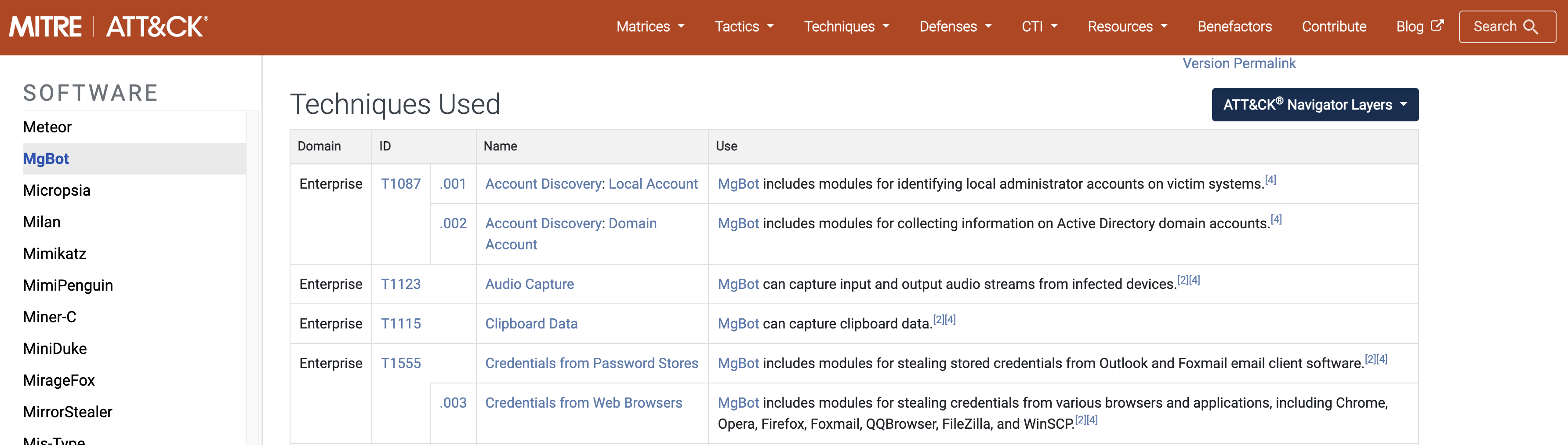
So the answer is T1123, Audio Capture. This was the part of the room I found hardest, and the lesson stuck: the first technique a tool suggests isn’t always the right one. Reading the actual research report beat trusting the auto-generated tag.
Defanging the URL and C2 IP
The ESET report (“Evasive Panda APT group delivers malware via updates for popular Chinese software”) contains the campaign’s network indicators. Two of the room’s questions wanted specific ones, submitted defanged. I pulled the download URL and the C2 IP from the report and ran them through CyberChef:
- The malicious update URL (first seen 2020-11-02):
hxxp[://]update[.]browser[.]qq[.]com/qmbs/QQ/QQUrlMgr_QQ88_4296[.]exe - The C&C server IP (detected 2020-09-14):
122[.]10[.]90[.]12
CyberChef’s Defang URL and Defang IP Addresses operations did the formatting. The defanged form is what you’d safely paste into a ticket or a report.
Finding the related Android sample
The last question was the one my notes flag as the most annoying. It asks for the hash of an Android spyware sample tied to the same campaign, and it wasn’t in the report directly. The way in was the C2 IP. I searched 122.10.90.12 on VirusTotal and opened its relations graph:
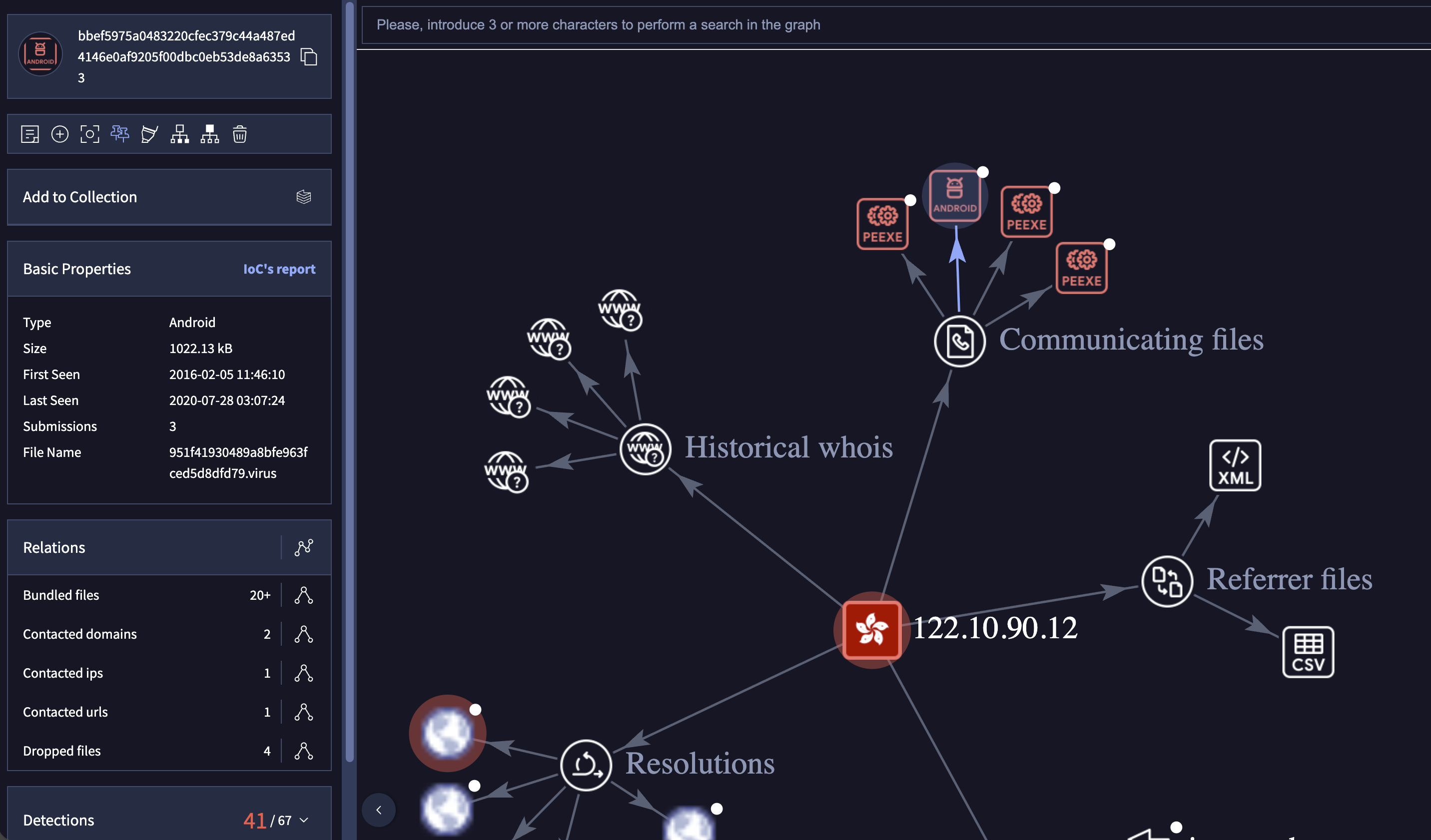
The graph centres on the IP and branches out into communicating files, dropped files and resolutions. One of the communicating files is an Android sample, and following it to its detail page gives the file I was after:
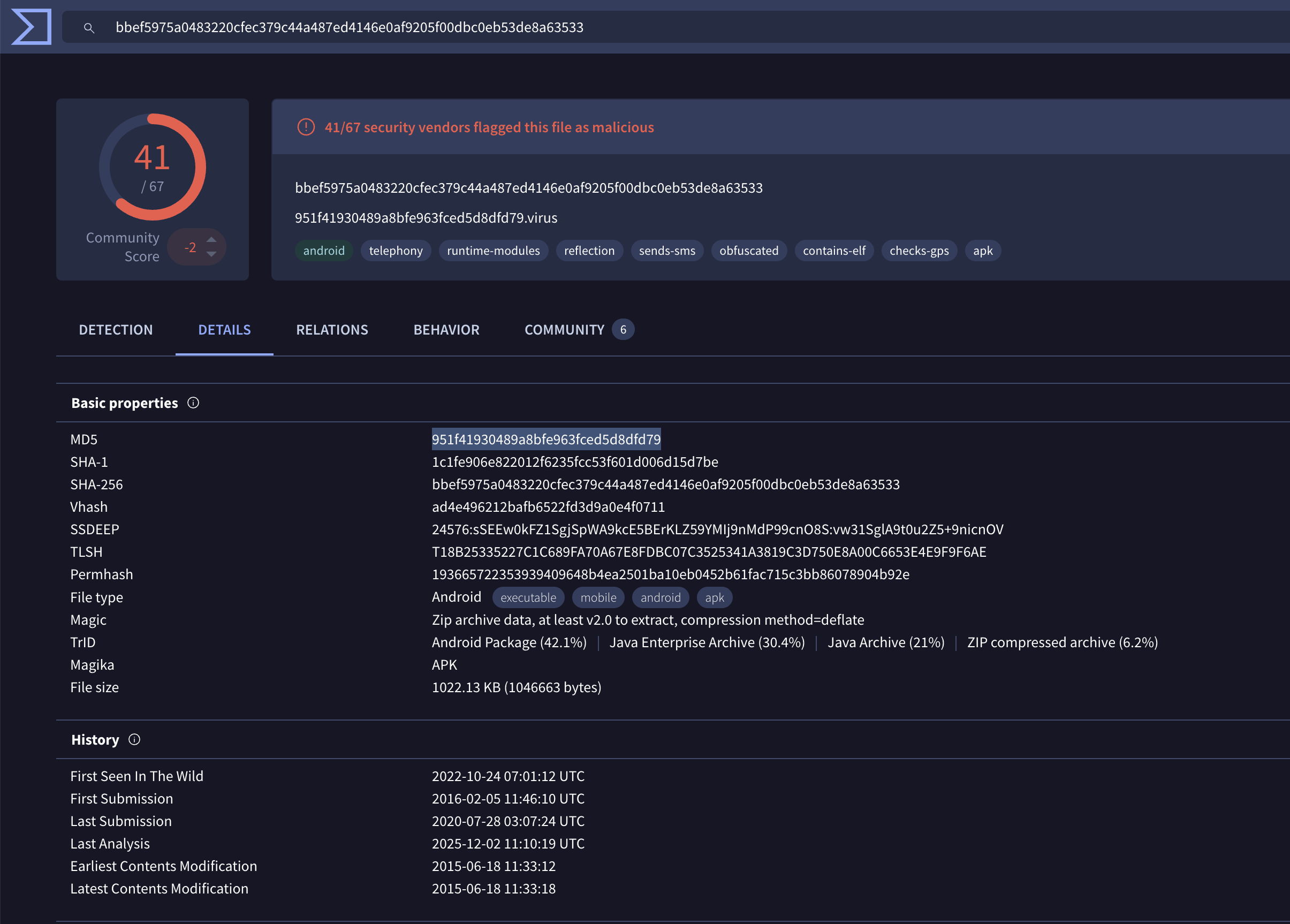
It’s an Android APK, 41/67 vendors flagged it, tagged android, telephony, sends-sms and obfuscated. The detail page gives both hashes: MD5 951f41930489a8bfe963fced5d8dfd79 and SHA1 1c1fe906e822012f6235fcc53f601d006d15d7be. Getting there meant pivoting from a Windows DLL, to a campaign report, to a C2 IP, to an Android sample, which is a longer chain than I expected from a single dropped file.
Tools Used
| Tool | Purpose |
|---|---|
| DocIntel (PandaProbe) | Reading the submission email and downloading the sample archive |
sha1sum | Hashing pRsm.dll locally |
| vex | Triaging the hash and surfacing the MgBot family in one command |
| VirusTotal | Engine detections, the IP relations graph, and the Android sample’s details |
| MITRE ATT&CK | Mapping the pRsm module to the correct technique (T1123) |
| ESET / WeLiveSecurity report | Campaign attribution and network indicators |
| CyberChef | Defanging the URL and C2 IP |
Flags
The room’s answers are public threat-intelligence indicators, but the archive password is a credential and is left as [redacted].
Lessons Learned
Pivoting is the whole skill. One hash got me to a family, the family got me to an ESET report, the report gave me a C2 IP, and the IP’s relations graph gave me a related Android sample. No single source had everything. The investigation was a chain of hops, and each one only made sense because of the one before it.
Submitting the wrong technique taught me more than getting it right would have. I read T1056 off VirusTotal’s behaviour tab and submitted it, and it was rejected. Only then did I go to the ESET report and the MITRE MgBot page and find the real answer, T1123 (Audio Capture). The auto-generated tag was a guess, not the answer. When a tool’s mapping doesn’t match what the module is actually named for, the primary research wins.
A C2 IP’s relations graph is a map, not a single dot. I’d mostly thought of an IP indicator as one fact. Searching 122.10.90.12 on VirusTotal and opening its graph showed communicating files, dropped files and resolutions branching off it, and one of those branches was the Android sample the room wanted. The graph turned one indicator into the shape of a whole campaign.
vex earned its place in the loop. The family identification that would have meant scrolling a VirusTotal engine list came back as a single line from vex triage. Reaching for a tool I’d built myself in the middle of a real investigation, rather than just testing it on its own, was the satisfying part.
File names are a hint, never proof. maillfpassword.dll and the others read like a feature list for a credential stealer, and they turned out to be modules of exactly that kind of framework. But the confirmation came from the hash and the report, not the names. Treating the names as a lead to verify, rather than a conclusion, is the right habit.
Defensive Takeaways
This is an intel room, so the defensive value is in what you’d do with the indicators once you’ve pulled them, rather than in any detection I built myself.
The network indicators are the immediate action. The C2 IP 122.10.90.12 and the malicious update URL on update.browser.qq.com are concrete things to block at the firewall and proxy and to hunt for retroactively in DNS and connection logs. Pulling them out in defanged form is exactly so they can be dropped into a blocklist or a report without anyone fat-fingering a live link.
MgBot’s modules map straight to detections. Each DLL is one capability: audio capture (T1123), clipboard theft (T1115), credentials from password stores (T1555), account discovery (T1087). The MITRE MgBot page reads like a detection checklist, and mapping each module to a data source (process behaviour, registry, credential-store access) turns the malware profile into coverage.
Delivery via hijacked software updates is the scary part. Evasive Panda pushed MgBot through updates for legitimate Chinese software. That defeats “only install trusted software,” because the trusted software is the delivery vehicle. The defences that actually help are update-integrity checks, egress monitoring for update channels reaching the wrong hosts, and application allowlisting.
Cross-platform campaigns need cross-platform monitoring. The same infrastructure that served Windows DLLs also served an Android sample. Threat intel that stops at the Windows estate would have missed half the picture. The pivot from a Windows IOC to a mobile one is a reminder to follow the infrastructure wherever it leads.