New Hire, Old Artifacts

Introduction
This room drops you into the SOC-analyst seat instead of the attacker’s. Widget LLC, a client on a managed Splunk service, flags that endpoint protection was switched off on one Finance department machine for a stretch in December 2021, and nobody ever actually looked into why. The room hands you that endpoint’s Sysmon logs already sitting in Splunk and eleven questions, no shell, no exploit to write, just log data and the job of reconstructing what actually happened on that box.
Theory
Sysmon logs the kind of detail Windows’ own event log doesn’t bother with: full command lines, parent-child process relationships, file hashes, and which DLLs get loaded into which process. Two Sysmon-specific things matter for this room. ProcessCreate events (EventCode 1) carry the full command line and the binary’s own embedded metadata, Company, OriginalFileName, Description, so a renamed executable’s real identity often survives being renamed on disk. ImageLoad events (EventCode 7) log every DLL a process pulls in, which is what makes DLL side-loading visible at all: a legitimate, signed executable loading a DLL it was never shipped with, because an attacker dropped a malicious one with the exact filename the program expects, next to it.
Walkthrough
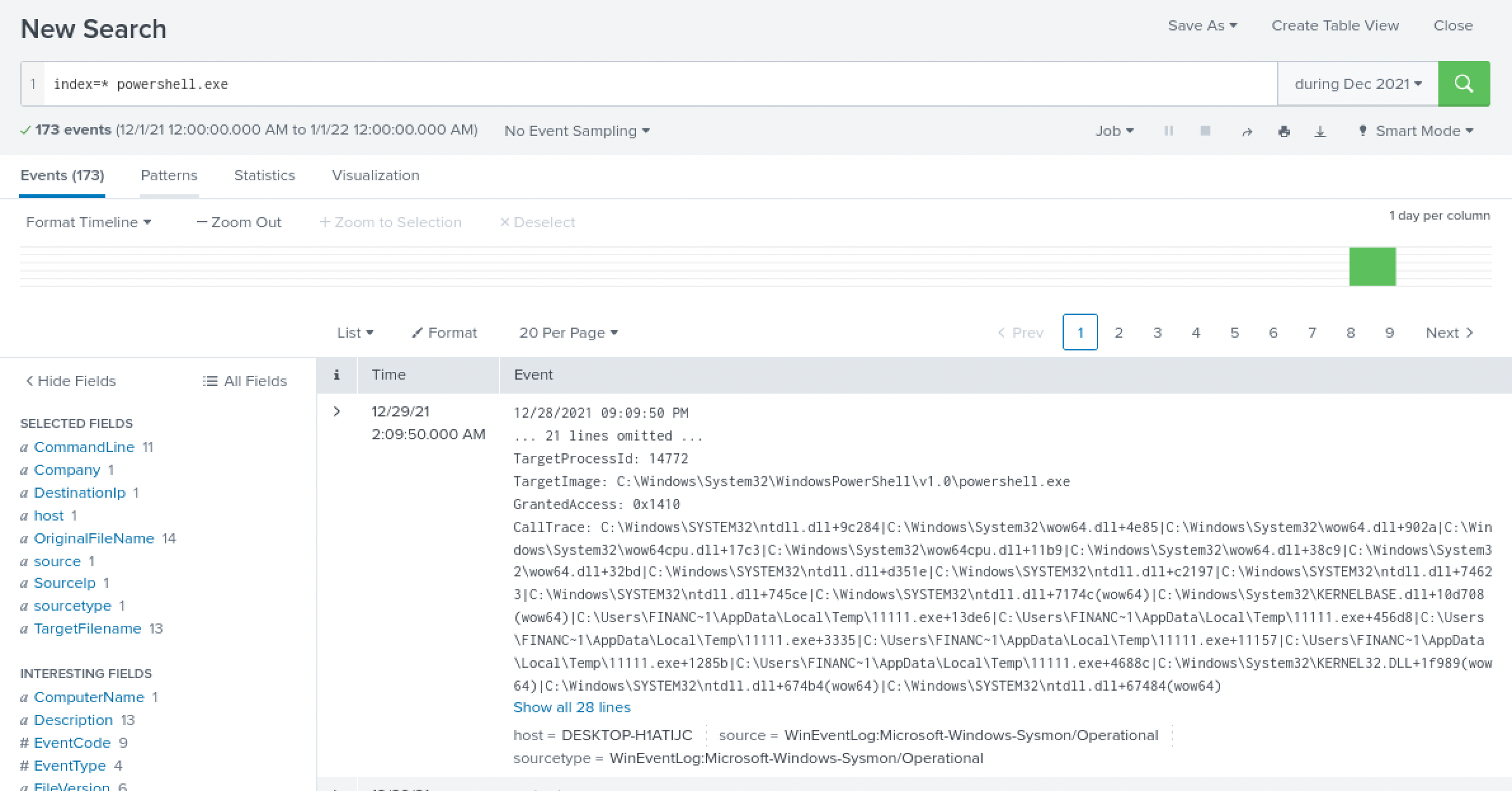
First artifact: a browser cookie thief. A straight index=* powershell.exe search to get a feel for the data returned 173 events, noisy, not narrow enough to mean much on its own yet.
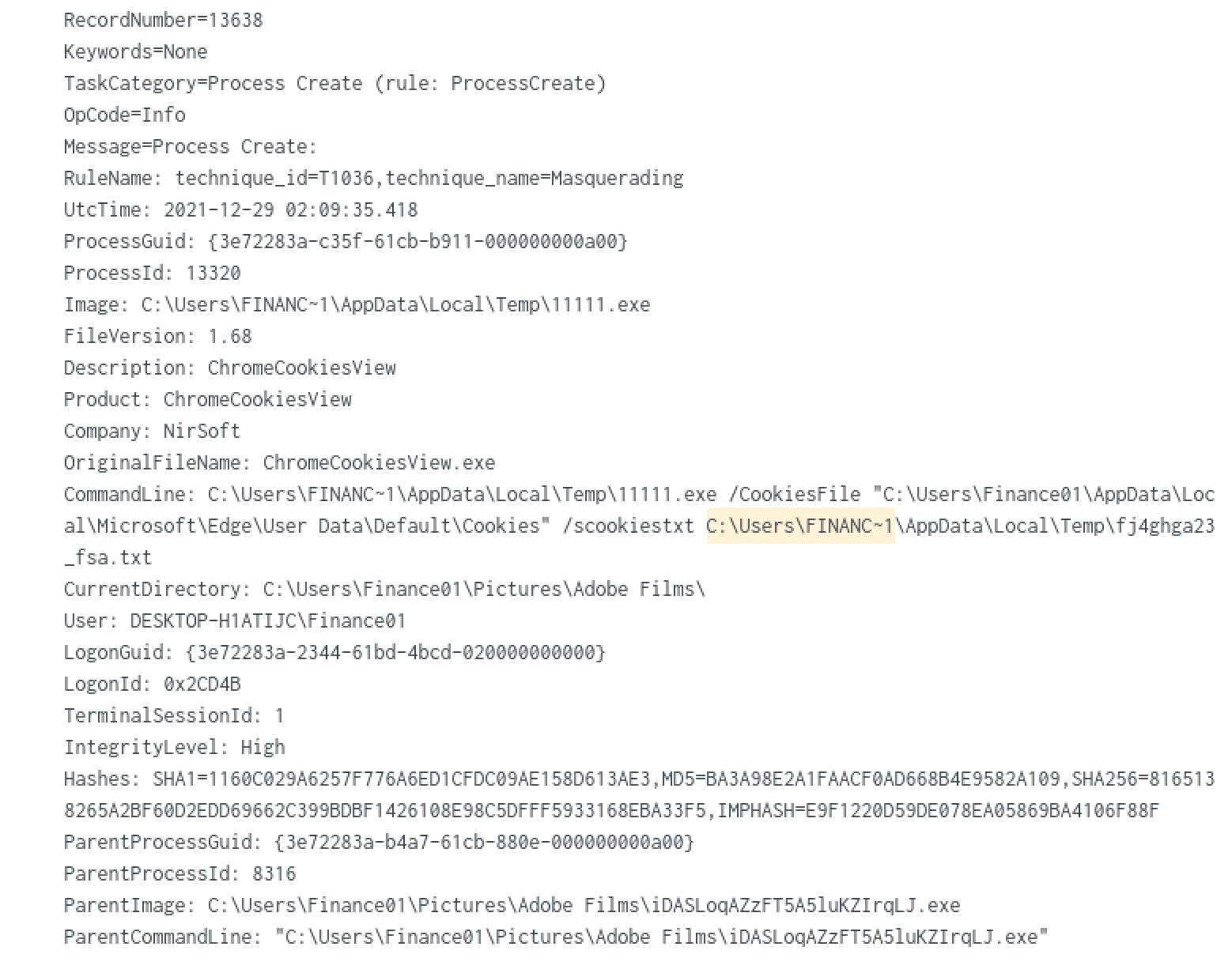
Narrowing down to process creation in the Finance01 user’s own Temp folder was more productive. The very first hit is 11111.exe, and its own embedded metadata gives it away immediately: OriginalFileName: ChromeCookiesView.exe, Company: NirSoft, with a command line pointed straight at Edge’s Cookies file and a /scookiestxt output path. I looked NirSoft up afterward: ChromeCookiesView is a real, legitimate browser-cookie-export utility, not something built for this room, which is exactly why it’s a useful thing for an attacker to drop instead of writing their own.
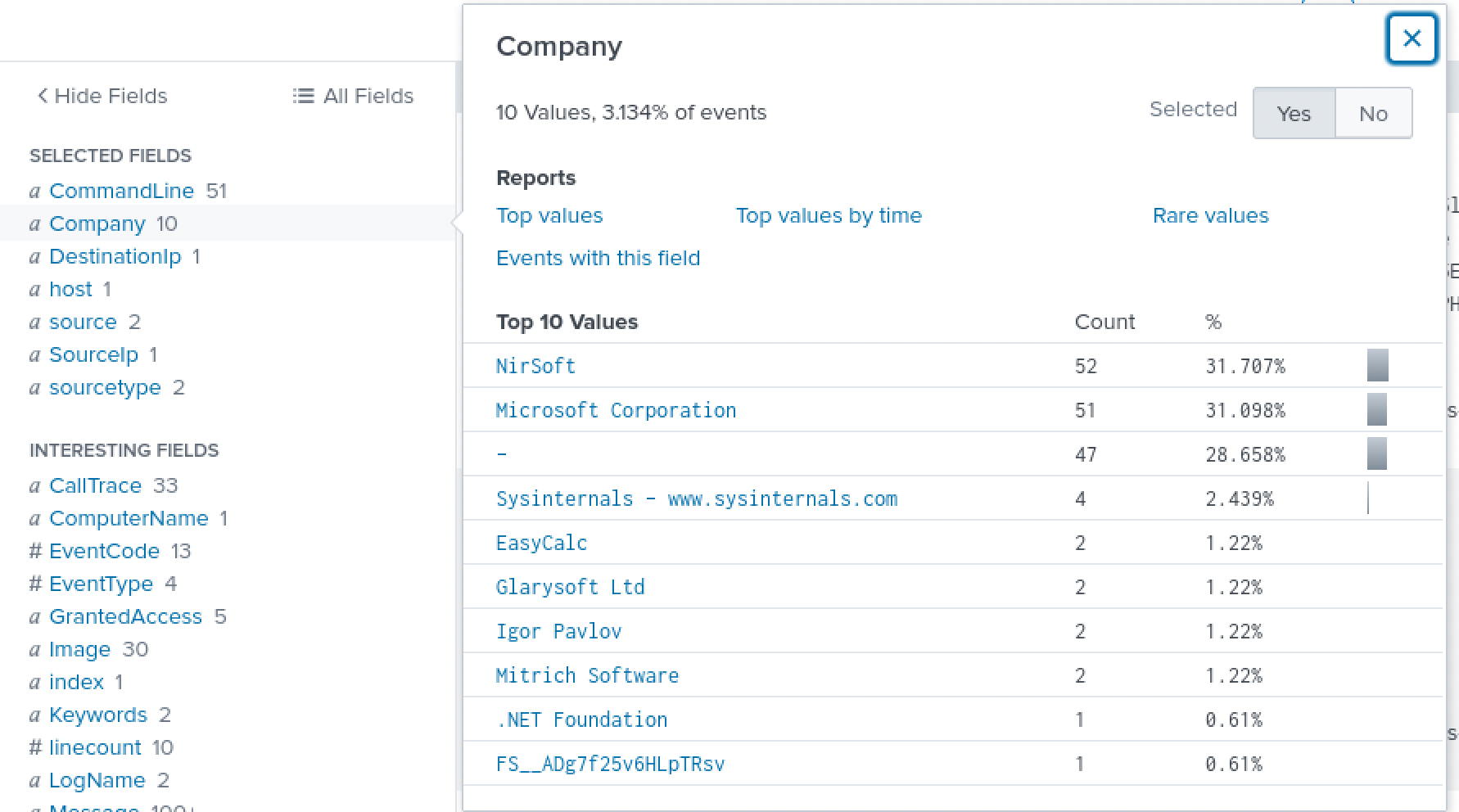
I’m not comfortable enough with SPL yet to write a tight stats/table pipeline straight off, so most of how I actually moved through this room was the field sidebar on the left of a search, clicking into a field and reading its top-value breakdown instead of writing the aggregation myself. The Company field across this event set was one of the first pivots that paid off, a spread of NirSoft, Microsoft Corporation, Sysinternals, and a handful of odd one-offs, which is a fast way to separate “legitimate signed tooling being abused” from the stuff worth chasing further.
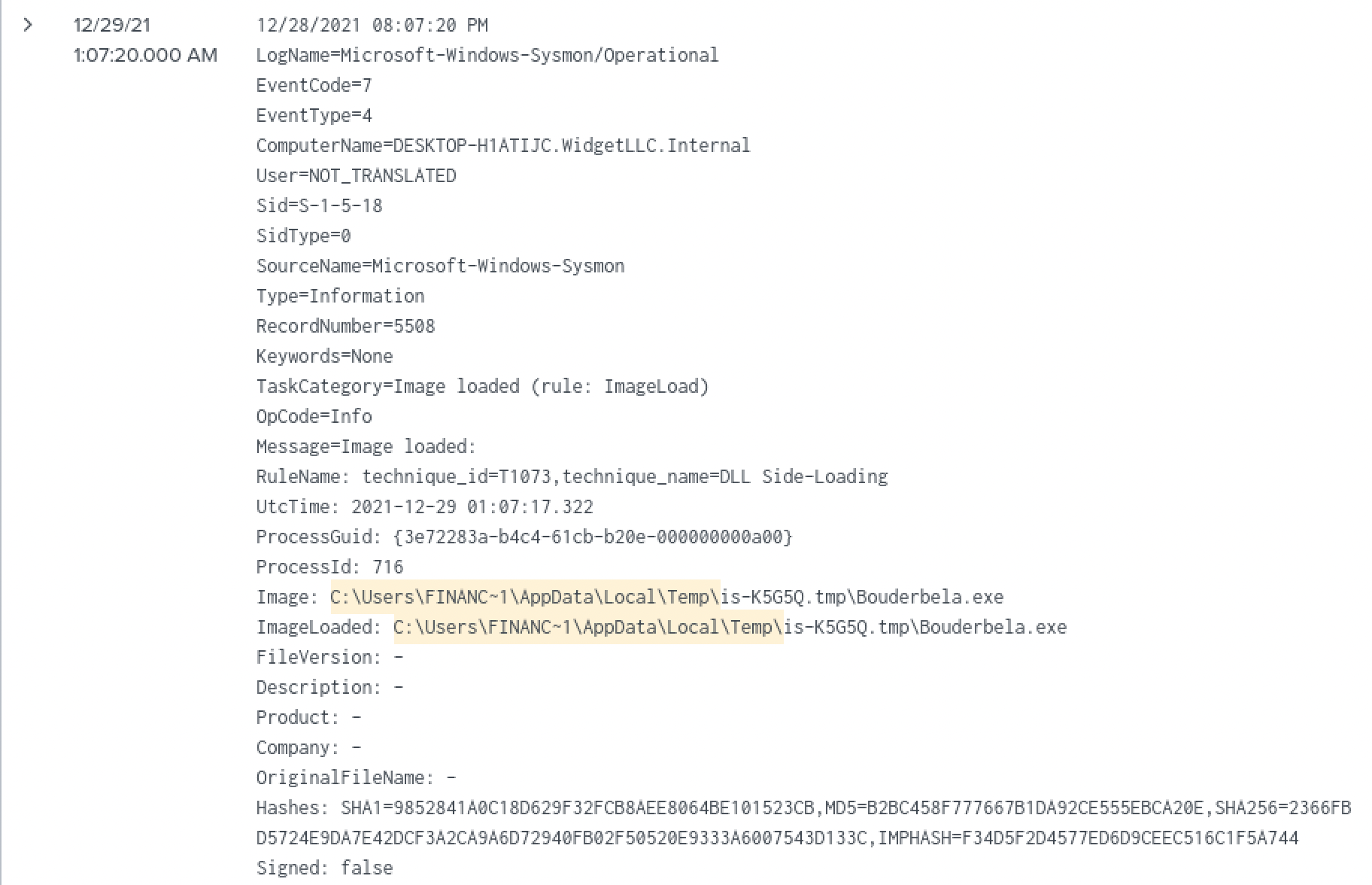
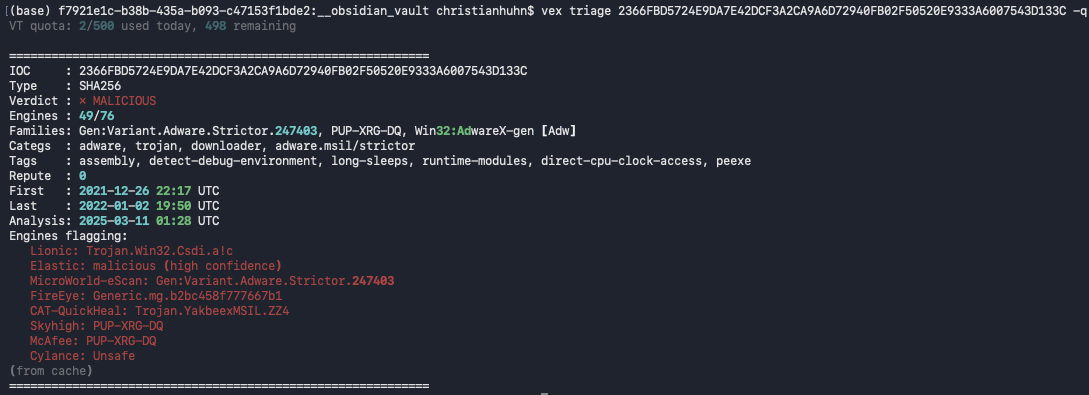
A second binary, confirmed malicious. A DLL side-loading Sysmon rule fired on a file called Bouderbela.exe, sitting inside a folder named is-K5G5Q.tmp. I looked that naming pattern up afterward, it’s how Inno Setup installers stage their temporary files, a sign this file rode in bundled with some other installer rather than landing on its own. I pulled its SHA256 and ran it through vex, my own IOC-triage tool: 49 of 76 engines flagged it, Adware/Trojan family, tagged for debug-environment detection and long sleeps, both sandbox-evasion behavior I recognized from the SOC L1 material.
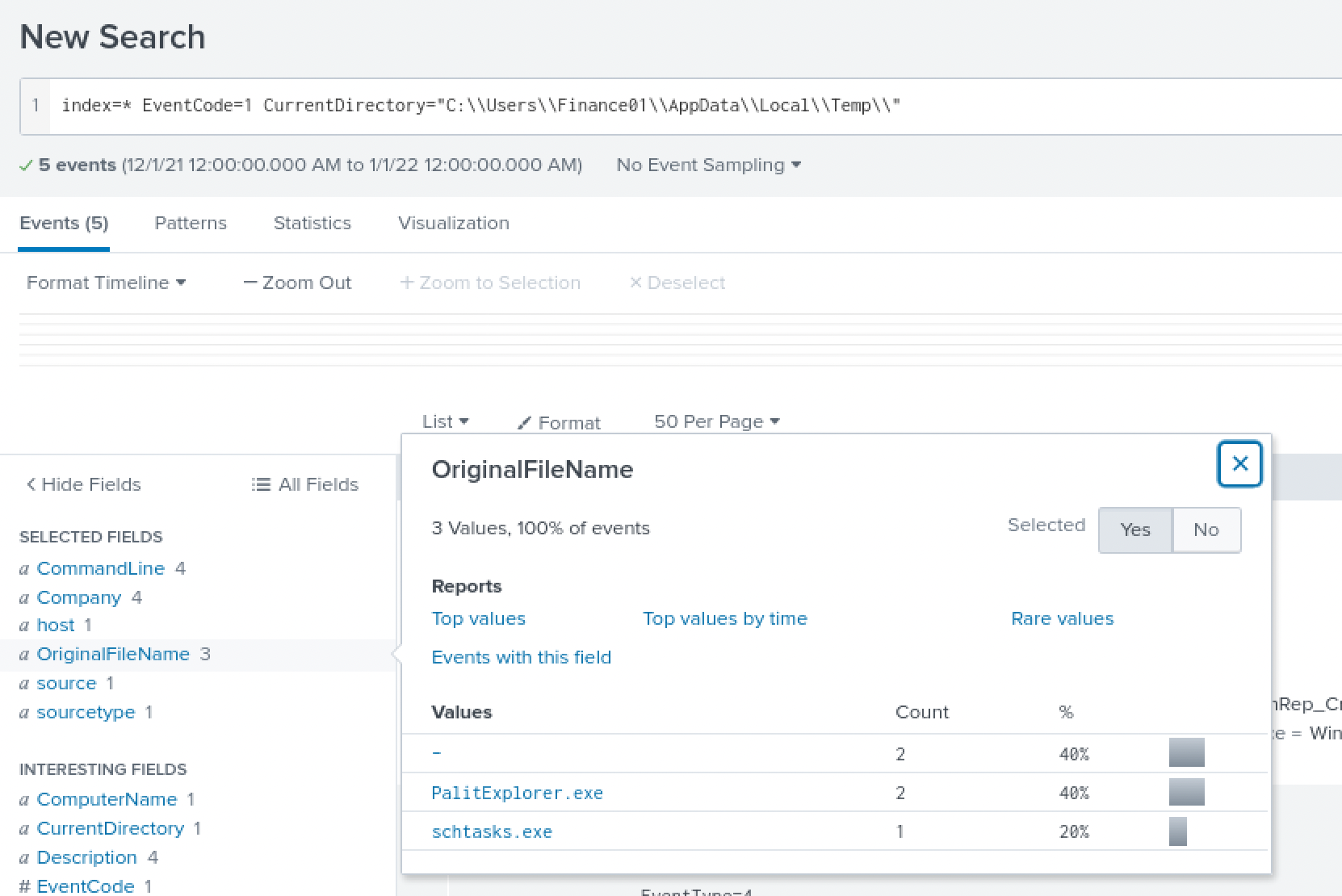
The renamed dropper that phones home. Filtering process creation down to just the Temp directory and looking at OriginalFileName turned up a process whose actual identity, PalitExplorer.exe per its own metadata, doesn’t match the name it’s running under on disk.
The actual command line confirms it: that binary is running as IonicLarge.exe, a plain rename with nothing hidden about it once you check the metadata Windows itself kept.

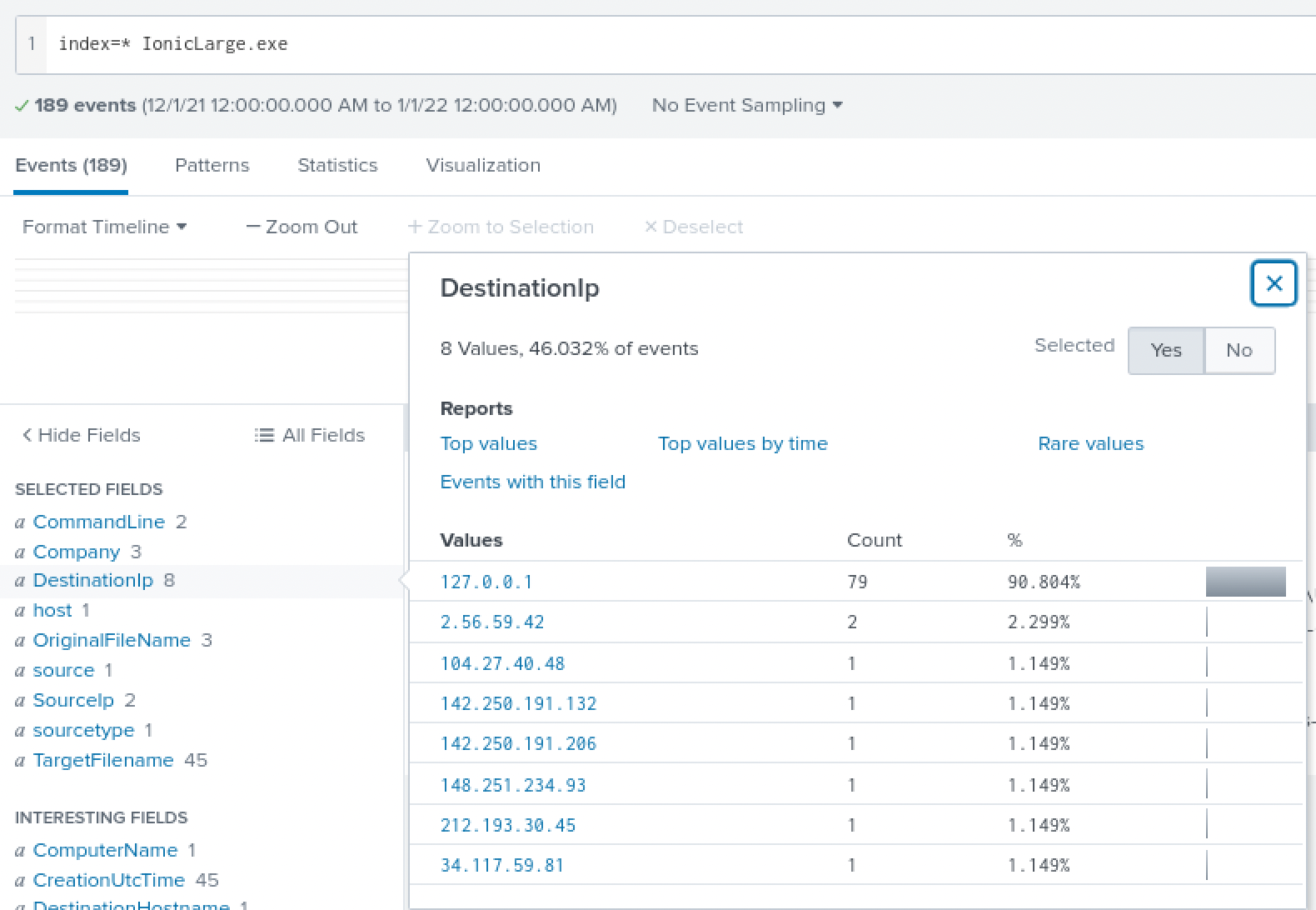
Searching directly on IonicLarge.exe pulled 189 events, and the DestinationIp field is where this stopped being just a renamed file and started being a live connection: 90% of the traffic is loopback noise, but sitting underneath that are a handful of external IPs each showing up once or twice, exactly the shape a beacon makes against normal background chatter.
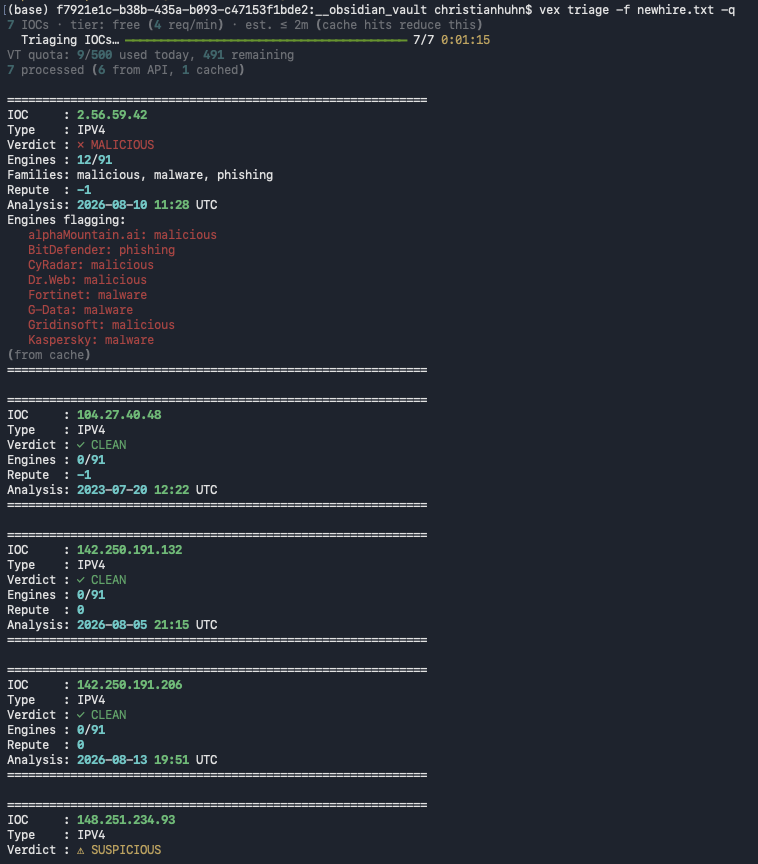
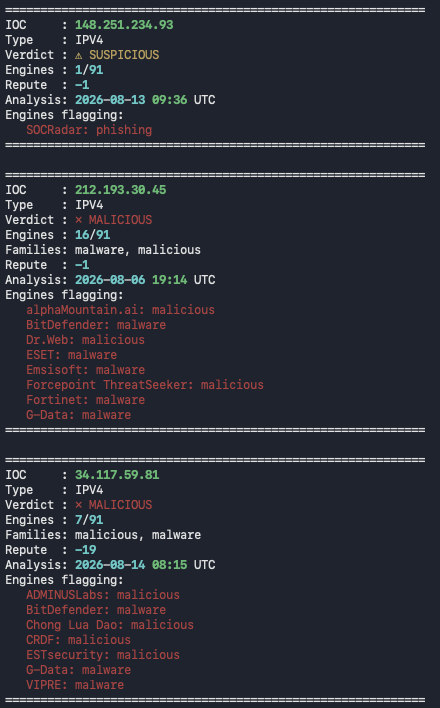
Running the full set of those IPs through vex in a batch sorted the noise from the signal fast: 2.56.59.42 came back outright malicious, malware and phishing families, 148.251.234.93 suspicious with a phishing tag, and 212.193.30.45 and 34.117.59.81 both flagged malicious by multiple engines. The rest were clean, ordinary CDN and cloud infrastructure.
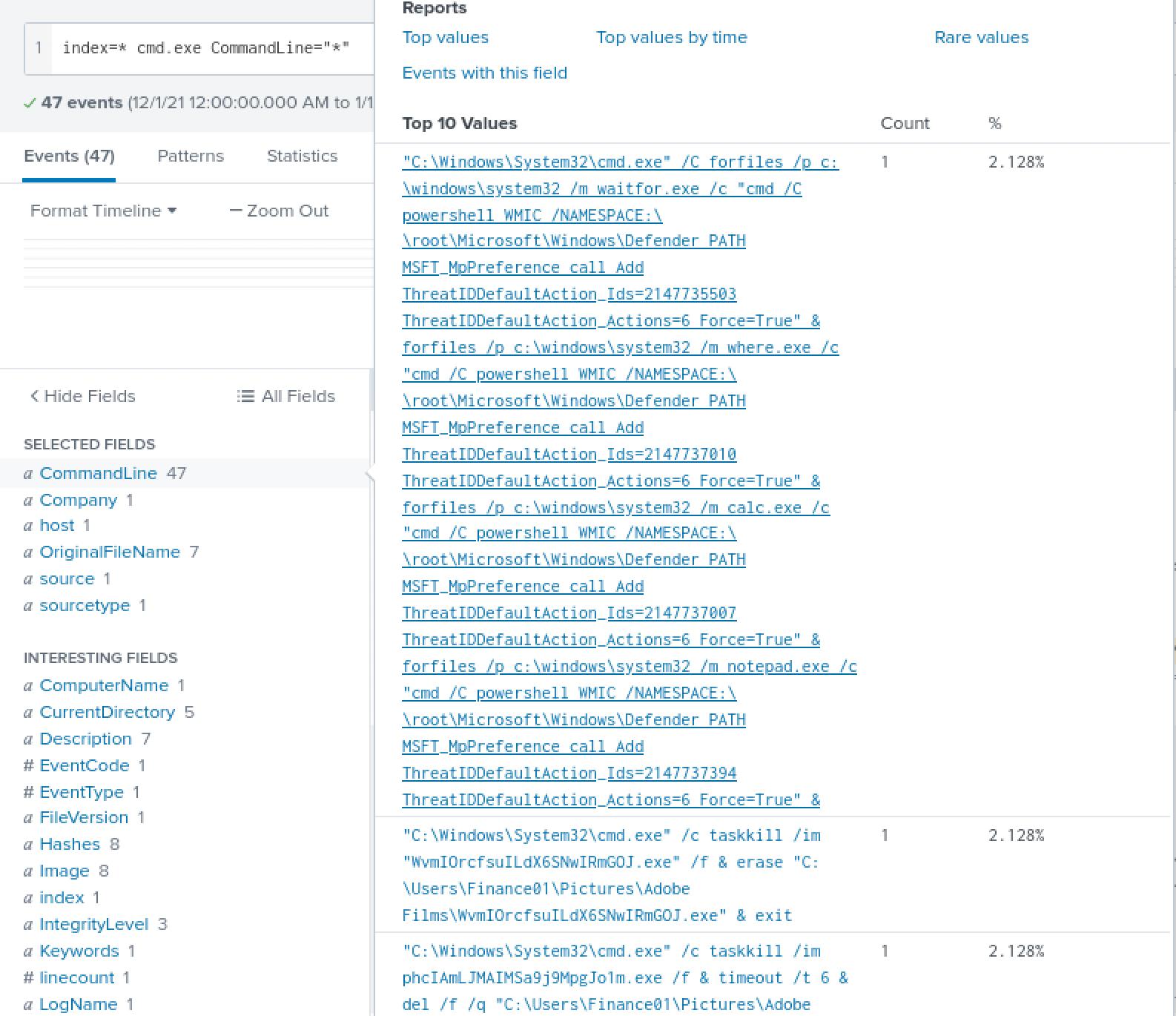
Turning off the alarm. A cmd.exe search turned up the piece that explains why endpoint protection was reported as off in the first place: a chained command running forfiles against several common analysis-tool names, wrapped around a PowerShell WMIC call against MSFT_MpPreference, explicitly adding specific threat IDs as allowed with Force=True. I didn’t know what MSFT_MpPreference and ThreatIDDefaultAction actually do until I looked them up afterward: this isn’t disabling Defender wholesale, it’s telling it to stop caring about specific, already-known-malicious signatures, so even re-enabling protection later wouldn’t have caught any of this retroactively.
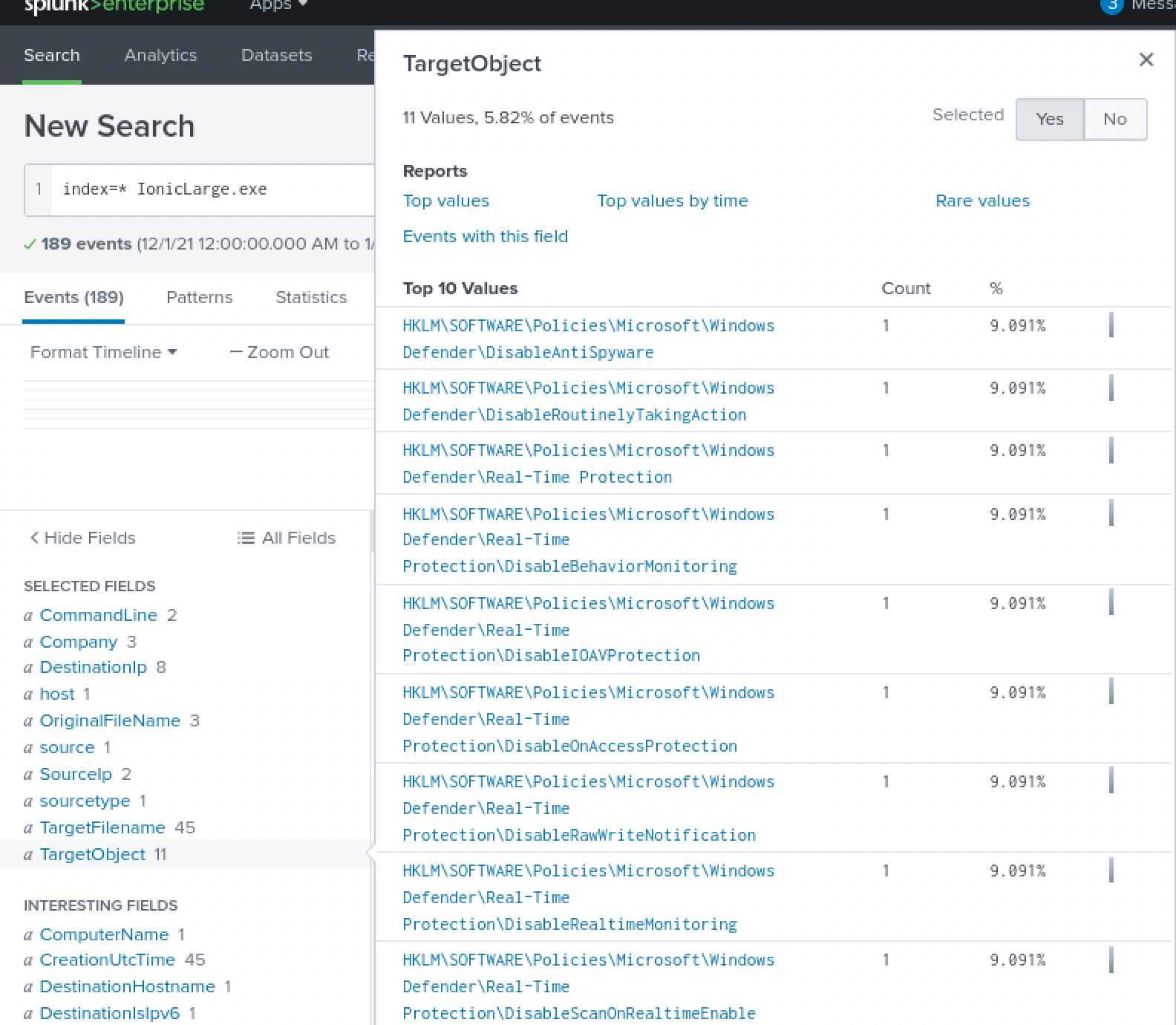
Separately, a set of registry events shows Defender getting disabled more directly too, values written under HKLM\SOFTWARE\Policies\Microsoft\Windows Defender, DisableAntiSpyware, DisableRealtimeMonitoring, and several of the Real-Time Protection sub-keys, one write per protection feature.
The same cmd.exe search also had the cleanup step sitting right there: taskkill /im against two random-hex-named executables, followed by erase and del, removing the noisiest early-stage binaries once they’d done their job. Standard enough housekeeping that it’s easy to miss it as its own step, but it’s the same instinct as covering tracks anywhere else.
The part meant to stay quiet. Searching for the DLL side-loading technique itself, filtered away from the first-stage cookie thief, surfaced EasyCalc.exe, sitting in AppData\Roaming rather than a Temp folder, loading nw.dll, ffmpeg.dll, and nw_elf.dll right alongside it.
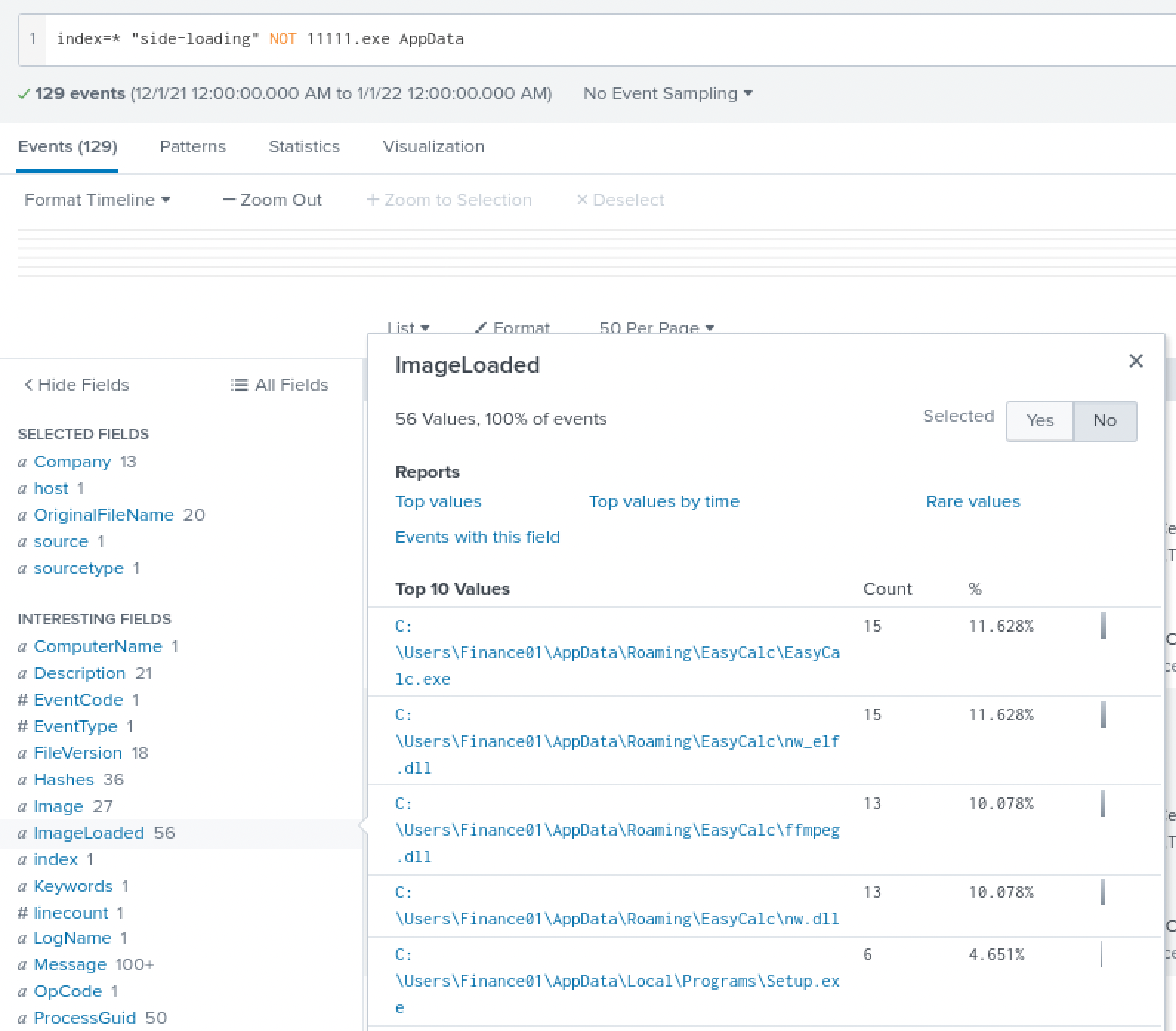
ffmpeg.dll I recognized, ffmpeg is a real, widely used media library. nw.dll I didn’t, so I looked it up: it’s a core NW.js runtime component, NW.js bundles Chromium and Node.js into a desktop app, an unusual choice for something calling itself a calculator, and ffmpeg riding along with it is just NW.js pulling in its own media-codec dependency, not a separate tool on its own. Widening the search past those three files turned up two more names I also had to look up, amsi.dll and MpOAV.dll. Neither is a normal NW.js dependency, and what they actually do, hooking into Windows’ own anti-malware scanning, isn’t something I’d have guessed from the filenames alone.
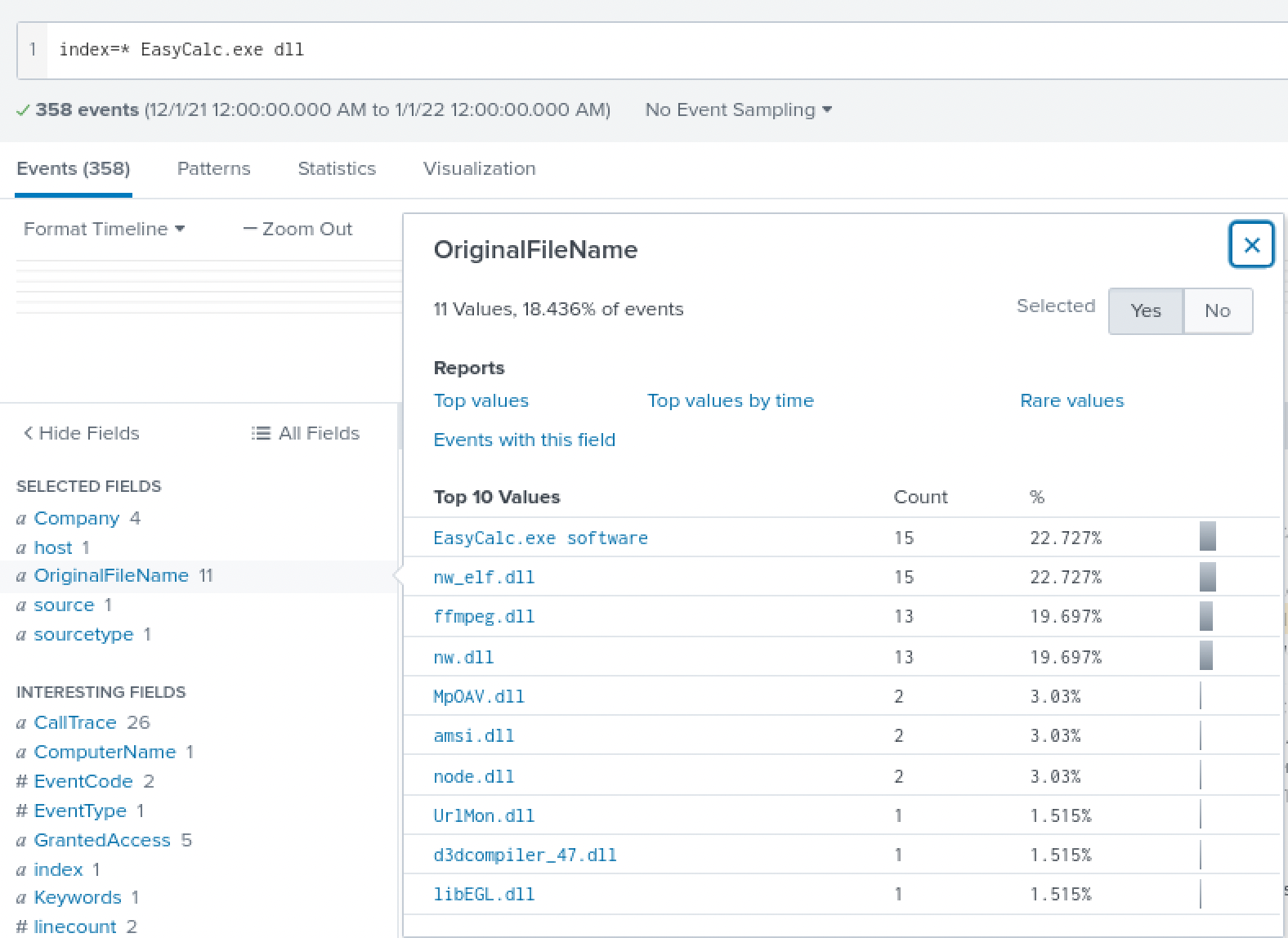
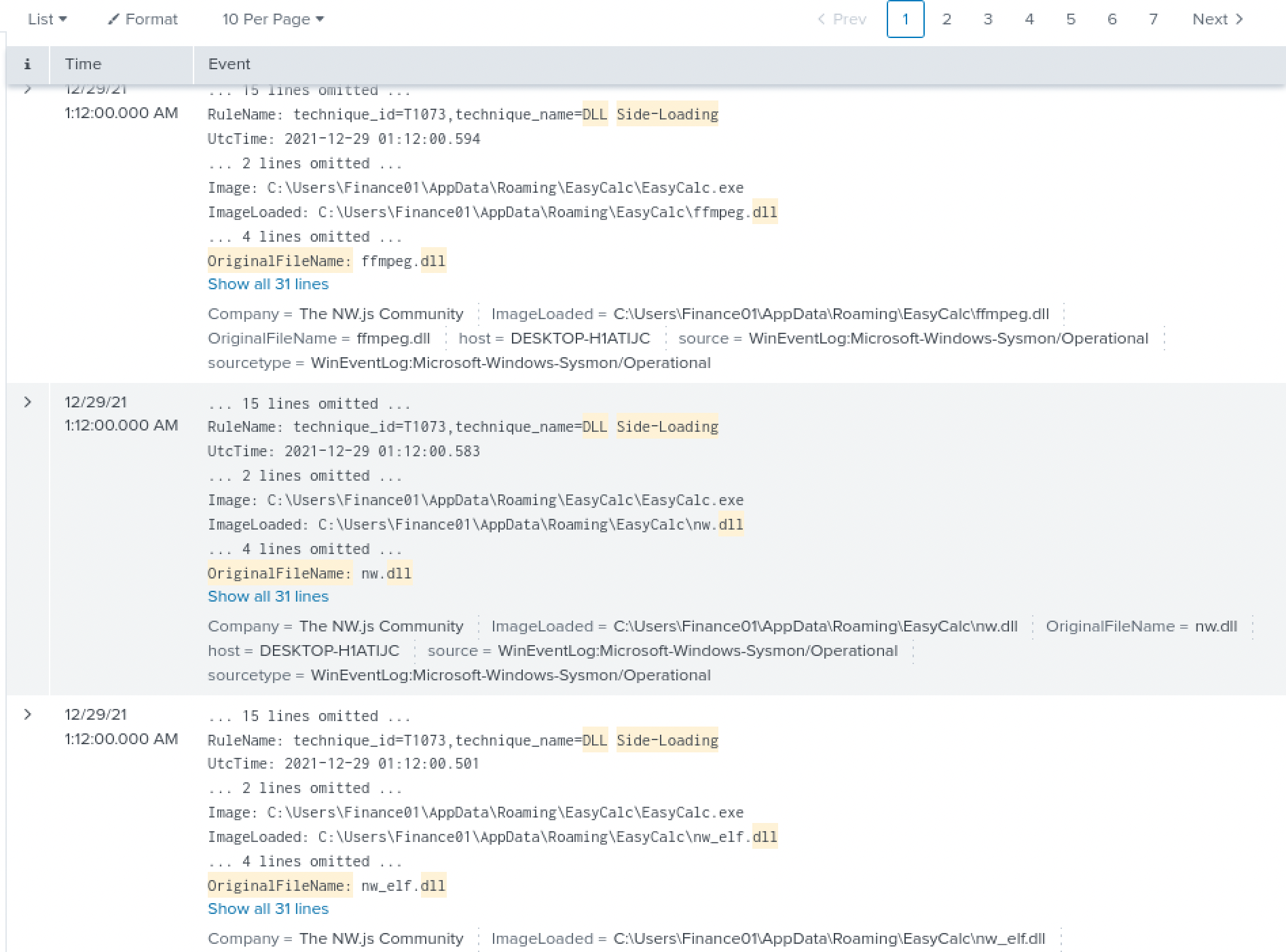
Pulling the raw events for the three main side-loaded files confirms they all load within the same second, off the same EasyCalc.exe process, the DLL Side-Loading rule firing on each one in turn. Fake calculator app, Chromium runtime underneath it, quietly living in AppData instead of Temp where nobody would think to look for a stager again.
What I’d actually want a SOC watching for here. Every piece of this chain leaves its own trace, and none of them looks catastrophic on its own. A signed binary’s OriginalFileName not matching the name it’s running under on disk is cheap to alert on and catches exactly this kind of rename. A write to the Defender policy registry key, or a WMIC call touching MSFT_MpPreference, from anything other than an actual admin action, is the kind of event that should page someone the moment it happens, not surface months later during an unrelated log review. A process that isn’t a browser making outbound connections to a handful of external IPs, each hit once or twice, sitting underneath a wall of loopback noise, is a beaconing pattern worth its own standing rule. And a signed binary loading DLLs it was never shipped with is the entire reason ImageLoad logging exists, if nobody’s watching that event stream, side-loading is close to invisible. None of these needed deep malware-analysis skill to catch, they needed the logging turned on and someone actually looking, which is exactly what didn’t happen here until this investigation.
Lessons Learned
I still can’t write a tight SPL pipeline from scratch, stats, eval, chained table commands are all things I know exist and don’t yet reach for automatically. What actually got me through this room was leaning hard on the field sidebar, clicking into Company, OriginalFileName, DestinationIp, TargetObject, one at a time, and reading the top-value breakdown instead of writing the aggregation query myself. That’s a slower way to work a SIEM than someone fluent in SPL would, and I want to name that plainly rather than write around it, but it got me to every answer this room asked for, and it taught me something a fast query would have skipped past: what noise actually looks like next to a real signal, 90% loopback traffic with a beacon buried under it, 173 events before I knew what to filter for. The DLL side-loading pattern is the technical thing I’m keeping past this specific room, a signed, legitimate binary isn’t trustworthy just because it’s signed, it’s only as trustworthy as every file sitting next to it that it’s willing to load without checking.