TryHackMe — Trooper

A multinational technology company has been hit by attackers stealing intellectual property. The task isn’t to break into anything. It’s to read. I’m handed a threat advisory report about a group the room calls “APT X” and have to figure out who they are and how they operate, using OpenCTI and the MITRE ATT&CK Navigator. No shells, no exploits. Just following links until the picture is complete.
This was my first room built entirely around OpenCTI. Up to now my threat-intel work had been single-indicator lookups (VirusTotal, my own tools barb, vex and sift). This was the first time I worked inside a full threat-intelligence platform where one entity is connected to dozens of others and you navigate by relationships instead of search bars.
| Field | Details |
|---|---|
| Platform | TryHackMe |
| Room/Machine | Trooper |
| Difficulty | Easy |
| Tags | opencti, cti, stix, mitre-attack, tropic-trooper, threat-intelligence |
Theory
Cyber Threat Intelligence and the report
Cyber Threat Intelligence (CTI) is the practice of turning raw data about attackers (indicators, malware names, techniques) into something an analyst can act on. The room frames it the way I’d expect a real workflow to start: a threat advisory report lands on your desk, and your job is to extract the structured facts from it and confirm them against a knowledge base.
The report here is about an APT (Advanced Persistent Threat) group, anonymised as “APT X”. The whole room is the process of de-anonymising it and mapping its toolkit.
OpenCTI
OpenCTI is an open-source threat-intelligence platform. It stores threat data as a graph: threat actors, malware, tools, attack patterns, vulnerabilities and the targets they hit are all entities, and the lines between them are relations (uses, targets, attributed-to). Instead of reading a flat report, you click an entity and see everything connected to it.
The parts I leaned on:
- Knowledge graph: a visual map of an entity and its neighbours.
- Knowledge tab: per-entity summary with a “distribution of relations” panel (how many attack patterns, malware, tools, etc. are linked).
- Timeline: entities ordered by date, useful for seeing how the group’s toolkit evolved.
- Arsenal / Techniques side menu: filtered lists of just the malware, tools or attack patterns tied to an entity.
STIX
STIX (Structured Threat Information eXpression) is the standard format OpenCTI uses under the hood. Every entity has a STIX ID, a type prefix plus a UUID, like malware--5d0ea014-.... It’s the unambiguous identifier for an object, so two analysts referring to the same malware by different names can still confirm they mean the same thing. The room asks for one of these IDs directly, which is how I learned to find it on an entity’s overview page.
MITRE ATT&CK
MITRE ATT&CK is the catalogue of adversary techniques, each with an ID like T1091. Techniques have sub-techniques (T1078.003) and belong to tactics (the “why”: Initial Access, Persistence, etc.). OpenCTI links entities to ATT&CK techniques, and the room also sends you into the ATT&CK Navigator for a couple of answers that are easier to read off the matrix than out of the graph.
Walkthrough
Reading the report: the phishing entry point
The starting point is the advisory report and the knowledge graph built from it. The graph for APT X shows the group at the centre, with targets edges fanning out to industries and countries (government, heavy industries, banking, healthcare, defense, high-tech, transport, research, plus the countries Taiwan and the Philippines), and uses edges pointing to its techniques and tools.
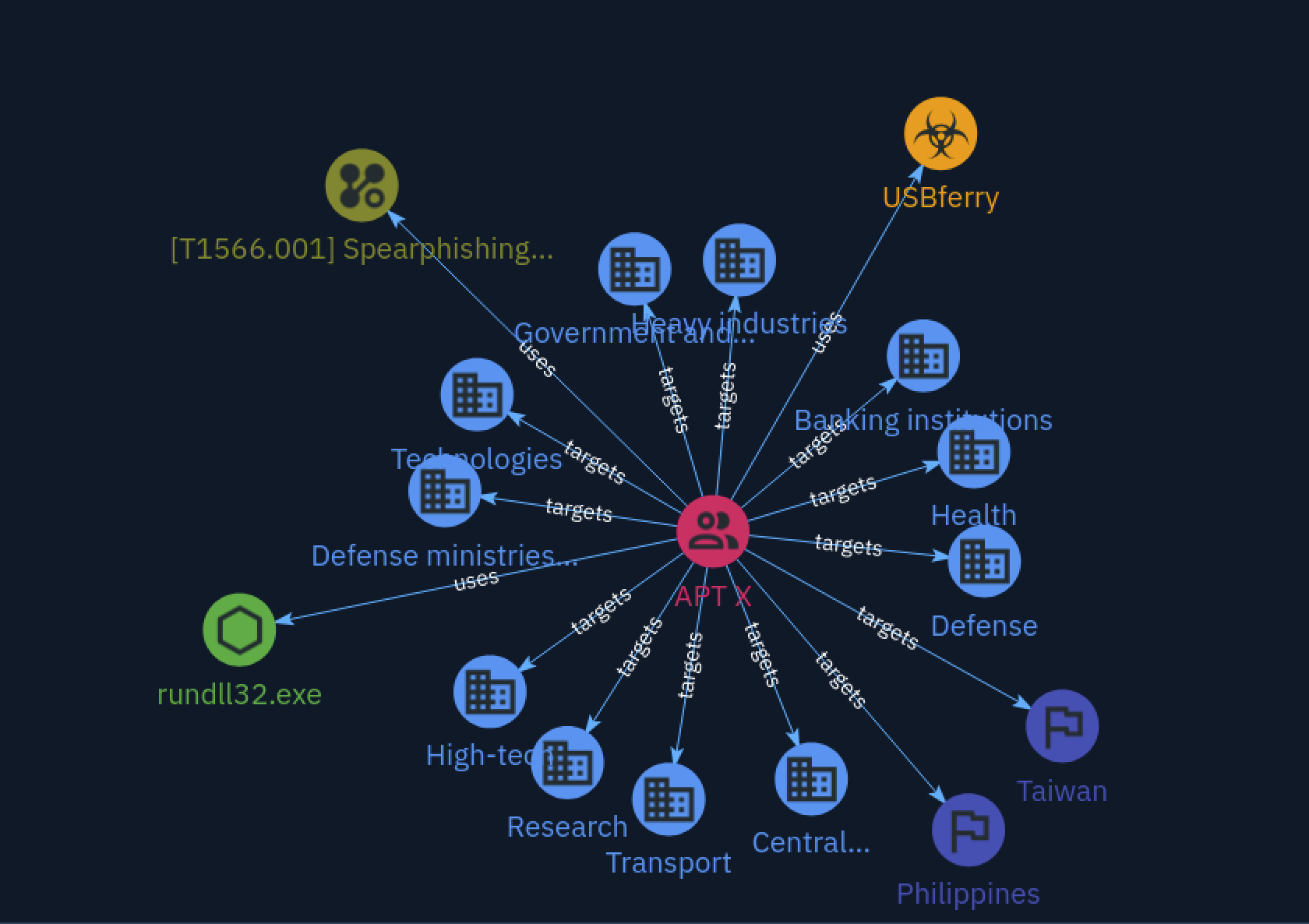
The first uses edge answers the first question: APT X gets in through spear-phishing emails, in ATT&CK terms T1566.001, Spearphishing Attachment. The graph also already gives away two more pieces I’d need later: the malware USBferry and the living-off-the-land binary rundll32.exe.
USBferry and its STIX ID
Clicking through to the malware entity opens the USBferry overview. The description is specific in a way that immediately narrows down who APT X is:
USBferry is an information stealing malware […] used […] in targeted attacks against Taiwanese and Philippine air-gapped military environments. USBferry shares an overlapping codebase with YAHOYAH.
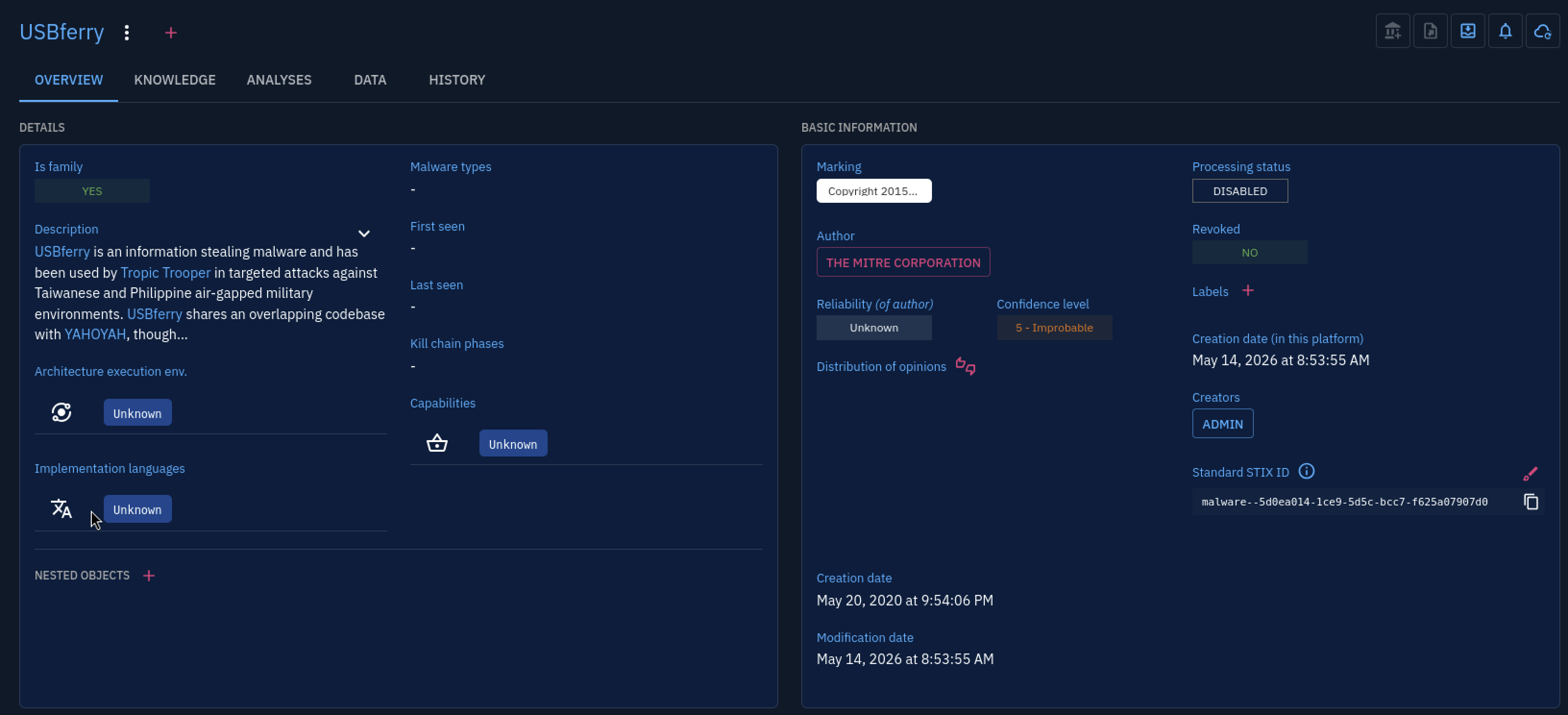
The Standard STIX ID is in the basic-information panel on the right: malware--5d0ea014-1ce9-5d5c-bcc7-f625a07907d0. That’s the answer to the STIX-ID question, copied straight off the page rather than guessed. “Air-gapped military environments” was the detail that made the USB angle click. If the targets are air-gapped, you can’t phish your way in over the network, so the malware has to ride in on physical media.
How USBferry actually spreads
That suspicion is confirmed under the group’s persistence and lateral-movement techniques. The lateral-movement entry is T1091, Replication Through Removable Media:
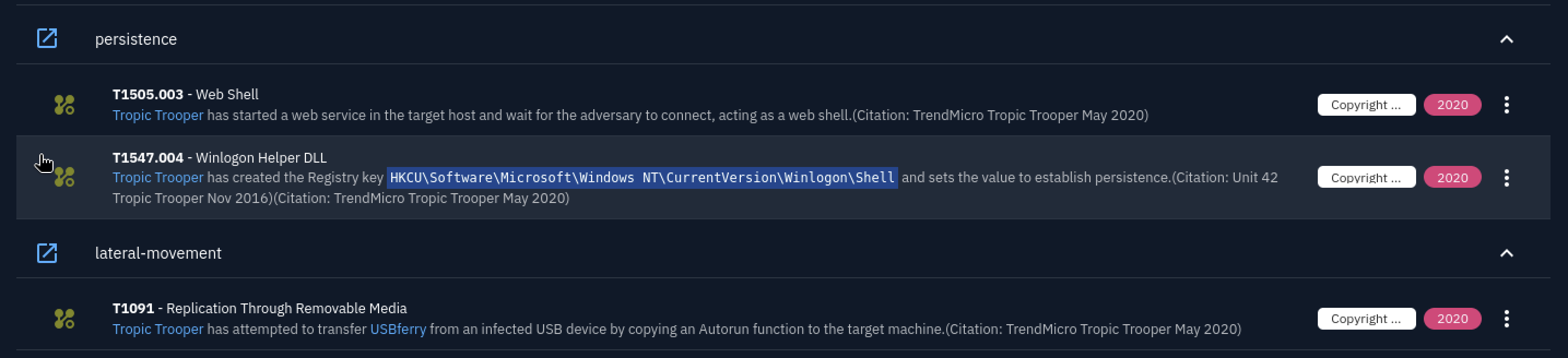
The description spells it out: the group “has attempted to transfer USBferry from an infected USB device by copying an Autorun function to the target machine.” So the USB technique used for initial access is Replication Through Removable Media, the way malware crosses the air gap.
Two other entries on the same screen are worth noting even though they aren’t direct questions. For persistence the group creates the registry key HKCU\Software\Microsoft\Windows NT\CurrentVersion\Winlogon\Shell (T1547.004, Winlogon Helper DLL) and also stands up a web shell (T1505.003). It’s a tidy example of how one OpenCTI entity bundles the whole persistence story in one view.
Naming APT X
Following the relationships and the overlap with YAHOYAH, APT X resolves to Tropic Trooper. The Tropic Trooper entity page carries the aliases the group is tracked under elsewhere, Pirate Panda and KeyBoy, which is the kind of cross-referencing the STIX model is built for.
The Knowledge tab on Tropic Trooper has a distribution-of-relations panel that summarises the whole arsenal at a glance:
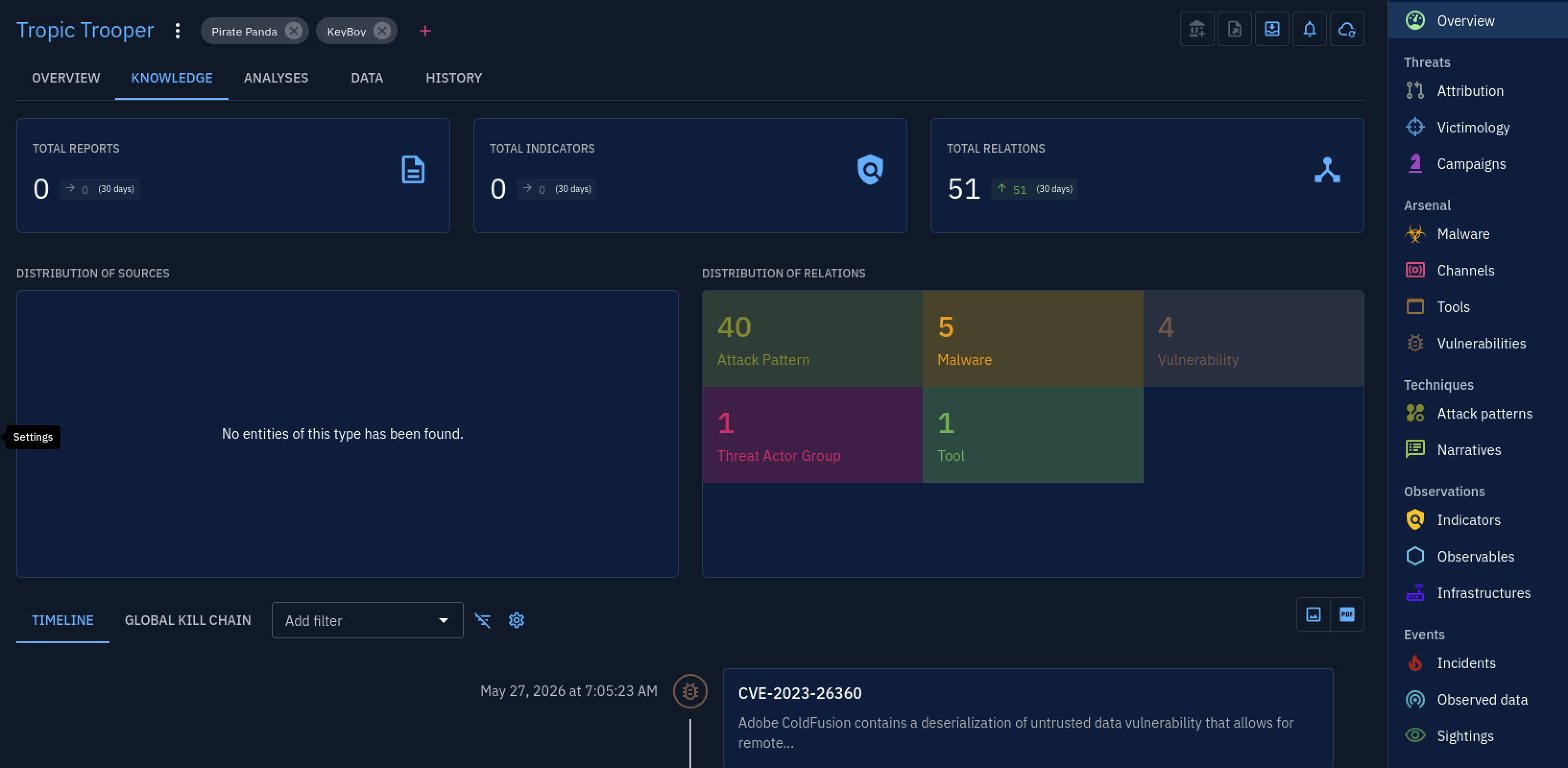
51 total relations, broken down into 40 attack patterns, 5 malware, 4 vulnerabilities, 1 threat-actor group and 1 tool. The room asks how many attack patterns are associated with the APT, and the distribution panel answers it directly: 40. Reading the number straight off the relations panel was quicker than counting techniques in the matrix by hand, and it’s exactly the count TryHackMe accepted.
The single linked tool
The distribution panel says there’s exactly 1 Tool. Filtering the entity’s arsenal down to tools confirms which one:
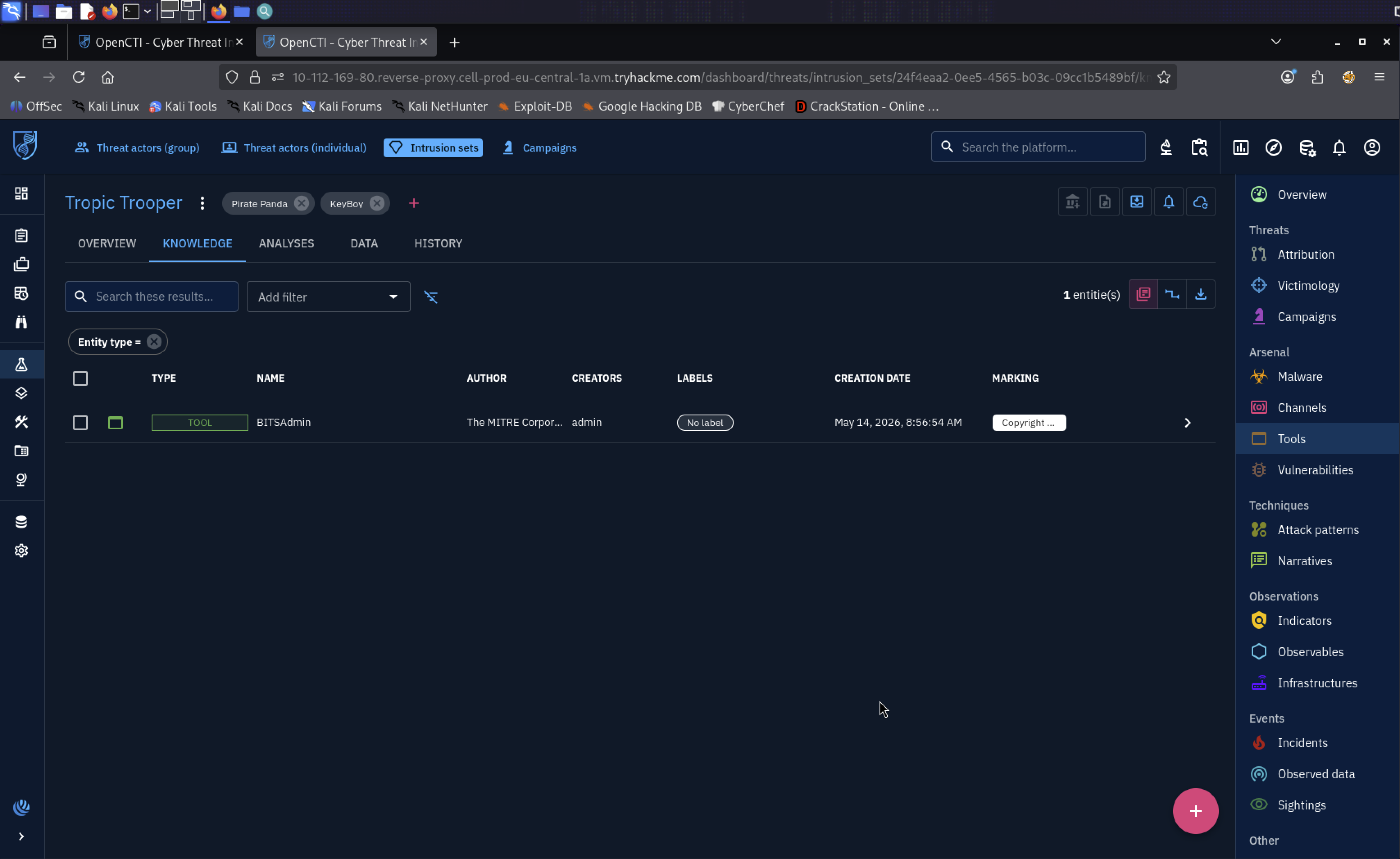
The one tool is BITSAdmin, a legitimate Windows command-line utility (Background Intelligent Transfer Service) that gets abused to download payloads quietly. OpenCTI files it as a “Tool” and not “Malware” because it’s a built-in binary, which is the distinction the room is testing.
The wider arsenal list fills in the rest of the malware family and roughly when each was first reported:
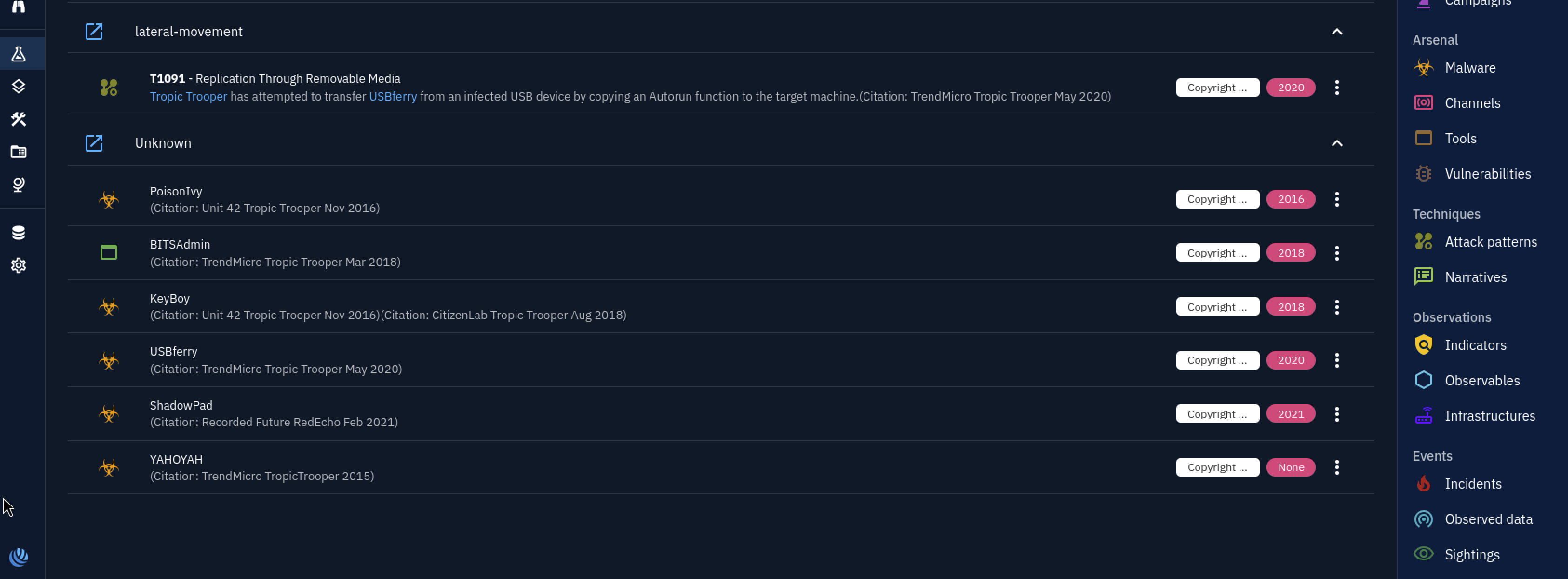
PoisonIvy, BITSAdmin, KeyBoy, USBferry, ShadowPad and YAHOYAH, with citation years from 2015/2016 up to 2021. Seeing them dated like this made the group feel less like a static report and more like something that’s been active and changing for years.
The timeline view
The timeline reorders the same entities by date, which surfaces things the graph hides, including vulnerabilities the group is associated with:
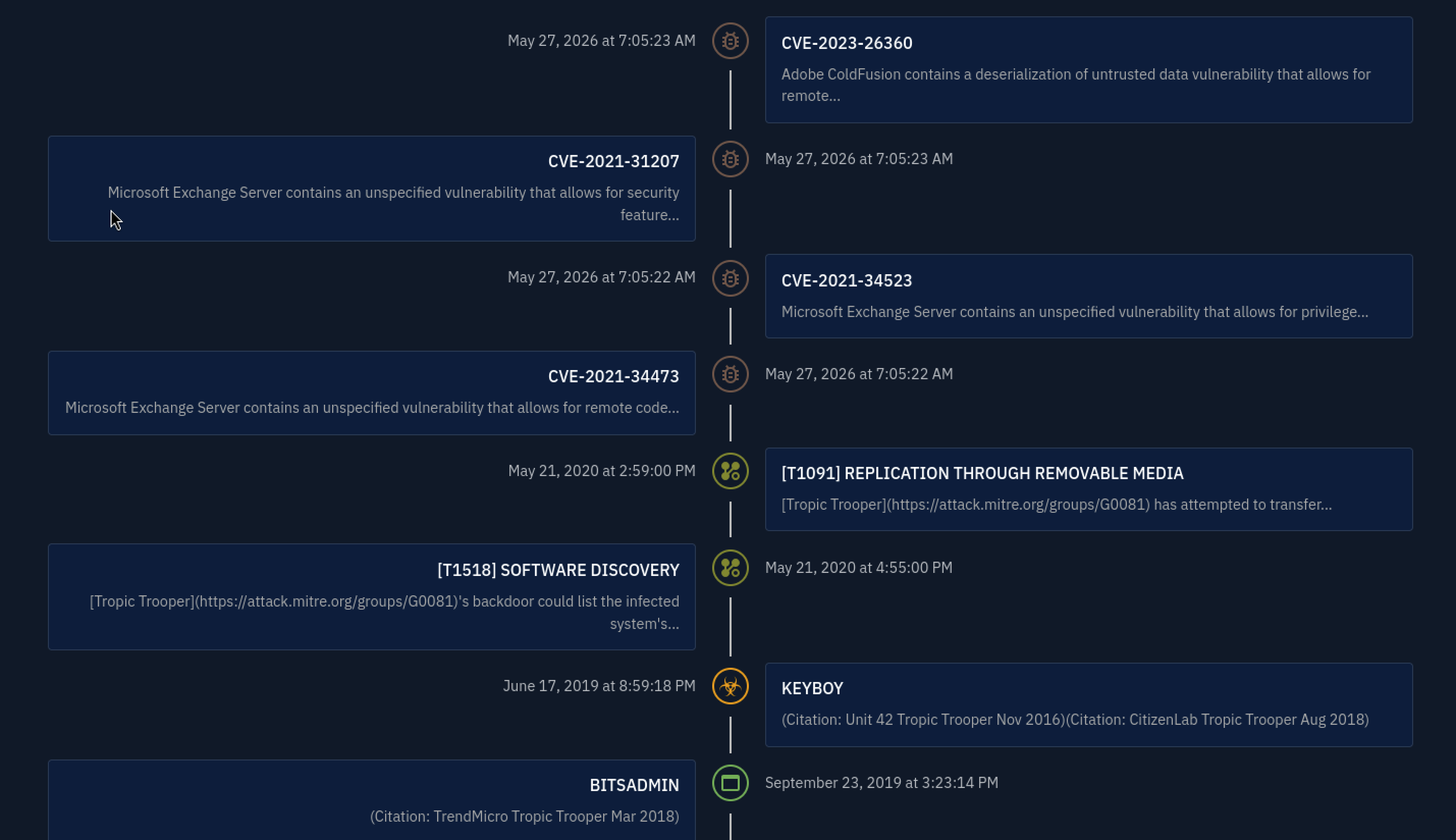
Alongside the techniques and malware, the timeline lists CVEs: CVE-2023-26360 (an Adobe ColdFusion deserialization bug) and the CVE-2021-31207 / 34523 / 34473 trio (the Microsoft Exchange ProxyShell chain). Those are the 4 vulnerabilities the distribution panel counted. I hadn’t expected a CTI room to tie a named group to specific CVEs so concretely. It’s a reminder that “this APT exploits Exchange” can be made precise down to the CVE.
Into the ATT&CK Navigator
The last couple of answers are easier to read off the MITRE ATT&CK Navigator than out of OpenCTI. Expanding the Valid Accounts technique (T1078) shows its sub-techniques; the one tied to the group is Local Accounts (T1078.003). Reading across the matrix, that technique sits under four tactics: Initial Access, Persistence, Defense Evasion and Privilege Escalation. It’s a good illustration of how one ATT&CK technique can serve several tactical goals at once.
Scanning the Collection column for the group’s techniques gives the final answer: the collection technique used is Automated Collection (T1119).
Defense evasion: steganography
One more technique stood out while clicking around, even though it’s not a scored question. Under defense evasion the group uses T1027.003, Steganography:

The group hides encrypted payloads inside JPG files to mask their backdoor and dodge detection. I’d read about steganography as a concept but hadn’t seen it attributed to a real group’s tradecraft before, and it made the whole arsenal feel a lot more deliberate.
Tools Used
| Tool | Purpose |
|---|---|
| OpenCTI | Primary platform — knowledge graph, entity pages, Knowledge tab, timeline, arsenal filtering |
| Threat advisory report | Starting source of facts about APT X |
| MITRE ATT&CK Navigator | Sub-technique expansion (Valid Accounts) and reading tactics off the matrix |
Flags
This is a knowledge room, so the “flags” are the facts themselves. The structured answers (STIX IDs, technique IDs, counts) are left for you to confirm in the platform.
Lessons Learned
A threat-intel platform is navigated by relationships, not search. My instinct from earlier rooms was to search for a term and read the result. OpenCTI rewards the opposite: click one entity, then follow its uses and targets edges. The whole room can be solved by starting at APT X and never typing into the search bar again. That shift, from looking things up to walking the graph, was the main thing this room taught me.
The STIX ID is the unambiguous handle. A group has aliases (Tropic Trooper / Pirate Panda / KeyBoy) and malware has overlapping codebases (USBferry / YAHOYAH), so plain names get fuzzy fast. The STIX ID is the one identifier that doesn’t. Finding it on the overview page rather than guessing is a small habit that matters when two reports use different names for the same thing.
Air-gapped targets explain the toolkit. The detail that USBferry targets air-gapped military networks is what made the Replication Through Removable Media technique make sense. You can’t phish a machine that isn’t on the network, so the malware spreads by USB Autorun instead. Reading the target told me what the technique had to be before I confirmed it.
OpenCTI gives you the count directly, if you read the right panel. The number of associated attack patterns is sitting in the Knowledge tab’s distribution-of-relations panel (40). I could have tried to count techniques by hand in the matrix and gotten it wrong; the platform had already totalled them. Knowing which panel holds the answer was half the work on that question.
One technique can belong to several tactics. Seeing Local Accounts sit under Initial Access, Persistence, Defense Evasion and Privilege Escalation in the Navigator made the tactic/technique distinction concrete. The technique is the “how”; the tactic is the “why”; and the same “how” can serve several “whys”.
Defensive Takeaways
This is an intel room, not a log-analysis one, so the defensive value is in turning the profile into things you could actually detect. Each technique on Tropic Trooper’s ATT&CK list is a line item for detection engineering.
Replication Through Removable Media (T1091) is a control problem first. The group spreads USBferry by copying an Autorun function to the target. Disabling Autorun/Autoplay and alerting when executables are run from removable drives closes the path. For air-gapped or segmented networks, where this technique exists precisely because there’s no network to phish over, removable-media policy is the control that matters most.
The Winlogon Shell registry key is a high-signal persistence indicator. The group sets HKCU\Software\Microsoft\Windows NT\CurrentVersion\Winlogon\Shell to survive reboots. The legitimate value is explorer.exe; anything else in that key is worth alerting on. Monitoring that specific path is a low-noise detection.
The Exchange CVEs are a patch priority, not just trivia. The ProxyShell chain (CVE-2021-34473, CVE-2021-34523, CVE-2021-31207) and the ColdFusion bug (CVE-2023-26360) are the named vulnerabilities the group has been seen using. Knowing which CVEs an actor reaches for turns a generic “patch Exchange” into a ranked list.
Steganography in JPGs defeats simple content inspection. Hiding encrypted payloads in image files (T1027.003) means the malicious content won’t look malicious to a scanner reading the image. Watching for image files being opened or decoded by processes that have no business handling pictures is a better angle than trying to inspect the images themselves.
A group’s ATT&CK profile is a ready-made detection checklist. The single most useful thing I took away is that the OpenCTI/ATT&CK technique list isn’t just documentation. Mapping each technique to a data source (registry, process creation, removable-media events) turns the threat profile straight into detection coverage.