TryHackMe — Hack From the Back 1: Stolen Mount
An intruder has infiltrated the network and targeted the NFS server where backup files are stored. A classified secret was accessed and stolen. The only evidence left behind is a packet capture (PCAP) file recorded during the incident. The mission: analyse the capture and discover the contents of the stolen data.
This is a purely forensic challenge — no exploitation, no shells. It’s a Network Traffic Analysis (NTA) exercise: the entire room is solved by analysing captured traffic in Wireshark, recovering exfiltrated data, and decoding the stolen secret.
| Field | Details |
|---|---|
| Platform | TryHackMe |
| Room/Machine | Hack From the Back 1: Stolen Mount |
| Difficulty | Easy |
| Tags | wireshark, pcap, nfs, nta, network-forensics, cyberchef |
Theory
What is NFS?
NFS (Network File System) is a protocol that allows a system to share directories and files with others over a network. It operates over TCP/UDP (typically port 2049) and is commonly used in Unix/Linux environments for centralised file storage. In a forensic context, NFS traffic captured in a PCAP can reveal exactly which files were accessed, read, or transferred — making it a valuable source of evidence when investigating data exfiltration.
Why PCAP Analysis Matters
A PCAP (Packet Capture) file is a recording of network traffic. Tools like Wireshark allow analysts to reconstruct exactly what happened on a network: which hosts communicated, what protocols were used, and — crucially — what data was transferred. For unencrypted protocols like NFS, the actual file contents are visible in the captured packets.
This room builds directly on skills developed in three preparatory TryHackMe rooms:
- Wireshark: The Basics — interface navigation, packet inspection, display filters
- Wireshark: Packet Operations — filtering techniques, following streams, exporting data
- Wireshark: Traffic Analysis — protocol-specific analysis, identifying anomalies, reconstructing events
CyberChef
CyberChef is a web-based data analysis tool developed by GCHQ. It provides hundreds of operations that can be chained together in a drag-and-drop interface — encoding/decoding, hashing, compression, parsing, and format conversion. In this room it’s used for QR code decoding, but in practice it’s indispensable for CTFs and forensic analysis alike.
Reconnaissance
Initial Triage
The virtual machine provides challenge.pcapng on the desktop. After opening it in Wireshark, sorting by Length immediately highlights an anomaly: Frame 286 stands out at 986 bytes — significantly larger than the rest.
Identifying the Payload
Inspecting Frame 286 reveals two things:
- The string
secret.PNGappears in the NFS data. - The payload starts with
50 4b 03 04— the magic bytes for a ZIP archive. Despite the.PNGfilename, the actual data is a ZIP.
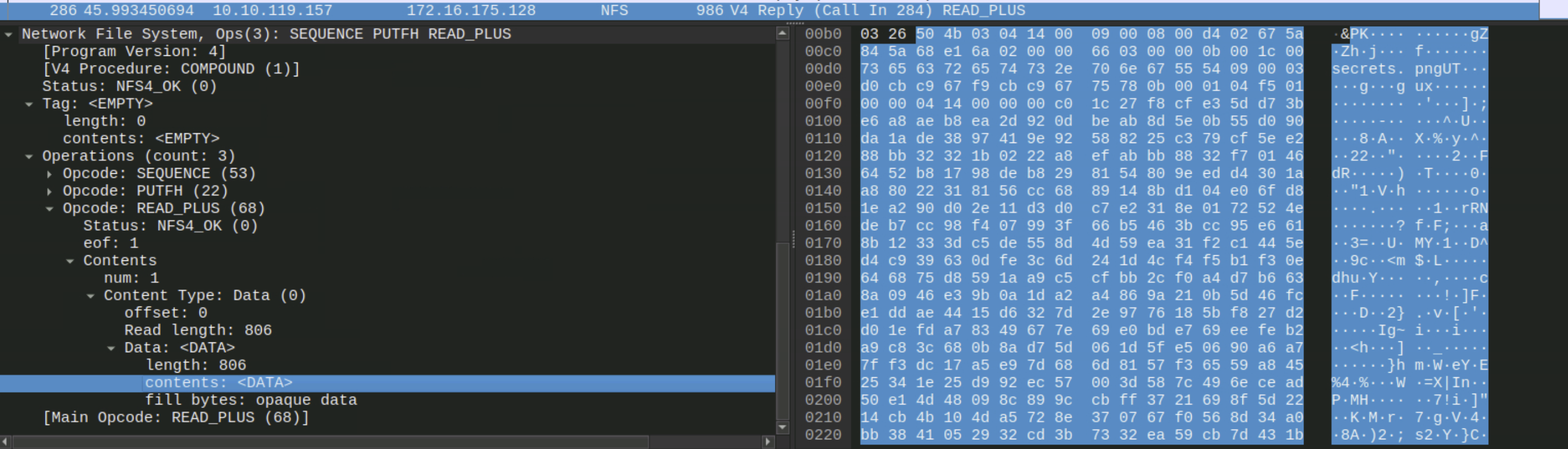
Tip: Magic bytes identify a file’s format regardless of its extension.
50 4b= ZIP,89 50 4e 47= PNG,ff d8 ff= JPEG.
Enumeration
Extracting the ZIP from the PCAP
With Frame 286 identified, expand the NFS tree down to READ_PLUS → Contents → Content Type: Data → contents: <DATA>, right-click → Export Packet Bytes, save with a .zip extension.
The exported file is a valid ZIP archive — but it’s password protected.
Finding the Password in the Traffic
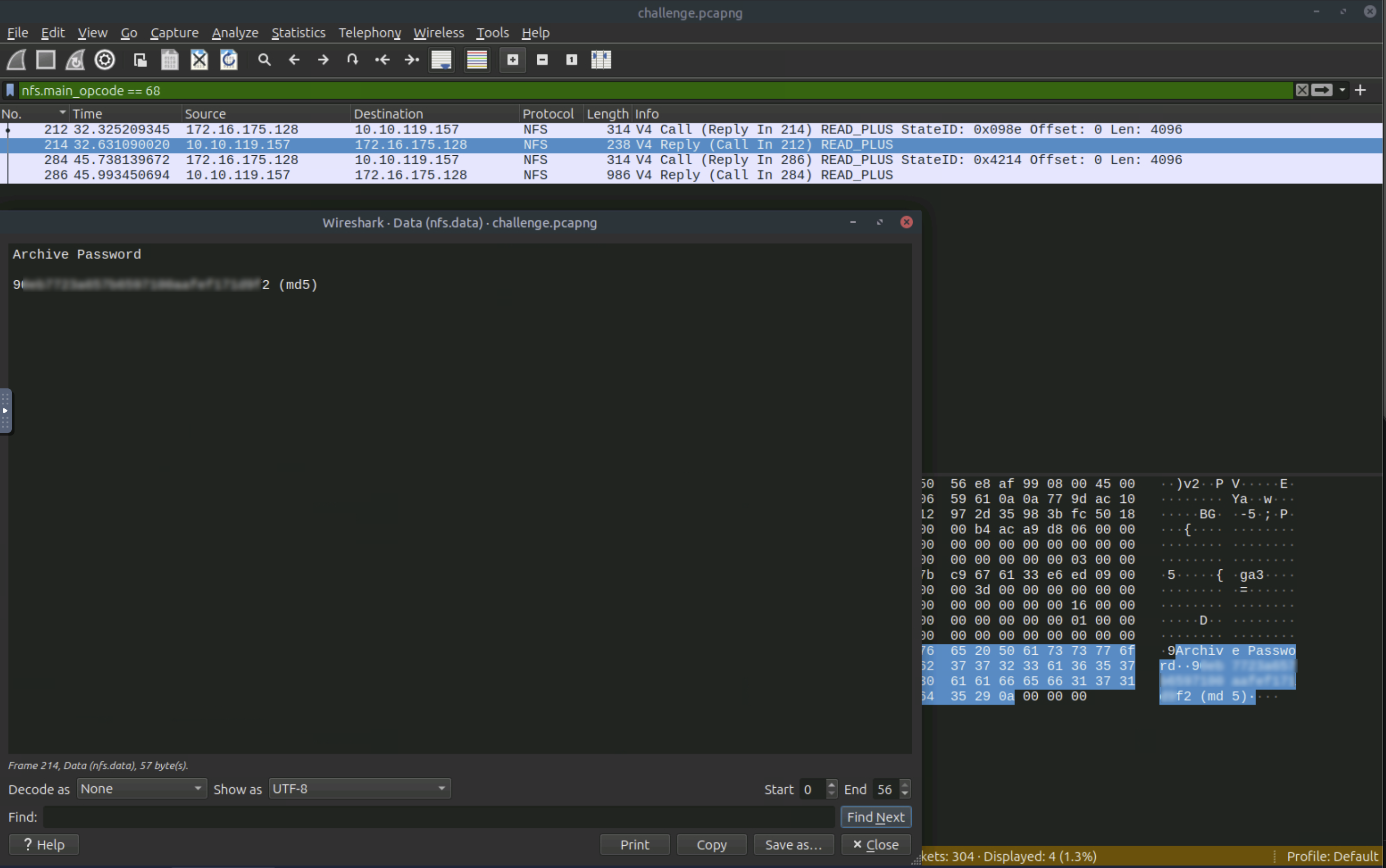
Directory listing via READDIR (opcode 26): The NFS share contains secret.PNG, hidden_stash.zip, and creds.txt.
File read via READ_PLUS (opcode 68): Packet 214 reveals creds.txt:
1
2
Archive Password
90############################f2 (md5)
Cracking the MD5 Hash
Submitting the hash to CrackStation instantly returns the plaintext. CrackStation uses precomputed lookup tables — MD5 of common words is effectively just obfuscation.
Data Extraction & Recovery
Step 1: Unlock the ZIP
1
unzip -P '[redacted]' secret.zip
The archive contains secret.PNG — a QR code image.
Step 2: Decode the QR Code
- Open CyberChef
- Drag
secret.PNGinto the input field - Add the Parse QR Code operation
The decoded output is the flag.
Why not scan with a phone? Unknown QR codes could point to malicious URLs. CyberChef processes the image client-side.
Tools Used
- Wireshark — PCAP analysis, packet inspection, payload extraction
- CrackStation — MD5 rainbow table lookup
- CyberChef — QR code decoding
Lessons Learned
Sort by size first. File transfers produce larger packets than protocol handshakes. The single 986-byte packet immediately pointed to the target.
Know your magic bytes. The filename said .PNG, the hex said 50 4b 03 04. File extensions can lie; magic bytes don’t.
Unencrypted protocols are forensic goldmines. NFS transmits everything in cleartext — file contents, directory listings, and credentials.
MD5 is not a security mechanism. A hash reversible via lookup table adds obfuscation, not security.
Tool mastery transfers across protocols. NFS was unfamiliar going in, but the methodology — inspect packets, identify patterns, extract data — is identical for HTTP, FTP, or SMB.