TryHackMe – IDOR

This room introduces Insecure Direct Object Reference (IDOR) — a vulnerability that occurs when an application exposes internal object references (like database IDs) directly to the user without proper access control checks. The room walks you through recognising IDOR opportunities by manually inspecting page source, response headers, and API calls. No special tooling required: a browser and DevTools are enough.
| Field | Details |
|---|---|
| Platform | TryHackMe |
| Room/Machine | IDOR |
| Difficulty | Easy |
| Tags | idor, web, api, enumeration |
Theory
What is IDOR? (Task 1)
IDOR stands for Insecure Direct Object Reference and is a type of access control vulnerability. It occurs when a web server uses user-supplied input to retrieve objects — files, data, documents — without validating on the server side that the requested object actually belongs to the user requesting it. Too much trust is placed in the client.
Where are IDORs Located? (Task 6)
The vulnerable endpoint isn’t always visible in the address bar. IDORs can appear in:
- AJAX requests loaded in the background — visible in the Network tab of DevTools
- JavaScript files that reference internal endpoints
- Hidden parameters that were used during development and never removed from production (parameter mining). For example,
/user/detailsmight look safe, but appending?user_id=123could expose another user’s data entirely.
How are Object References Disguised? (Tasks 3–5)
Developers sometimes try to obscure IDs to make enumeration harder. These are the three most common patterns — and why none of them are a real security measure:
Encoded IDs (Task 3): Data is often base64-encoded before being passed between pages via query strings, POST data, or cookies. Base64 is immediately recognisable by its a-z, A-Z, 0-9, +, /, = character set. Decoding, modifying, and re-encoding the value is trivial using tools like base64decode.org and base64encode.org.
Hashed IDs (Task 4): IDs are sometimes hashed — for example, the integer 123 becomes 202cb962ac59075b964b07152d234b70 under MD5. This looks opaque, but hashes of small sequential integers are well-known and can be looked up instantly via services like CrackStation. The room’s practical machine uses this exact pattern: a customer ID that appears as an MD5 hash is still trivially sequenceable.
Unpredictable IDs (Task 5): If an ID can’t be decoded or cracked, a reliable detection method is to create two accounts and swap their IDs. If account A can access account B’s data using B’s ID (or vice versa), an IDOR exists. This requires a minimum of two accounts.
Warm-up Exercise (Task 2)
Before the main machine, the room provides a small practice website to illustrate the concept hands-on. The scenario: you’re looking at a fictional webshop inbox showing order confirmation emails. Clicking on an order confirmation opens an invoice page with a URL like:
1
https://onlinestore.thm/order/1234/invoice
The order ID 1234 is embedded directly in the path. Replacing it with 1000 loads a different customer’s invoice — no authentication error, no access check. That’s IDOR in its simplest form: a numeric identifier in a URL, trusted blindly by the server.
The flag is returned immediately upon accessing the manipulated URL, confirming the vulnerability.
Reconnaissance
This is a purely web-based room with no network scanning involved. The target is a fictional company website called Acme IT Support, accessible via the machine’s IP or the provided reverse-proxy URL.
Manual Exploration
The first step is simply opening the site and clicking through every available page: Home, News, Contact, Customers. For each page, open the browser’s DevTools (F12) and check:
- Elements / Source – hidden links, comments, hardcoded paths
- Network – what requests are fired, what responses come back
- Response Headers – sometimes metadata is leaked here
Tip: Developers often leave debug information, hidden links, or test data in places they assume users won’t look. Source code review is always worth the two minutes it takes.
Enumeration
Source Code Review – Home Page
Inspecting the HTML source of the home page reveals a subtly hidden link:
1
<p class="welcome-msg">Our dedicated staff are ready <a href="/secret-page">to</a> assist you with your IT problems.</p>
The word “to” is hyperlinked to /secret-page — easy to miss visually, but immediately visible in the source. Navigating there yields a flag. This illustrates how security through obscurity is not a real access control.
Response Headers – X-Flag
When loading any page, the Network tab → Response Headers shows an X-Flag header containing a flag value. This is a classic example of sensitive data being unintentionally leaked through HTTP headers.
Contact Form – AJAX Response Leakage
The /contact page contains an input form. After submitting it and watching the Network tab, the AJAX response for the contact_msg request returns more than just a confirmation:
1
{"msg": "Message Received", "flag": "THM{...}"}
The server is returning a flag embedded in the JSON response body — data the frontend never displays to the user, but which is fully accessible via DevTools.
Customer Area – Direct API Access
After registering an account and logging in, navigating to “Your Account” triggers a network request visible in DevTools:
1
GET /api/v1/customer?id=50
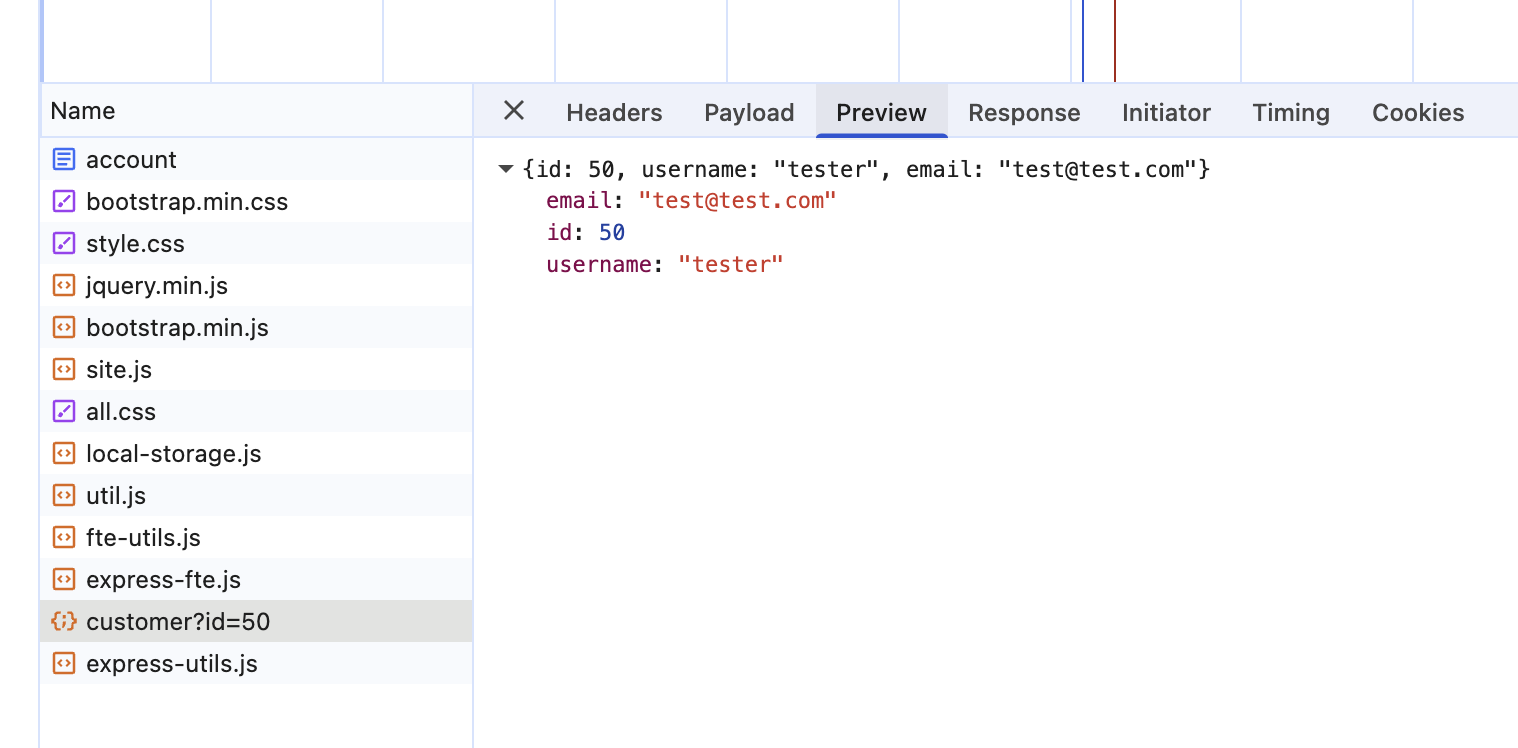
This is the core IDOR vulnerability: the server trusts the client-supplied id parameter without verifying that the requesting user is authorised to view that record.
Exploitation
IDOR via API Parameter Manipulation
With the API endpoint identified, exploitation is trivial: manually change the id parameter in the browser address bar and observe the response.
1
GET /api/v1/customer?id=2
Response:
1
{"id": 2, "username": "test-account", "email": "test@test.thm"}
No authentication error. No access control check. Any authenticated user can retrieve any other user’s data simply by iterating through IDs.
Note: The two IDs required to answer the room’s questions are not shown here — you’ll find them quickly by trying a few values around the ones demonstrated above.
Going Further (Beyond the Room Scope)
Burp Suite – Intercept the API request and send it to the Intruder. Use a numeric payload list to iterate over id=1 through id=N.
ffuf – Fuzz the ID parameter directly from the command line:
1
2
3
4
ffuf -u "http://MACHINE_IP/api/v1/customer?id=FUZZ" \
     -w /usr/share/seclists/Fuzzing/4-digits-0000-9999.txt \
     -H "Cookie: session=YOUR_SESSION_COOKIE" \
     -o results.json
Flags
Flags are intentionally omitted. The key insight is where to look, not what the flag value is.
Lessons Learned
Enumeration starts with your eyes open. Reading page source and watching network traffic costs nothing and often reveals the vulnerability immediately.
Obscurity is not access control. A hidden link, a non-displayed header value, or a JSON field the UI doesn’t render — none of these are security mechanisms.
Numeric sequential IDs are a red flag — and so are hashed ones. Whenever you see ?id=50, ask: what happens at ?id=1? Replacing an integer with its MD5 hash adds nothing — the hash is deterministic and trivially computable for any sequential value.
API endpoints deserve extra scrutiny. The frontend may only show your own profile, but the underlying API might return data for any ID you ask for.